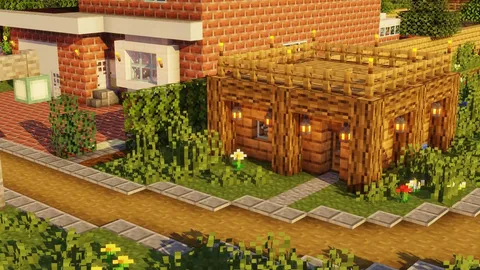
Ano ang Gumagawa ng Texture Pack na "Realistic"
Ang mga realistic texture pack ay pinapalitan ang blocky 16x16 pixel textures ng Minecraft ng high-resolution images na nagmimikita ng real-world materials. Ang bato ay mukhang tunay na bato na may makikitang grain at cracks. Ang kahoy ay nagpapakita ng natural bark patterns. Ang tubig ay may depth at transparency.

Ang mga pangunahing factor na tumutukoy ng isang realistic pack:
- Resolution: 64x minimum, karaniwang 128x o 256x
- Material detail: Makikitang grain, weathering, surface imperfections
- Color palette: Natural, muted tones sa halip na saturated colors ng Minecraft
- Consistency: Bawat block ay tumutugma sa parehong visual style
Resolution Comparison
| Resolution | Pixel Detail | File Size | RAM Usage | Best For |
|---|---|---|---|---|
| 64x | 4x default | 20-50 MB | Low | Mobile, entry-level realistic |
| 128x | 8x default | 80-200 MB | Medium | Mid-range phones, tablets |
| 256x | 16x default | 200-500 MB | High | High-end tablets, PCs |
| 512x | 32x default | 500 MB-1 GB | Very high | Gaming PCs only |
Top Picks by Style
Photorealistic
Ang mga packs na ito ay naglalayong makamit ang maximum realism. Bawat block texture ay batay sa tunay na mga larawan ng materials.
- Detalyadong bato na may nakikitang mineral deposits at cracks
- Wood planks na may natural grain variation sa bawat plank
- Realistic ores na may metallic sheen na naka-embed sa rock
- Glass na may subtle reflections at thickness
Resolution: 128x-256x. Device: High-end tablet o PC ang inirerekomenda.
Semi-Realistic
Isang balanse sa pagitan ng charm ng Minecraft at real-world detail. Ang mga blocks ay madaling makilala ngunit mas detalyado kaysa vanilla.
- Enhanced stone at dirt na may subtle depth
- Improved vegetation na may leaf variation
- Mas magandang water at lava textures
- Upgraded UI elements at item sprites
Resolution: 64x-128x. Device: Gumagana sa karamihan ng modernong phones.
Natural/Organic
Nakatuon sa outdoor elements — ang grass, trees, flowers, sky, at weather ay mukhang kahanga-hanga habang ang indoor blocks ay mas simple pa rin.
- Lush grass na may blade detail at color variation
- Realistic tree bark at leaf textures
- Dramatic sky at cloud replacements
- Enhanced particle effects para sa rain at snow
Resolution: 64x-128x. Device: Mid-range at above.

Architectural
Dinisenyo para sa builders. Clean, detalyadong textures para sa construction materials — concrete, bricks, tiles, metals.
- Smooth concrete na may subtle surface variation
- Realistic brick patterns na may mortar detail
- Polished metal at glass textures
- Consistent scale sa lahat ng building materials
Resolution: 128x-256x. Device: Depende sa resolution choice.
Texture Packs Collection
Libreng realistic, HD, at stylized texture packs na nasubukan para sa Bedrock 1.21. I-download at baguhin ang iyong mundo sa loob lamang ng ilang minuto.
Browse Texture Packs →Device Requirements
Ang mga realistic pack ay nangangailangan ng higit pa mula sa iyong hardware. Narito kung ano ang inaasahan:
| Device | Max Resolution | Settings Adjustments |
|---|---|---|
| iPhone 15 Pro / iPad Pro | 256x | Render distance 10-12 chunks |
| iPhone 12-14 / Galaxy S21+ | 128x | Render distance 8 chunks |
| Older phones / budget tablets | 64x | Render distance 6 chunks, fancy off |
| Gaming PC (8 GB+ RAM) | 512x | Full settings |
Performance Tips
- Bawasan ang render distance muna — ito ang may pinakamalaking impact sa FPS kasama ang HD packs
- I-turn off ang smooth lighting — nakakatipid ng GPU load na may minimal na visual difference sa 128x+
- Isara ang background apps sa mobile bago maglunsad
- Iwasan ang stacking ng realistic packs — isang high-quality pack ay mas mahusay kaysa sa tatlong overlapping na isa
- I-pair ang shaders nang maingat — shaders kasama ang 256x textures ay nangangailangan ng seryosong hardware
Pairing with Shaders
Ang realistic textures kasama ang shaders ay lumilikha ng pinakamagandang visual experience sa Minecraft. Ang shaders ay nagdadagdag ng dynamic lighting, soft shadows, at reflective water na umabot-kamay sa high-resolution textures.
Recommended approach:
- I-install ang iyong realistic texture pack muna
- Magdagdag ng lightweight shader pack (iwasan ang ultra presets sa mobile)
- Subukan ang performance — bawasan ang render distance kung kinakailangan
Para sa style comparisons higit pa sa realistic, tingnan ang aming texture style comparison guide.
How to Install
Sundin ang aming complete download and installation guide para sa step-by-step instructions. Quick version:
- I-download ang
.mcpackfile mula sa aming texture collection - I-tap ang file — Minecraft ay aawtomatikong ini-import ito
- Settings > Global Resources > I-activate ang pack
- I-adjust ang render distance batay sa device table sa itaas
Gusto mo ng lightweight packs sa halip? Tingnan ang aming FPS-friendly texture pack guide.