Why Bedrock Players Are Searching for "Iron Spells and Spellbooks"
Iron's Spells 'n Spellbooks introduces the classic RPG spellcasting fantasy to the game — but there's a problem. The mod only exists for Java Edition. Bedrock players searching for "minecraft mod iron spells and spellbooks" aren't finding what they want because Iron's Spells 'n Spellbooks features over 100 upgradable spells, multiple wizard armor sets, and randomly generated structures that simply don't exist on mobile, console, or Windows 10 Bedrock Edition.
That's where A Magic Way comes in. This addon is inspired by 3 different mods, and while the creator doesn't explicitly name Iron's Spells as one of them, the resemblance is unmistakable. A Magic Way is an addon offering 100+ spells designed specifically for Bedrock Edition. The addon has accumulated over 1.6 million downloads on CurseForge since its release, making it one of the most popular magic mods in the Bedrock community.
Players looking for Iron's Spells on Bedrock have finally found their answer.
What A Magic Way Addon Brings to Minecraft Bedrock
A Magic Way is a Bedrock Edition addon by qduoubp that turns magic into a full system, and the scope rivals many Java Edition magic mods. You can create your own spellbook with various types and casting weapons, giving you control over how you build your magical character.
The addon organizes spells into elemental categories. Spells are categorized by elements like fire, water, air, earth, and more, and these spells were categorized by element type and spell characteristics as attributes. Each element changes how you approach combat and exploration.
The addon supports Minecraft Bedrock 1.21.40 to 1.21.100, covering the current stable versions most Bedrock players use. The addon now has a built-in UI Queue in recent versions, simplifying installation.
If you're exploring other popular addons or checking out our guide to the Best Magic and Spells Addons for Minecraft Bedrock, A Magic Way stands out as the most comprehensive option available.
Core Features: Spells, Spellbooks, and Casting Weapons
Spellbooks and Customization
Spell books hold a list of spells, limited to spells compatible with that book. You can't just throw every spell into one book and call it a day. Compatibility matters. Create a Spellbook using a Magic reinforcement table, a Book and quill, and a bunch of Lapis Lazuli. The spellbook starts empty, waiting for you to fill it with the spells you unlock.
Three Casting Weapons
The addon gives you three weapon types, each with distinct advantages:
Wands prioritize speed. The wand boasts a high spell-casting speed and the ability to rapidly switch between spells. Wands flick between spells quickly and spend more souls, making them ideal for players who want fast, aggressive combat.
Staffs offer conservation. Staffs conserve souls across longer battles, giving you sustained casting power without burning through your resources.
Spellswords combine melee and magic. Spellswords carry their own magic for a compact combat setup. The spell sword offers a balanced spell-casting speed and soul consumption, making it a versatile middle-ground option.
Crafting Stations and Progression
The addon introduces three custom crafting stations that form the backbone of your magical progression:
Learning Station Table: Use the Learning station table to unlock available spell recipes. You can unlock it by adding a bookshelf at the surrounding table like an enchanting table, with a minimum stack to get all spell recipes of 30 blocks.
Spell Binding Table: The Spell Binding Table attaches spells to books. The spell binding table is essential for linking a spell scroll with a spellbook, provided they are compatible.
Magic Reinforcement Table: The Magic Reinforcement Table uses lapis lazuli to improve your gear and magical attributes. Spell strength depends on your magic attributes, so weak spells usually mean gear that needs upgrading at the Magic Reinforcement Table.
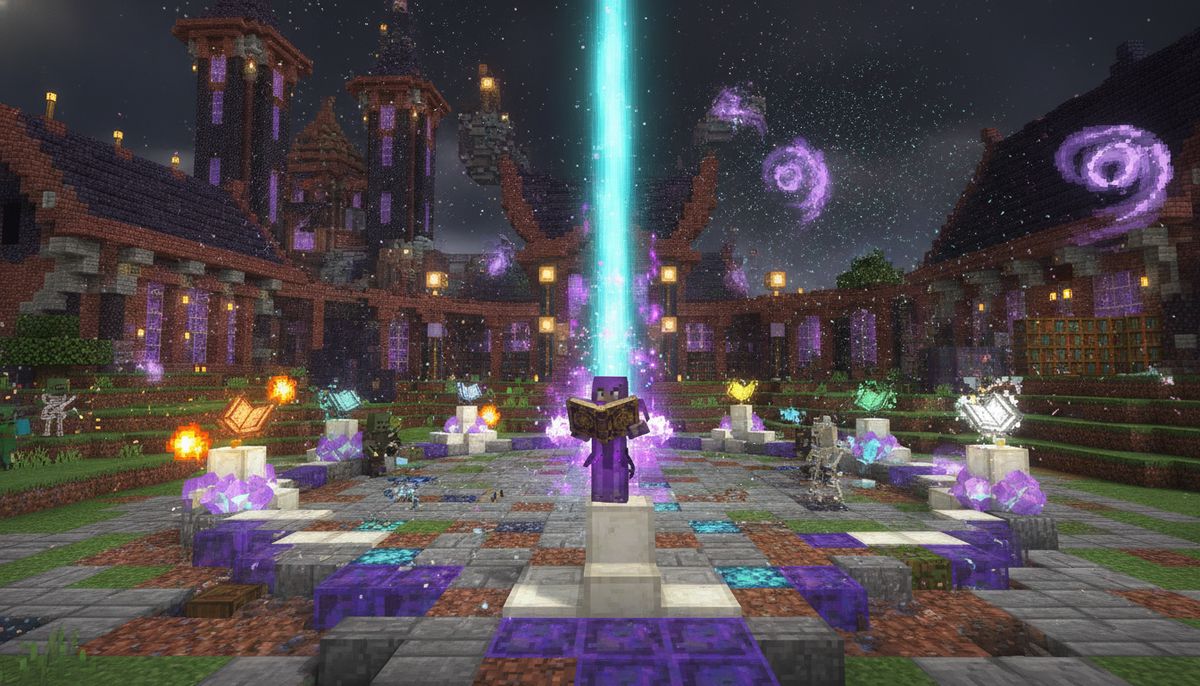
A Magic Way turns an ordinary enchanting room into a mage's workshop, and its library holds more than 100 spells.
Mage Armor Sets
Mage and Battlemage armor add protection and magical strength along the way, and both sets can be dyed in a cauldron. The addon added a brand new mage and battlemage set armor that can be reinforced with magic power, giving you gear that grows alongside your magical abilities.
How to Install A Magic Way on Bedrock Edition
Installation varies slightly depending on your device, but the core process remains the same across iOS, Android, and Windows platforms.
Requirements and Dependencies
Before you add this pack you need to add one more addon called "UI Queue", it will help this addon to add custom UI. Without it, the addon won't display spell menus or casting interfaces properly.
The addon now has a built-in UI Queue, but users still need to install it when using multiple addons with built-in UI Queue to make it work. Build listings show UI Queue as required for 1.21.40 to 1.21.51 and as optional for newer builds.
UI Queue powers the custom interface, while Novelty API adds optional equipment features. The Novelty API isn't required but unlocks additional features if you want them.
Installation Steps
For all Bedrock platforms (iOS, Android, Windows):
- Download both the Resource Pack and Behavior Pack files (they come as .mcpack or .mcaddon files)
- Open the .mcaddon or .mcpack file with Minecraft and wait for the import to finish, then enable the resource and behavior packs in the world settings
- Enable experimental features in the world settings before playing
- Download and install UI Queue using the same process if your version requires it
- Launch your world and verify the addon loaded correctly
Reopening the world after activating the missing pack gives its scripts a fresh start if you encounter any issues with custom UI not displaying.
For detailed installation guides specific to your device, check our complete tutorials on How to Add Mods to Minecraft Bedrock, Minecraft Mods for iOS, Minecraft Mods for Android, and Minecraft Mods for Windows.
Is A Magic Way Safe to Download?
A Magic Way is licensed under the MIT License and distributed through CurseForge, one of the most trusted mod hosting platforms for both Java and Bedrock editions. The creator, qduoubp, has maintained the addon with regular updates since release.
The addon requires experimental gameplay features because it uses custom components and scripting. This is standard for advanced Bedrock addons and doesn't indicate any security risk. The experimental toggle simply allows the addon to access Bedrock's extended API for custom items and UI elements.
Downloading from official sources like CurseForge protects you from modified or malicious versions. Avoid third-party reupload sites that bundle addons with unwanted software. Our article Are Minecraft Mods Safe? How to Download Without Viruses covers how to identify legitimate sources and avoid common download scams.
Getting Started: Your First Spells
Starting with A Magic Way follows a clear progression path:
Acquire a Spellbook using a Magic reinforcement table, a Book and quill, and a bunch of Lapis Lazuli, though the Spellbook will initially be empty.
Create Spells by choosing them on the Learning station, and to upgrade the power of the spells, use a Magic Reinforcement Table and upgrade your Spellbook with Lapis Lazuli.
Use a Spellbinding table to attach spells to your spell book, ensuring compatibility between the Spell and the Spellbook.
Select a Wand, Staff, or Spellsword as your preferred casting method, as each type has its own advantages.
The addon includes quality-of-life commands for testing. Running /function get_all_spell gives a spell book containing every spell, useful for creative mode experimentation. /function get_all_spell gives a spell book with every spell, though a wand cannot swap through it because it only cycles slots 1 to 9, and /scriptevent amw:cast followed by a spell id casts directly.
Comparing A Magic Way to Other Magic Addons
The Bedrock modding scene offers several magic-focused addons, but few match the depth of A Magic Way. Where simpler addons give you a handful of pre-made wands or staffs with fixed abilities, A Magic Way requires crafting, progression, and strategic planning.
The elemental system sets it apart. Most magic addons treat spells as simple damage types with different visual effects. A Magic Way ties elements to compatibility, forcing you to specialize or carefully balance your spellbook slots. Fire mages play differently than frost mages, and hybrid builds require compromise.
The three casting weapon types also distinguish A Magic Way from competitors. Many addons lock you into one casting method — usually right-clicking with a staff. Choosing between wands, staffs, and spellswords based on your playstyle adds meaningful variety.
For players interested in other magic systems, check out our curated collection of Best Magic and Spells Addons for Minecraft Bedrock, which includes alternatives ranging from simple elemental wands to complex ritual-based magic. If you're building a magical world and want additional content, browse our Best Fantasy RPG Addons for Minecraft Bedrock Edition for complementary mods featuring custom mobs, dungeons, and loot.
Popular Mods and Addons
Discover trending addons across all categories, from magic and RPG systems to guns, vehicles, and custom mobs.
Browse Collection →Tips for Building Your Mage Character
Specialize early, experiment later. Your first spellbook has limited slots. Picking one or two compatible elements lets you fill those slots efficiently. Once you understand the crafting system, you can create specialized books for different situations — a combat book, a utility book, a mining book.
Upgrade attributes before collecting spells. The quality of your spells depends on your magic attributes, and you can upgrade your attributes by using the Magic Reinforcement Table. Weak spells hit harder when your attributes support them.
Match your weapon to your playstyle. Fast, aggressive players benefit from wands. Defensive players who value sustained combat prefer staffs. Hybrid melee-magic builds should try spellswords. Don't force yourself into a weapon type that doesn't fit your natural playstyle.
Surround your Learning Station with bookshelves. The station works like an enchanting table — more bookshelves unlock more recipes. The minimum stack to get all spell recipes is 30 blocks, so plan your mage tower accordingly.
Dye your armor for roleplaying. Both mage sets can be dyed in a cauldron when your new tower deserves matching robes. Small cosmetic touches make magic builds feel more immersive.
Troubleshooting Common Issues
Missing UI elements or blank screens: If you don't add UI Queue, it won't show anything on the screen. Download and activate UI Queue before loading the world with A Magic Way enabled.
Spells not working after installation: Make sure experimental gameplay is enabled in your world settings. The addon requires experimental features to function. You'll find this option under world settings before creating or loading a world.
Compatibility with other addons: In your world's Behavior Pack list, ensure that core scripting libraries (such as UI Queue) are placed above the main magic addon so their scripts initialize first. Load order matters for script-heavy addons.
Performance issues on older devices: A Magic Way uses custom rendering for spell effects and UI elements. Lower-end mobile devices might experience lag during heavy spell use. Reducing render distance and turning off fancy graphics in video settings helps. For more performance tips, see our guide to Top 15 FPS-Friendly Texture Packs for Low-End Devices.
Should You Download A Magic Way?
A Magic Way delivers what Bedrock players searching for Iron's Spells and Spellbooks actually want: a comprehensive, progression-based magic system with over 100 spells, multiple casting methods, and meaningful customization. The addon respects player time by offering clear upgrade paths and rewarding experimentation.
The system has depth without needless complexity. New players can craft their first spellbook within an hour of starting. Veterans can spend weeks optimizing attribute combinations and building specialized spell loadouts for different situations.
User reviews call this "literally the best magic mod for Minecraft bedrock" and note it surpasses some paid mods. The 1.6 million downloads and consistent updates validate that praise.
The creator notes that version 1.9 finished the first chapter and version 2, titled "A magic Way: Magic Emerging," will focus on adding new mobs, bosses, and world interactions. Future updates promise even more content, making now an ideal time to start your magical journey.
Ready to explore more Bedrock content? Browse our complete collection of addons, including Best Building Mods for Minecraft Bedrock, Best Survival Addons for Minecraft Bedrock, and Best Adventure Maps for Minecraft Bedrock. For a curated experience, check out our Bedrock Modpacks guide for themed addon bundles.
Tools and Items Mods
Expand your arsenal with custom weapons, tools, armor sets, and utility items that enhance gameplay and add new mechanics.
Browse Collection →Download A Magic Way for Bedrock Edition
A Magic Way transforms Minecraft Bedrock into a proper magic RPG, giving players the Iron's Spells experience they've been searching for. The addon runs on iOS, Android, Windows 10, Xbox, PlayStation, and Nintendo Switch — any platform that supports Bedrock Edition addons.
Builds cover Minecraft Bedrock 1.21.40 to 1.21.100, ensuring compatibility with current and recent game versions. Regular updates from creator qduoubp keep the addon stable and expand the spell library with each release.
The addon is completely free and open source under the MIT License. No premium features, no locked content, no pay-to-win mechanics. Just 100+ spells waiting for you to master.
Start building your mage tower, surround your Learning Station with bookshelves, and prepare your first spellbook. The path to magical mastery begins now.
Download A Magic Way and explore hundreds of other free addons →