
Why World Utilities Addon Is Trending Right Now
Players searching for the World Utilities addon are looking for one thing: less grind, more gameplay. This comprehensive mod consolidates multiple quality-of-life improvements into a single, unified interface that solves some of Bedrock Edition's most frustrating survival pain points. Mining tedious ore veins block-by-block becomes obsolete. Chopping down massive trees turns into a one-click task. Getting lost thousands of blocks from your base transforms into a quick waypoint teleport home.
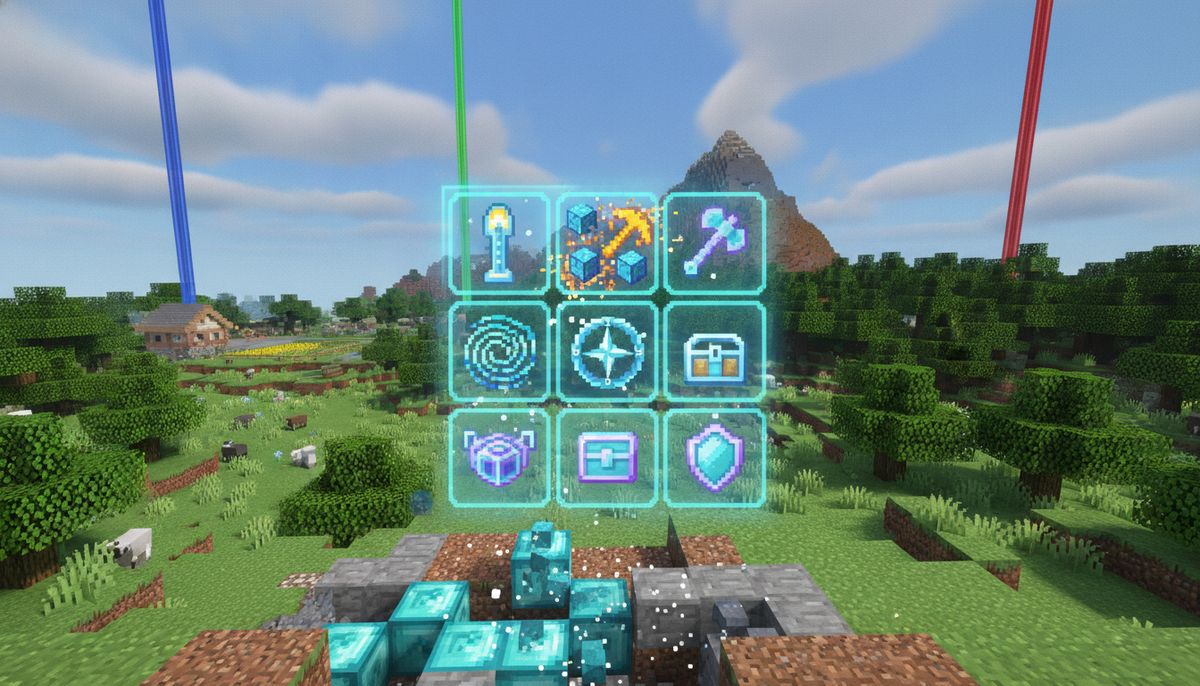
The addon packs 9 powerful utilities into a single clean menu, including teleportation, waypoints, weather and time controls, tool repair, auto-collect, flight, and smart mining features. No cheats are needed and the addon is achievement friendly, meaning you can use every feature without sacrificing progression rewards or disabling trophies on console platforms.
Two distinct versions dominate the Bedrock community. The Marketplace version created by Gamefam is available for 310 Minecoins, while the free community version by VoxenMC2 has accumulated over 16,100 downloads on CurseForge. Both deliver the core functionality that makes this addon an essential download for survival enthusiasts, though the premium Marketplace release includes expanded features and guaranteed compatibility with future Minecraft updates.
Core Features and What They Do
Waypoint System and Dimensional Teleportation
The waypoint feature lets you save any location with a custom name and teleport back anytime, even across dimensions. No more writing down coordinates in a notebook or taking screenshots of your base location. Mark your home, farms, mining outposts, and End portal locations with memorable names. Cross-dimensional functionality means you can set a waypoint in the Overworld and warp directly there from the Nether or End, bypassing the usual portal travel entirely.
The teleport menu extends beyond simple waypoints. You can teleport to specific coordinates, move to other players in multiplayer, bring players to your location, and browse your full teleportation history covering the last 20 locations you visited. Accidental lava death 5,000 blocks from spawn becomes a minor inconvenience rather than a session-ending disaster.
Vein Miner and Tree Capacitor
Vein Miner eliminates the tedium of clearing entire ore deposits. Break a single diamond ore block and the entire connected vein shatters simultaneously, dumping all drops at your feet. The same logic applies to coal, iron, redstone, and every other mineral cluster. What used to consume minutes of careful pickaxe work now resolves in seconds.
Tree Capacitor mirrors this functionality for logging operations. Chop the bottom block of any tree and every connected log and leaf block instantly breaks. Massive jungle trees and towering spruce giants topple with a single swing. Your axe durability still depletes based on the number of blocks destroyed, preserving game balance while removing repetitive clicking.
Weather, Time, and Environmental Controls
Weather toggles and time adjustment give you full control over your world's environmental conditions. Tired of constant rain interrupting your build session? Clear skies with one menu click. Need daylight for exterior screenshots or want to skip the night without sleeping? Adjust time directly through the utilities interface. These controls prove especially valuable in multiplayer settings where coordinating sleep among all online players becomes impractical.
Tool Repair and Auto-Collect Systems
The tool repair function lets you restore durability to any damaged item without anvils, experience, or additional materials. Your enchanted netherite pickaxe sitting at 1% durability returns to pristine condition through the menu. This feature saves countless hours of re-enchanting replacement tools and gathering repair materials.
Auto-collect creates an invisible radius around your player that automatically pulls dropped items directly into your inventory. Mine a block and the drop teleports straight to your hotbar rather than falling at your feet. Combine this with Vein Miner and you can clear massive underground caverns without worrying about items despawning in lava or getting buried under gravel.
Flight and Movement Abilities
Flight toggles without requiring creative mode or elytra. Useful for construction projects, terrain surveying, or simply traveling long distances without tunneling through mountains. The flight mode maintains survival inventory and health mechanics, preventing accidental exploitation of combat or farming scenarios.
Harvester Hoe and Auto-Replanting
The Harvester Hoe automatically replants broken crops and can be used to move end portals to your base. Break mature wheat and the tool instantly re-seeds the tilled soil, dramatically accelerating large-scale farming operations. The End Frame Breaker functionality mentioned in the Marketplace version represents a game-changer for technical players who want to relocate stronghold portals to more convenient locations.
Marketplace vs Free Community Version: Feature Comparison
| Feature | Free Version (VoxenMC2) | Marketplace (Gamefam) |
|---|---|---|
| Price | Free | 310 Minecoins (~$1.55 USD) |
| Total Items/Abilities | 9 core utilities | 31-37 items and abilities |
| Waypoints | ✓ | ✓ |
| Vein Miner | ✓ | ✓ |
| Tree Capacitor | ✓ | ✓ |
| Tool Repair | ✓ | ✓ |
| Auto Collect | ✓ | ✓ |
| Flight | ✓ | ✓ |
| Omni Tool | ✗ | ✓ |
| Spawner Wrench | ✗ | ✓ |
| Disenchanter | ✗ | ✓ |
| Chunk Borders | ✗ | ✓ |
| Downloads/Reviews | 16,100+ | 21,000+ reviews |
| Rating | N/A | 4.7/5 stars |
| Last Update | August 2026 | October 2026 |
| Platform | CurseForge, MCPEDL | In-game Marketplace |
The Marketplace version includes 37 useful items and abilities, featuring the Omni Tool, Spawner Wrench, Disenchanter, Chunk Borders, and more. With an average rating of 4.7 out of 5 stars, the premium version has proven extremely popular despite the price tag. World Utilities is also included in the Minecraft Marketplace Pass and can be played for free if you have the pass.
The free community version delivers all the essential functionality most players need. VoxenMC2's version updated on August 5, 2026, demonstrating ongoing support. The Spawner Wrench and Disenchanter exclusive to the Marketplace build provide advanced utility for technical players and enchantment optimization that power users will appreciate.
More Essential Tools and Items
Discover dozens of utility addons that streamline gathering, crafting, and survival mechanics across Bedrock Edition.
Browse Collection →How to Download and Install on Bedrock Edition
Installing the Free Community Version (Windows, Android, iOS)
For the free VoxenMC2 version available on CurseForge and MCPEDL:
Windows 10/11: Download the .mcaddon or .mcpack file, open the file to import into the game, then in World Settings go to Resource Packs and Behavior Packs to enable it. The file association should automatically launch Minecraft and begin the import process. The game will display "Import Started..." followed by "Successfully Imported World Utilities Pack".
Android: Download the .mcaddon file and tap it in your file manager. Android will prompt you to open it with Minecraft. The addon imports automatically. Navigate to your world settings, enable both the Resource Pack and Behavior Pack under their respective menus, and load into your world.
iOS: Download the .mcaddon file through Safari or your browser. Tap the downloaded file and select "Open in Minecraft" from the share sheet. Follow the same activation steps as Android by enabling both packs in your world settings.
Installing the Marketplace Version (All Platforms)
To purchase through the Minecraft Marketplace, open the in-game store, search for "World Utilities Add-On," and purchase or claim it via your Marketplace Pass. The Marketplace version works identically across Windows, Xbox, PlayStation, Nintendo Switch, iOS, and Android since all platforms access the same unified store.
After purchase, select "Existing" to add it to a saved world or "New" to create a new world with it. The addon automatically enables when applied through the Marketplace interface, requiring no manual pack activation.
Applying to Existing Worlds
Both versions can be added to existing worlds, allowing you to enhance current survival playthroughs without starting fresh. Edit your world settings before loading in, navigate to Behavior Packs and Resource Packs, and activate World Utilities in both sections. Some features may require experimental gameplay toggles depending on your Minecraft version.
Always create a backup copy of important worlds before adding new addons. Navigate to your world in the menu, click the pencil icon, scroll down, and select "Copy World" to create a safety duplicate.
Is World Utilities Safe and Achievement-Friendly?
The addon requires no cheats and is achievement friendly, meaning it functions entirely through legitimate Bedrock scripting APIs without triggering the achievement lock that activates when you enable creative mode or command cheats. You can earn all in-game achievements and console trophies while using every feature.
The Marketplace version undergoes Microsoft's official review process before publication, guaranteeing it meets security and quality standards. The community version from VoxenMC2, available on established modding platforms like CurseForge, follows standard addon file structure using .mcaddon packaging. Both versions pose no risk when downloaded from their official sources.
Avoid reuploading sites or unfamiliar third-party mirrors that may bundle malware with otherwise legitimate files. Stick to the official Minecraft Marketplace, CurseForge, or MCPEDL for verified downloads. If you're concerned about mod safety in general, our guide on Are Minecraft Mods Safe? How to Download Without Viruses covers verification methods and warning signs for all Bedrock content.
Compatibility with Other Addons
World Utilities plays nicely with most other addons since it operates through menu-based systems rather than modifying core game mechanics. You can combine it with creature mods like Alex's Mobs Addon, dimension expansions, and weapon packs without conflicts. The vein miner and tree capacitor functions work on modded blocks introduced by other addons, extending utility beyond vanilla materials.
Potential conflicts may arise with other utility mods that implement similar waypoint or teleportation systems. Running two separate teleport addons can create UI overlap or conflicting keybinds. Test compatibility in a backup world before committing to a combination on your main save.
World Utilities launched as one of the first 19 addons on the Minecraft Marketplace, establishing it as a pioneer in the official addon ecosystem. The developer experience in crafting feature-complete utility systems shows in the polished menu interface and reliable functionality across devices.
Alternative Utility Addons Worth Checking Out
Players searching for specific utility features might also consider these alternatives from our tools and items collection:
WorldEdit Addon — Essential for large-scale terrain editing and creative building projects. Copy, paste, and manipulate massive structures with simple commands. Complements World Utilities by handling the construction side while World Utilities manages survival conveniences.
Quick Build Addon — Accelerates construction with instant block placement and structure templates. Pairs well with World Utilities' flight mode for rapid base development.
Just Zoom Addon — Adds an Optifine-style zoom function for Bedrock. Lightweight alternative if you only need the camera zoom feature without full utility overhaul.
World Border Addon — Creates configurable world boundaries for custom maps and challenge runs. Useful for server administrators managing player-accessible areas.
For players interested in expanding their modding toolkit beyond utilities, browse our curated collections:
- Best Survival Addons — Backpacks, camping gear, and hardcore survival mechanics
- Best Building Mods — Expanded block palettes and construction tools
- Popular Mods — Trending downloads across all categories
Survival Enhancement Addons
Explore backpacks, tool upgrades, farming automation, and quality-of-life improvements that refine the survival experience without removing challenge.
Browse Collection →Tips for Getting the Most from World Utilities
Set Waypoints Before Exploration — Mark your spawn point, home base, and portal coordinates immediately after installing the addon. Getting lost in unfamiliar terrain becomes impossible when you can instantly return to labeled locations.
Combine Vein Miner with Fortune — Your Fortune III pickaxe applies its enchantment multiplier to every block destroyed by vein miner. A single click on a diamond vein with Fortune III can yield 30+ diamonds from a large cluster.
Use Auto-Collect During Strip Mining — Enable the auto-collect radius before beginning branch mining operations. Ores, cobblestone, and mob drops teleport directly to your inventory, eliminating the need to stop and pick up items every few seconds.
Repair Tools Before Switching Tasks — Check tool durability through the utilities menu before transitioning from mining to building or exploration. Repairing mid-task prevents the frustration of having your enchanted gear break during crucial moments.
Create Dimensional Waypoint Networks — Establish waypoints at strategic Nether hub locations that correspond to Overworld bases. Fast travel between dimensions without manually calculating portal coordinates.
Test Flight Limits on New Worlds — Experiment with the flight toggle in a test world before using it on your main save. Understand how the mechanics interact with elytra and fall damage to avoid accidental deaths.
Why Utility Addons Matter for Modern Bedrock Survival
Minecraft's core gameplay loop hasn't fundamentally changed since its early days. You still punch trees, craft pickaxes, and dig underground for diamonds. What has evolved is player expectations around quality-of-life features. Java Edition players have enjoyed mods like Vein Miner and Waystones for years through Forge and Fabric loaders. Bedrock Edition finally caught up with official addon support, and World Utilities represents the culmination of that community-driven innovation.
With 21,206 player reviews and a 4.7-star rating, the Marketplace version demonstrates clear demand for streamlined survival tools. The fact that both a premium and free version coexist speaks to different player priorities. Some value the convenience of one-click Marketplace installation and guaranteed updates. Others prefer the flexibility of community-maintained alternatives that they can modify or combine with other experimental addons.
The trend toward comprehensive utility packs mirrors broader gaming industry shifts. Players have limited time and want meaningful progression rather than repetitive busywork. Breaking 50 individual ore blocks or manually replanting crop rows doesn't teach new skills or present interesting challenges after the first few times. World Utilities respects player time by automating the tedious aspects while preserving the strategic elements that make survival mode engaging.
Final Thoughts on World Utilities for Bedrock Edition
World Utilities delivers exactly what its name promises: essential tools consolidated into one accessible package. Whether you choose the 310 Minecoin Marketplace version (approximately $1.55 USD) or the free community alternative, you're getting proven functionality that thousands of Bedrock players rely on daily.
The addon shines brightest in survival mode where its quality-of-life improvements compound over long play sessions. Ten minutes saved here and there through auto-replanting, instant teleports, and vein mining add up to hours reclaimed over the lifetime of a world. You spend more time building, exploring, and engaging with the game's creative aspects rather than performing mechanical tasks.
For players just starting to explore Minecraft Bedrock addons, World Utilities serves as an excellent introduction to what's possible with the official addon system. It demonstrates how properly designed modifications enhance rather than diminish the core experience. The achievement-friendly implementation proves you don't need to enable cheats or sacrifice progression rewards to enjoy modern conveniences.
Ready to eliminate survival busywork and focus on what makes Minecraft fun? World Utilities belongs in every Bedrock player's addon library alongside essential quality-of-life improvements. Check our tools and items collection for even more ways to optimize your survival workflow and spend less time grinding, more time creating.