
Why Alex's Mobs Addon is Trending on Bedrock Right Now
Bedrock players have been searching for Alex's Mobs conversions for over 18 months. The addon introduces over 40 meticulously designed new animals and environmental elements to mobile and console versions of the game. The most recent version was updated on August 18, 2026 on CurseForge, sparking renewed interest across Android, iOS, and Windows 10 platforms.
The original Alex's Mobs mod was created by sbom_xela for Java Edition and has accumulated over 153 million downloads since 2020. The Java version adds 89 creatures with custom animations and unique mechanics. Multiple independent developers have created unofficial Bedrock ports to bring this wildlife overhaul to players who can't access the Java mod. These conversions remain incomplete compared to their Java counterpart, but they represent the closest mobile and console players can get to the full experience.
Tutorial videos and download guides surged in August 2026 as new port versions became available. Players tired of vanilla wildlife are driving searches for mobs addons that meaningfully expand ecosystem diversity without compromising performance.
What Makes Alex's Mobs Different From Other Creature Addons
Most mob addons dump dozens of random creatures into worlds with minimal thought toward balance or purpose. Alex's Mobs takes a different approach. All creatures fulfill a necessary purpose, and either have unique drops, mechanics or functions, as there are no purely aesthetic creatures.
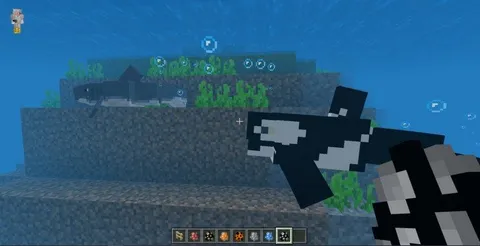
Most mobs are real world creatures, like Grizzly Bears, Roadrunners, Orcas, etc; but some of them are purely fictional, like the Endergade and Bone Serpent. This split between reality and fantasy gives survival worlds both familiarity and surprise. You'll encounter grizzly bears defending their territory near honey sources and roadrunners sprinting across deserts at realistic speeds. In contrast, bone serpents patrol Nether lava lakes while cosmic cod swim through End dimension air.
Each mob features unique AI routines, including realistic wandering, foraging, and defensive or aggressive reactions. Animals don't just exist as animated decorations. They hunt, flee, defend nests, and interact with their environments in ways that make biomes feel genuinely populated.
The Bedrock conversions aim to preserve these behaviors within the technical limitations of the addon system. While unofficial ports can't replicate every Java feature, they maintain the core philosophy: every creature serves a gameplay function beyond visual variety.
Complete Feature Breakdown for Bedrock Edition
The Bedrock versions of Alex's Mobs include both passive ambient wildlife and hostile fantasy creatures that challenge experienced players. Here's what the addon adds to your world:
Real-World Animals
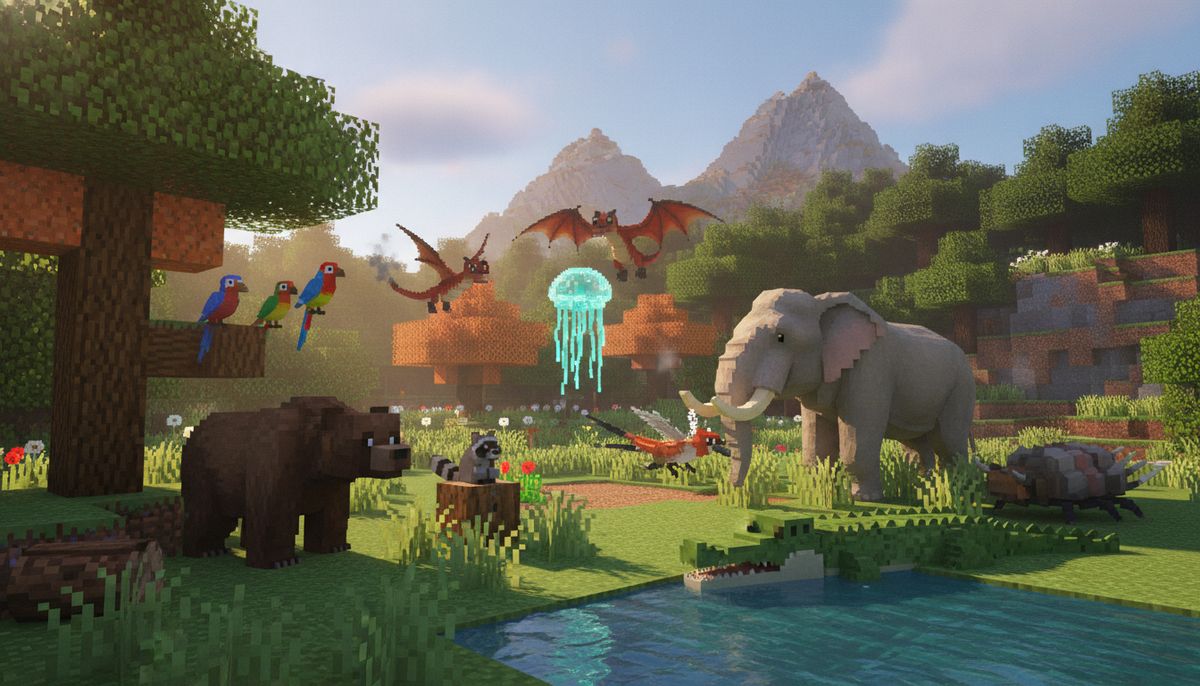
New wildlife seamlessly integrates into existing biomes, making every environment feel active and alive. Expect encounters with bears in forests, crocodiles in swamps, elephants in savannas, and various fish species in oceans and rivers. These creatures behave according to their real-world counterparts—predators hunt, herbivores graze, and scavengers seek out food sources.
Some animals can be tamed or bred using specific items. Others provide unique drops like fur, scales, or specialized meat. The addon creates natural food chains where predators hunt smaller mobs and territorial species defend their space against intruders.
Fantasy and Hostile Mobs
Fantasy creatures populate dangerous areas and dimension biomes. Bone serpents lurk in Nether fortresses. Endergrades drift through End cities. These fictional additions maintain the mod's quality standard with distinctive models and attack patterns that require tactical thinking to overcome.
Hostile mobs in Alex's Mobs aren't simple damage sponges. They employ varied attack strategies, status effects, and environmental advantages. Some summon allies, others inflict debuffs, and several require specific counter-strategies to defeat efficiently.
Custom Items and Drops
Discover new materials and items obtained through interacting with the addon's creatures. These drops craft into equipment, tools, food items, and decorative blocks not available in vanilla Minecraft. Some materials unlock progression paths similar to netherite or elytra, giving players concrete goals beyond simple mob collecting.
Certain drops enable unique gameplay mechanics. You might find items that grant temporary abilities, consumables with powerful buffs, or crafting materials for specialized gear. This transforms creature hunting from optional content into a rewarding gameplay loop worth pursuing.
More Creature Addons for Bedrock
Browse our complete collection of mob and animal addons for Minecraft Bedrock Edition, including mythical creatures, prehistoric animals, and realistic wildlife expansions.
Browse Collection →How to Download and Install Alex's Mobs on Bedrock Edition
Installing addon files on Bedrock differs significantly from Java mod installation. The process varies by platform but follows a consistent pattern. Before starting, verify you're running a compatible game version—most current Alex's Mobs ports support Minecraft 1.20 through 1.21.
iOS Installation (iPhone and iPad)
Open Minecraft Bedrock on your device. Navigate to Settings. Under Storage, click Import. Find the downloaded Alex's Mobs Addon file in your Downloads folder and select it.
iOS users should download the .mcaddon file directly to their device using Safari or another mobile browser. Tap the file once downloaded, and iOS will prompt you to open it with Minecraft. The game automatically imports the addon into your available resource and behavior packs.
For more detailed platform-specific instructions, check our guide on how to install Minecraft mods on iOS devices.
Android Installation
Android follows the same basic import process as iOS. Download the .mcaddon file using Chrome or your preferred mobile browser. Open your file manager, navigate to Downloads, and tap the addon file. Android will ask which app should open it—select Minecraft Bedrock Edition.
Minecraft will automatically import the addon, and you should see it in your list of available packs. The import process takes a few seconds depending on file size. Once complete, the addon appears in your world creation settings under both resource packs and behavior packs.
Our comprehensive Android mods installation guide covers troubleshooting for common import errors.
Windows 10 and 11 Installation
Open the file (.mcaddon) using Minecraft PE. Activate the addon (game settings). Windows makes this straightforward: double-click the downloaded .mcaddon file, and the Windows version of Minecraft Bedrock automatically launches and imports it.
Windows users can also manually place addon files in their Minecraft directory. Navigate to "C:\Users[YourUsername]\AppData\Local\Packages\Microsoft.MinecraftUWP_8wekyb3d8bbwe\LocalState\games\com.mojang" and place behavior packs in "behavior_packs" and resource packs in "resource_packs" folders.
For Windows-specific installation details, see our Windows Minecraft mods guide.
Activating the Addon in Your World
After importing, create a new world or edit an existing one. Scroll down to the "Resource Packs" and "Behavior Packs" sections in world settings. Locate Alex's Mobs in the available packs list and activate both the resource pack (visuals, sounds, models) and behavior pack (mob AI, spawning, mechanics).
You need to turn on the Experimental Settings if the addon does not work. Many Bedrock addons require experimental gameplay features enabled. Scroll to "Game" settings, expand "Experiments," and toggle on any options related to custom biomes, entity properties, or molang features. The exact experiments needed may vary by addon version.
Is This Addon Safe and Legitimate?
All addons of Alex's Mobs ported to Bedrock Edition are fake. It is never recommended to download them since they do not have everything from the real Alex's Mobs mod. This statement from the unofficial wiki deserves context.
The Bedrock ports are "fake" only in the sense that they're unofficial conversions not created or endorsed by the original Java mod developer. They aren't malicious or dangerous—they're fan-created recreations attempting to bring Alex's Mobs content to platforms that can't run Java mods. Think of them as tribute projects rather than authorized ports.
These conversions face technical limitations. Bedrock's addon system can't replicate every Java modding feature. Some creatures may have simplified AI, missing animations, or absent mechanics from the Java version. Certain unique items or progression systems might not translate to Bedrock's architecture.
Download safety depends entirely on your source. Stick to established Bedrock addon communities with reputation systems and user reviews. Avoid sketchy file-sharing sites demanding surveys or app installations. Our article on Minecraft mod safety covers red flags to watch for when downloading any community content.
The August 2026 CurseForge version represents one of the more polished attempts at a Bedrock conversion. CurseForge implements basic malware scanning and file verification. While not foolproof, major community platforms provide significantly better security than random file-sharing sites.
Performance Considerations and Device Compatibility
Adding 40+ new entities with custom behaviors impacts performance differently across devices. High-end Android phones and Windows PCs typically handle Alex's Mobs without significant frame rate drops. Budget devices and older hardware may experience stuttering in areas with high mob density.
Mob spawn rates directly affect performance. If you're playing on a lower-end device, consider editing world settings to reduce simulation distance and entity rendering distance. These adjustments limit how many creatures load simultaneously, improving frame rates at the cost of encounter frequency.
iOS devices generally perform well due to Apple's hardware-software optimization. Even older iPads can run the addon smoothly with appropriate render distance settings. Android performance varies wildly based on device specifications—8GB RAM and a recent chipset provide the smoothest experience.
Console players on Xbox and PlayStation face additional constraints. Consoles limit addon capabilities more strictly than mobile or Windows platforms. Some Alex's Mobs features may not function correctly on console Bedrock editions even if installation succeeds.
What's Missing From the Bedrock Version?
The gap between Java Alex's Mobs and Bedrock conversions is significant. Java Edition modding allows deep access to game systems that Bedrock's addon API doesn't expose. Here's what typically doesn't make it to Bedrock ports:
The Animal Dictionary item exists in Java as an interactive guidebook documenting every creature's behavior, drops, and taming methods. When joining a world with Alex's Mobs for the first time, the player will be given the Animal Dictionary. This is a very basic guide and documentation of each creature added by the mod. Bedrock versions may lack this item entirely or offer a simplified version without full functionality.
Advanced interactions like specialized taming mechanics, breeding systems, and mob-to-mob relationships often simplify or disappear in Bedrock conversions. Java allows complex entity behavior trees that Bedrock's system can't fully replicate. Creatures may attack when they should flee, or ignore food items that should trigger taming.
Some of the 89 mobs from the complete Java mod don't appear in Bedrock ports at all. Technical limitations, animation complexity, or unique mechanics that rely on Java-exclusive features prevent certain creatures from converting successfully. The Bedrock versions typically include 40-50 of the most iconic and technically feasible mobs.
Custom item abilities and special equipment effects may work differently or not at all. If a Java item grants unique movement abilities or temporary stat buffs, the Bedrock equivalent might only provide basic stat changes or omit the feature entirely.
Alternative Mob and Creature Addons for Bedrock
If Alex's Mobs doesn't meet your needs or you want complementary wildlife expansions, several quality alternatives exist in the Bedrock ecosystem. Our top 10 mobs mods for Bedrock article covers the complete landscape.
For players specifically interested in tameable companions, our pet and animal addons guide showcases options focused on rideable mounts, combat pets, and decorative creatures. These often include simpler mechanics than Alex's Mobs but provide better Bedrock optimization.
Ocean explorers should check our underwater and ocean addons collection. Several addons focus exclusively on aquatic life, delivering more fish species, marine mammals, and deep-sea creatures than Alex's Mobs provides.
If you're building custom experiences, browse our fantasy RPG addons for creature packs designed around specific gameplay themes. Many include custom bosses, hostile mob variants, and progression systems that integrate with other addons.
Combining Alex's Mobs With Other Addons
The addon works alongside most other Bedrock modifications without conflicts, but some combinations create issues. Addons that extensively modify biome generation may prevent Alex's Mobs creatures from spawning correctly. The addon expects vanilla biome structures, and heavily altered terrain generation can break spawn rules.
Other mob addons usually coexist peacefully with Alex's Mobs. You can run multiple creature expansion packs simultaneously to maximize wildlife variety. Monitor mob spawn rates—too many creature addons active at once can overcrowd worlds and hurt performance.
Watch for item ID conflicts if you're running multiple addons that add custom items. While less common in Bedrock than Java, conflicts occasionally cause crashes or prevent certain items from crafting correctly. If you experience issues after activating multiple addons, disable them one at a time to identify the culprit.
Our guide on combining addons safely on Bedrock explains load order, conflict detection, and compatibility testing strategies. Following best practices prevents wasted time troubleshooting addon interactions.
For curated addon combinations, check our Bedrock modpacks article featuring tested addon bundles organized by gameplay theme. Several packs include Alex's Mobs alongside complementary content.
Common Installation Problems and Fixes
"Import failed" errors typically indicate corrupted downloads or incompatible file formats. Redownload the .mcaddon file and verify it wasn't partially downloaded or renamed incorrectly. Some mobile browsers add .zip or .txt extensions—remove these so the file ends with .mcaddon only.
"Unknown pack" errors mean Minecraft can't read the addon's manifest file. This usually happens when downloading from sketchy sources that modify or break the addon's internal structure. Download from reputable platforms with version verification systems.
If creatures don't spawn after successful installation, verify you've enabled experimental gameplay features in world settings. Many custom mobs require specific experiments toggled on. Also check that both the resource pack and behavior pack are active—both components must load for full functionality.
Texture glitches or invisible mobs indicate the resource pack isn't loading correctly. Deactivate and reactivate the resource pack in world settings. If problems persist, delete and reimport the addon file. Mobile devices occasionally corrupt addon files during import, requiring fresh downloads.
Crashes immediately after loading a world with the addon active suggest device resource limitations. Try reducing render distance, closing background apps, and restarting Minecraft before loading the world. If crashes continue, your device may lack the RAM or processing power to run the addon smoothly.
Building Worlds Around Alex's Mobs Content
The addon transforms how you approach world building and survival gameplay. Planning bases around biome-specific creatures creates organic integration between your builds and the enhanced wildlife.
Establish safari zones showcasing different ecosystem types. Build observation platforms in savannas to watch elephants and gazelles. Create aquarium exhibits for new fish species. Construct reinforced outposts in dangerous biomes where hostile fantasy creatures spawn frequently.
Use creature drops as building progression gates. Design survival challenges requiring specific materials from Alex's Mobs creatures before advancing to new areas or crafting certain items. This creates structured goals beyond vanilla Minecraft's standard progression.
Incorporate creature behaviors into redstone contraptions and automated systems. Some mobs interact with specific blocks or items in ways vanilla creatures don't. Experiment with these interactions to build unique farms, traps, or defensive systems.
For builders focused on structures rather than survival, pair Alex's Mobs with furniture addons and building mods to create lived-in environments. Populated villages and cities feel dramatically more realistic when ambient wildlife wanders through streets and nearby wilderness.
Map makers can leverage Alex's Mobs to enhance custom adventure maps and challenge worlds. Place rare creatures as bosses, use specific animals as quest objectives, or design puzzles requiring knowledge of creature behaviors to solve.
The Future of Alex's Mobs on Bedrock
Bedrock addon development continues evolving as Mojang expands the addon API with each major update. Features currently impossible in Bedrock ports may become achievable as the API gains new capabilities. The gap between Java mods and Bedrock addons gradually narrows with each Minecraft version.
Community developers periodically update their Alex's Mobs conversions to include additional creatures, fix bugs, and optimize performance. Check for newer versions every few months if you've been using an older conversion. Improvements in mob AI, animation smoothness, and feature completeness appear regularly.
The original Java mod continues receiving updates from sbom_xela, adding new creatures, items, and mechanics. These additions may eventually inspire updated Bedrock conversions, though expect significant delays between Java releases and Bedrock adaptations.
For players seeking the complete Alex's Mobs experience with every feature intact, Java Edition with Forge remains the only option. The Bedrock ports provide excellent approximations constrained by platform limitations. Mobile and console players should view these conversions as "Alex's Mobs Lite"—capturing the core concept with reduced scope and complexity.
Interest in quality creature addons shows no signs of declining. As long as Bedrock players demand diverse wildlife beyond vanilla's limited selection, developers will continue creating and improving unofficial conversions of popular Java mods. Alex's Mobs represents just one option in a growing ecosystem of Bedrock wildlife expansions.
Complete Mobs and Creatures Collection
Explore hundreds of creature addons for Minecraft Bedrock including hostile mobs, passive animals, fantasy beasts, and prehistoric creatures. Filter by biome, behavior type, and compatibility.
Browse Collection →