Why Everyone is Searching for Glowing Ores
The surge in searches for glowing ore texture packs has exploded in October 2026, driven by players struggling to spot valuable minerals in Minecraft Bedrock's massive cave systems. The Vibrant Visuals graphics mode added in Chase the Skies brings water shaders, specular highlights, emissive textures, and directional lighting and shadows to Bedrock Edition, making true glow effects finally possible without mods.
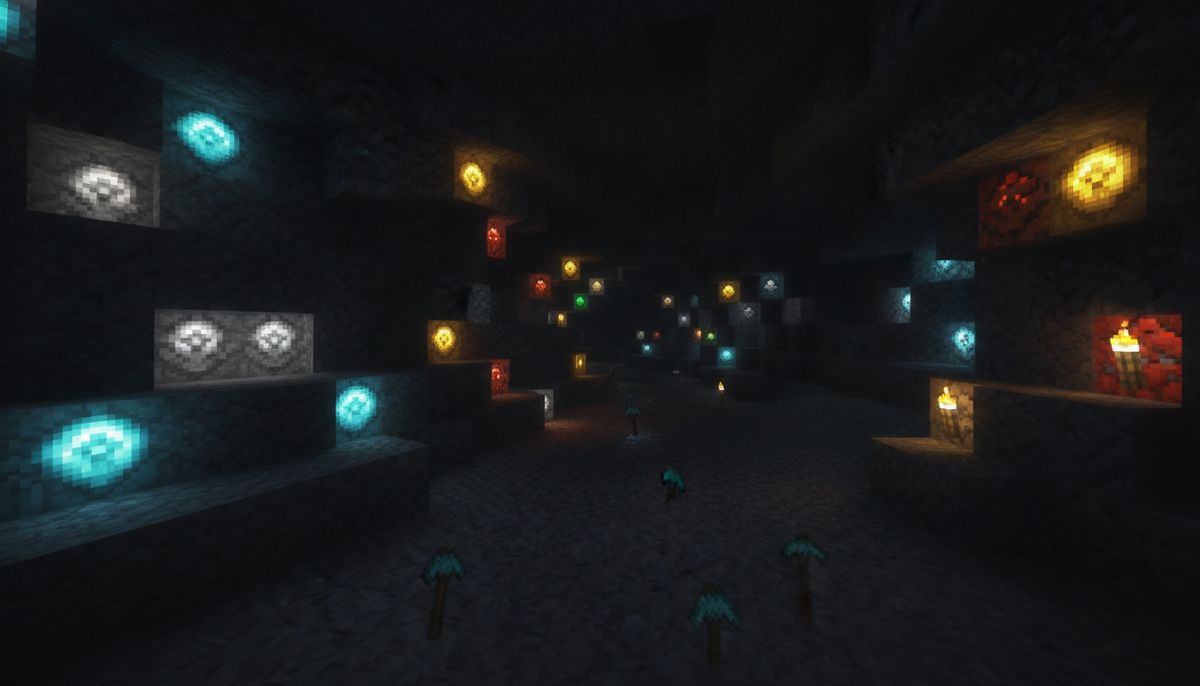
The cave update made mining more tedious since after the cave update, with sprawling caverns hiding ore veins in dark corners. Standard texture packs only change colors. Glowing ore packs use emissive textures, meaning ores actually light up in darkness. You spot a diamond vein from across a ravine. No more walking past ancient debris in the Nether.
Multiple creators have released packs with over 154.9K downloads, supporting emissive using Vibrant Visuals. DevAV's Ore Highlighter has surpassed 111.3K downloads, while Raiyon's Glowing Ores has reached 1.1M downloads. The Glow Em All Shader has surpassed 1.0M downloads despite requiring third-party loaders. Players want visibility without losing the survival challenge.
What Glowing Ores Texture Packs Actually Do
Ore Highlighter is a lightweight survival utility texture pack that helps easily spot diamonds, netherite, and ancient debris in the deepest caves with clean, high-visibility colored outlines. These packs make all vanilla ores and valuable blocks easy to spot through brightened ore pixels on classic graphics, and true glow-in-the-dark ore veins under Vibrant Visuals.
The effect works in two ways. On classic graphics the brightened textures make ores highly visible but do not emit light. The glow is a surface effect where ores shine in darkness but do not light up the surrounding area. Ores glow without creating new light sources that affect mob spawning or gameplay balance.
Complete ore coverage includes coal with subtle ember glow, iron and copper with metallic glow, gold, redstone with the strongest glow of all ores, plus diamond, emerald, lapis, and ancient debris. Both stone and deepslate variants receive treatment. Materials are layered on top of Minecraft's official Vibrant Visuals maps, so metals keep their shine, gems stay glossy, and amethyst keeps its translucency.
How Vibrant Visuals Makes It Work
Vibrant Visuals became available during normal gameplay as a default graphics mode on supported devices in version 1.21.90. On top of regular RGBA texture maps, Vibrant Visuals uses six new maps including metalness, emissive, roughness, subsurface scattering, normal, and height maps, with emissive lights produced by blocks, entities, and particles with emissive pixels in their texture set.
Version 1.21.120 added Vibrant Visuals support for some Marketplace DLCs and add-ons, recognizable with the Vibrant Visuals tag. Texture pack creators can now include emissive maps that tell the game which pixels should glow. The rendering engine handles the rest.
Packs are fully optimized for version 1.26 and compatible with all Bedrock shaders. They work flawlessly on servers, local multiplayer, and official Bedrock Realms without causing performance drops or server tick lag. Resource packs modify visuals client-side, so you can use them on any server.
Top Glowing Ore Packs for Bedrock
Several creators released competing versions in October 2026, each with distinct approaches:
| Pack Name | Creator | Downloads | Style |
|---|---|---|---|
| Ore Highlighter | DevAV | 111K+ | Colored outlines plus emissive glow |
| Ore Highlighter / Ore Outline | parzival0312 | 154K+ | Simple outline highlighting |
| Raiyon's Glowing Ores | lordraiyon69 | 1.1M+ | Full addon with behavior changes |
| Glow Em All Shader | Azion Studios | 1.0M+ | Custom shader requiring patches |
DevAV's pack offers classic outline mode with clean static colored borders around every ore block, plus 100% compatibility with Minecraft Bedrock's Deferred Technical Preview. The Borderful version gives every ore block a colored, glowing border on top of the glowing ore, so it reads instantly at a distance and in dim light.
Raiyon's version works with render dragon and makes ores emit light like redstone, turning off if you hit the block and requiring replacement to glow again. This is a full addon requiring both resource pack and behavior pack, with glowing ores only appearing in unexplored terrain, meaning in existing worlds only new chunks will have glowing ores.
Glow Em All is a shader for Minecraft Bedrock that makes the game look better with glowing ores, but will not work without using required patches and players should read the installation guide before downloading.
How to Install on Bedrock Edition
Installation varies by device but follows similar patterns across platforms.
Windows 10 and 11
Download the .mcpack file from your chosen source. Double-click the file and Minecraft imports it automatically. Open the .mcpack file with Bedrock so it imports, following the general steps in the guide to installing add-ons on Bedrock, then in your world's settings open Resource Packs and activate Glowing Ores.
Enable Vibrant Visuals under Experiments in your world settings, then go to Settings, Video, Graphics Mode, and select Vibrant Visuals. Move your chosen pack to the top of your active resource pack list and note that Minecraft Bedrock 1.21.80 or newer is required.
Android and Mobile
For Minecraft Bedrock Edition when the pack is available for Bedrock/MCPE, simply click on the downloaded file to install it. The .mcpack format triggers automatic import on mobile devices. Navigate to Settings, then Global Resources or the specific world's resource pack settings to activate.
For shader versions requiring patches, install MB Loader APK, import the resource pack to Minecraft and activate it in global resources, then launch Minecraft through MB Loader APK. Note that shader-based solutions require more technical setup than standard texture packs.
iOS and iPad
There isn't an easy method to install shaders on iOS devices, either requiring jailbreak or needing to install an untrusted IPA. Standard texture packs using Vibrant Visuals work normally through the same .mcpack import method as other platforms.
Are These Packs Safe and Legit?
Texture packs that use Vibrant Visuals are completely safe and legitimate. They are 100% resource pack with no behaviour pack, so achievements stay enabled and it's safe to add to an existing world. Packs like Raiyon's do not disable achievements even when including behavior modifications.
The packs add no entities and no scripts, only swapping texture and lighting data, so on their own they cost essentially zero FPS, with Vibrant Visuals being the demanding part from Minecraft's renderer not the pack, meaning if your device runs Vibrant Visuals it runs these packs.
Minecraft Bedrock does not officially support loading custom shaders, which is why shader solutions like Glow Em All require third-party loaders. These loaders modify game files and carry more risk. Stick to texture packs from established creators on CurseForge, MCPEDL, or Modbay to avoid malware.
The major packs have hundreds of thousands of downloads and active updates. Recent versions are fully optimized for 1.26, showing ongoing creator support. Download only from verified sources and check file sizes match expected values.
Troubleshooting Common Issues
If your ores look completely normal, it's almost always because Vibrant Visuals is still off. Without Vibrant Visuals enabled, the pack does not work properly, so if ores look unchanged check this setting first. Navigate to Settings, Video, Graphics Mode and confirm Vibrant Visuals is selected.
Some packs note that Vibrant Visuals is required, but if it cannot be used the visibility of minerals is still improved even without Vibrant Visuals. The outline or brightened texture approach works on classic rendering, just without the full emissive glow effect.
If using multiple texture packs, keep the glowing ores pack above other packs so its ore textures win, placing it above addons like Actions and Stuff in your active pack list so the glow works as normal. Pack load order determines which textures display when multiple packs modify the same blocks.
Not all devices support Vibrant Visuals. The feature requires DirectX 12 compatible graphics and sufficient processing power. Vibrant Visuals is Bedrock's built-in modern graphics mode released in version 1.21.90 in June 2025 and is the default graphics mode on supported devices. Older mobile devices and consoles may lack compatibility.
Alternatives in Our Catalog
Looking for different ways to enhance your mining experience? Our ores collection features addons that add entirely new ore types and mining mechanics beyond simple visibility improvements. The Best Ores and Mining Addons for Minecraft Bedrock guide covers gameplay-changing modifications.
For players seeking performance improvements alongside visual upgrades, check out Top 15 FPS-Friendly Texture Packs for Low-End Devices. These optimize rendering while maintaining visual quality, crucial when enabling demanding features like Vibrant Visuals.
The Best Cave and Mining Addons for Minecraft Bedrock explores mods that overhaul underground exploration with new structures, challenges, and rewards. Combine glowing ore visibility with expanded cave content for a complete mining overhaul.
Texture Pack Collection
Browse hundreds of texture packs including realistic, cartoon, and performance-optimized options for every Bedrock device.
Browse Collection →Players interested in comprehensive visual overhauls should explore Best Realistic Texture Packs for Minecraft Bedrock or compare styles in Faithful vs Realistic vs Cartoon Textures — Which Style to Pick. Understanding texture pack categories helps you build compatible stacks.
The Gamma Texture Pack for Minecraft Bedrock offers another visibility solution through brightness adjustments rather than emissive effects. It works without Vibrant Visuals requirements, making it compatible with older devices that struggle with modern rendering features.
Combining with Other Visual Mods
Pack creators state that these packs only change ores, do not affect other blocks, and do not hurt performance, working smoothly alongside most vanilla-style texture packs. This compatibility allows stacking with other visual enhancements.
Layer glowing ores with realistic lighting packs, water improvements, or sky overhauls for comprehensive visual upgrades. Packs are fully Vibrant Visuals compatible, enabling the pack never turns Vibrant Visuals off for your world, meaning you can use multiple PBR-enhanced packs simultaneously.
Check our guide How to Combine Addons Safely on Bedrock for load order tips and conflict resolution strategies. Texture packs rarely conflict since they modify different files, but understanding pack priority prevents unexpected visual glitches.
For comprehensive modding knowledge, review Minecraft Bedrock Addons — Complete Guide to Finding and Installing Add-Ons and Minecraft Mods vs Addons — What's the Difference? to understand how texture packs fit into Bedrock's modification ecosystem.
Version Compatibility Notes
Current packs support version 1.26 and are compatible with all Bedrock shaders. Some packs require Minecraft Bedrock Edition 1.26.50 or newer. Packs support Minecraft Bedrock 1.26.30 and later, being resource pack only with no Experimental Features required.
The most recent updates from creators like parzival0312 came in October 2026, showing active development alongside game updates. DevAV's latest version includes two subpacks, one with glowing ores and another with ores that have a glowing outline, giving players style options within a single download.
Older versions remain available for players on previous Bedrock releases. Note that shader versions only work on 1.21.100 and above since Mojang changed lighting there. Standard texture packs using Vibrant Visuals have broader compatibility across recent versions.
Tools and Items Mods
Enhance your mining toolkit with new pickaxes, torches, and utilities designed for efficient resource gathering.
Browse Collection →Players running older Bedrock versions should verify compatibility before downloading. Most creators list supported versions in file descriptions. When in doubt, grab multiple versions and test which works best on your device and game version.
Safety matters when modding. Our Are Minecraft Mods Safe? How to Download Without Viruses guide covers verification steps and red flags to watch for when downloading any Bedrock content. Always scan files and use reputable sources.
The glowing ores trend shows no signs of slowing. As Vibrant Visuals support expands and more devices gain compatibility, expect continued innovation in emissive texture packs. These lightweight visual enhancements solve a real gameplay frustration without compromising the survival experience or requiring complex installations.