
Why Everyone Is Searching for the Goatman Addon Right Now
The "mcpe mod goatman" search query has exploded in recent weeks, driven by horror content creators showcasing terrifying encounters with this cryptid-inspired creature. Players are hunting for the most advanced version of the addon, particularly the recently updated Goatman Stalker that uses Bedrock's Script API for truly adaptive horror.
Goatman is a terrifying horror addon for Minecraft Bedrock that brings a mysterious creature inspired by urban legends into your world. Unlike jump-scare mods that rely on cheap scares, the Goatman addon creates sustained psychological tension through stalking behavior, ambient dread, and unpredictable encounters.
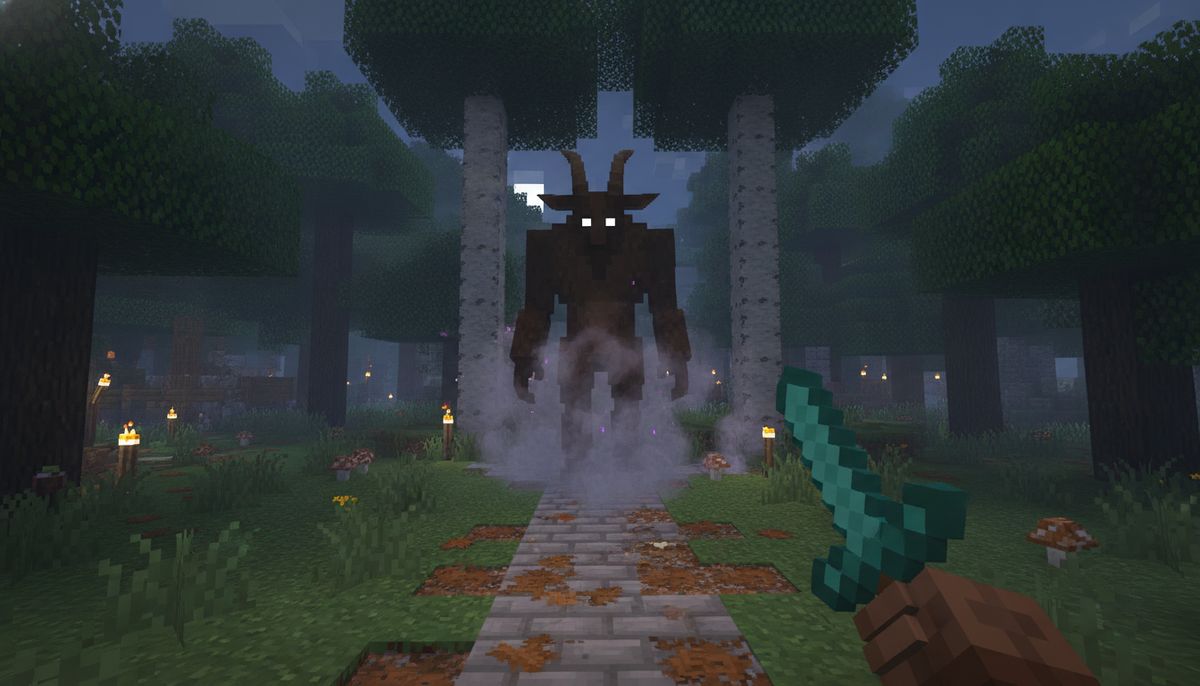
The creature draws from American folklore surrounding the Goatman cryptid, a half-human, half-goat entity reportedly seen in Maryland and Texas. Hidden within forests and dark areas, the Goatman silently stalks players before attacking with terrifying speed and strength.
Multiple versions exist across the Bedrock ecosystem, each bringing different features and levels of polish. Some focus on pure chase mechanics. Others implement context-aware horror that adapts to where you are and what you're doing.
Most Popular Goatman Versions for Bedrock Edition
Several creators have released Goatman addons, but three versions dominate the download charts.
LunarGroup's Goatman remains the most downloaded version. The Goatman is now on Bedrock. Download The Goatman for Bedrock by LunarGroup, with over 71.1K+ downloads on CurseForge The Goatman is a mod based off the cave dweller It offers you great fear and fun :] Features: New Scary Sounds New Skin New Model New Animations Some New AI Some sounds were inspired by sounds from the game, "Do You Copy?"
Dreadmc15's Goatman takes a more aggressive approach. Download Goatman by Dreadmc15, with over 24.1K+ downloads on CurseForge You may hear strange noises in the distance, catch glimpses of movement between trees, or spot glowing eyes watching you from the darkness. The creature becomes more aggressive the longer you survive, turning peaceful exploration into a constant nightmare
The Goatman Stalker by BlockCraftAddons represents the cutting edge of Bedrock horror design. Released in July 2026, this version leverages script-driven behavior for encounters that feel disturbingly intelligent. The Goatman Stalker — A smart horror addon that reacts to how you play. Door knocks, bed visits, surface glimpses, cave chases & a brutal jumpscare — all adaptive, all unpredictable.
| Version | Creator | Downloads | Key Features |
|---|---|---|---|
| The Goatman for Bedrock | LunarGroup | 71,000+ | Cave Dweller-inspired AI, custom sounds from "Do You Copy?" |
| Goatman | Dreadmc15 | 24,000+ | Escalating aggression, forest stalking, glowing eyes |
| The Goatman Stalker | BlockCraftAddons | 7,900+ | Script-driven encounters, context awareness, psychological horror |
What Makes the Goatman Stalker Stand Out
BlockCraftAddons' recent release deserves special attention. This is a fully script-driven horror overhaul built for Bedrock Edition, designed around one idea: you should never feel completely safe.
The addon uses Bedrock's Script API to create encounters that respond to your actions and location. What happens to you depends on where you are and what you're doing — near a door, asleep in bed, wandering the surface, or deep underground mining.
This means the Goatman doesn't spawn randomly. It appears when you're vulnerable. When you're focused on mining. When you think you're safe in your base.
A layer of unsettling ambient sound follows you no matter where you go. Distant, directionless, impossible to place. You'll never be quite sure if it's nothing — or if something just noticed you The soundscape creates constant unease without relying on sudden loud noises.
Underground exploration becomes genuinely frightening. Venture below the surface and the horror escalates. Something waits in tunnels you haven't finished digging — frozen, silent, embedded in the very rock ahead of you — until it isn't anymore
The addon includes door knocking behavior where the creature taps on your base entrance at night. It can visit your bed while you sleep. These psychological elements transform safe spaces into sources of dread.
No commands, no configuration — drop it into a Survival world and it takes care of the rest The addon requires both the behavior pack and resource pack to function, but no experimental features need to be enabled.
More Horror Mods for Bedrock
Looking for other terrifying creatures? Browse our complete collection of horror addons including The Man from the Fog, Cave Dweller variants, and analog horror experiences.
Browse Horror Mobs →How to Download and Install the Goatman Addon
Installing Goatman addons follows the standard Bedrock installation process. The files come in .mcaddon or .mcpack format, which Minecraft recognizes automatically.
For Windows 10 and 11
First, you'll need a Windows 10 or Windows 11 computer with Minecraft: Bedrock Edition installed. Download the world or Add-On file from the provided source. If the file downloads as a .zip file, change the file extension name to ".mcworld" or ".mcpack". Open the file and the Add-On should open in Minecraft
After the file imports, create a new world or edit an existing one. Navigate to the Behavior Packs section in world settings. Find the Goatman addon under "My Packs" and activate it. Most versions also include a Resource Pack that must be activated separately for custom models and sounds to work.
For Android Devices
Download the world or Add-On file to your Android device. Go to the Settings app and select Storage > Explore (at the bottom). Select the directory where you saved the file, usually "Download". Select the file & the Add-On should open in Minecraft
Once the mcaddon file is on the device, use File Manager to locate the file, click on the file and the import of the add-on should start. The pre-requirement is of course to have Minecraft PE (Bedrock Edition) installed on your device
For iOS (iPhone and iPad)
iOS installation follows the same basic process as Android. Download the .mcaddon or .mcpack file through Safari or your browser of choice. When you open the file, iOS should prompt you to open it with Minecraft. The addon imports automatically and becomes available in your Behavior Packs list.
You can learn more about iOS-specific installation steps in our comprehensive guide on Minecraft Mods for iOS.
Important Installation Notes
You may also find two .mcpack or .mcaddon files, one is the add-on (Behavior Pack) and the other is the texture pack (Resource Pack). Both must be installed for the add-on to work properly, as shown in the image.
The Goatman addon requires both packs because the behavior pack handles AI and spawning while the resource pack provides the custom model, textures, and sounds. Activating only one will result in a broken experience.
For more detailed installation instructions across all platforms, check out How to Download and Install Minecraft Mods on Bedrock Edition.
Is the Goatman Addon Safe to Download?
Safety depends entirely on where you download the addon. Versions hosted on CurseForge, MCPEDL, and similar established Bedrock repositories go through basic screening and are generally safe.
You can find add-ons on websites such as mcpedl.com (opens in a new tab) or curseforge.com (opens in a new tab). Always make sure to download add-ons from reliable sources and that they are compatible with the version of Minecraft Bedrock you are using.
Avoid downloading from random file-sharing sites or links in YouTube video descriptions that redirect to sketchy ad-filled pages. The real versions of popular addons are hosted on reputable platforms.
Addon files for Bedrock are relatively simple packages containing JSON files, scripts, and media assets. They can't install system-level malware the way executable files can. The main risk comes from downloading fake versions bundled with adware or redirects.
We cover this topic in depth in our article Are Minecraft Mods Safe? How to Download Without Viruses.
Gameplay Tips for Surviving the Goatman
The Goatman changes how you approach survival in Minecraft Bedrock. Standard base-building strategies don't provide the same security.
Lighting becomes critical. Most versions of the Goatman spawn more frequently in darkness and become more aggressive at night. Place torches generously around your base perimeter and along frequently traveled paths.
Avoid forests at night. The creature favors wooded areas where it can watch from behind trees. If you must travel through forests after dark, stay alert for movement in your peripheral vision or unusual sounds.
Sound design provides early warnings. Listen for ambient noises that don't match normal Minecraft sounds. Distant breathing, footsteps on grass, or eerie whispers signal the Goatman is nearby. Playing with headphones dramatically increases the horror factor and gives you better spatial awareness.
Don't assume your base is safe. The Goatman Stalker version specifically targets bases with door knocking and bed visit mechanics. Consider building multiple safehouses or escape tunnels.
Underground mining requires new strategies. The creature can appear in caves and mineshafts. Mining with a partner reduces isolation and provides backup when encounters happen. Keep your back to walls when stopping to organize inventory.
Combat often proves futile. The Goatman typically has high health and deals significant damage. Running and hiding are usually better survival tactics than direct confrontation.
Performance and Compatibility
The Goatman addon works on all Bedrock platforms including Windows, Android, iOS, Xbox, PlayStation, and Nintendo Switch. Requirements vary by version.
Older versions like LunarGroup's original release work on Bedrock 1.19 and later. The Goatman Stalker by BlockCraftAddons requires Bedrock 1.21 or newer due to its Script API implementation.
✔ Minecraft Bedrock 1.21+ ✔ Works in Survival Worlds ✔ Multiplayer Friendly ✔ Stable Script API — no experimental toggles required ✔ Lightweight & Optimized ✔ No commands required ⚠ Both Behavior Pack and Resource Pack must be applied
Performance impact remains minimal on most devices. The addon doesn't add new world generation, extensive particle effects, or large numbers of entities. It spawns a single creature that follows AI behavior patterns. Mobile devices and Switch should run it without significant frame rate drops.
The Goatman works in multiplayer, though experiences vary. Some players report the creature only targets the host. Others have encountered it in Realms with full functionality for all players. Multiplayer behavior depends on the specific version and how the creator implemented entity tracking.
Alternative Horror Addons for Bedrock
If you enjoy the Goatman concept, several similar horror addons might interest you.
The Man from the Fog creates a Slenderman-inspired stalker that appears in fog and rain. The creature watches from a distance and disappears when directly observed. Like the Goatman, it emphasizes psychological horror over jump scares.
Cave Dweller variants provide underground horror with creatures that lurk in caves and abandoned mineshafts. These addons pair well with the Goatman for comprehensive horror coverage both above and below ground.
Bloodbath Analog Horror brings VHS-style horror aesthetics to Bedrock with glitchy visuals and unsettling entities. Read more about it in our detailed Bloodbath Analog Horror Addon guide.
The Obsessed introduces a stalker that becomes fixated on specific players, appearing repeatedly across worlds. The addon creates a persistent threat that follows you between saves. Our Obsessed Horror Mod guide covers installation and gameplay.
For players interested in horror experiences beyond creature encounters, check out Best Horror Maps for Minecraft Bedrock which includes escape rooms and story-driven scary worlds.
More Creature Addons
Explore hundreds of mob addons including realistic animals, fantasy creatures, and boss fights. Find companions, enemies, and everything between.
Browse All Mob Mods →Combining Goatman with Other Addons
The Goatman addon can be combined with other mods, though compatibility varies. Horror-focused addons generally work together since they add entities without modifying core gameplay systems.
Combining multiple horror creature addons creates an intense experience where different threats require different strategies. Pairing the Goatman with Cave Dweller covers both surface and underground horror. Adding The Man from the Fog introduces weather-based encounters.
Avoid combining the Goatman with addons that significantly alter mob spawning mechanics or AI behavior. These can conflict with the creature's stalking patterns and spawn triggers.
Building and decoration addons work well alongside horror mods. Adding furniture mods or building blocks lets you create more detailed hideouts and bases without affecting the Goatman's functionality.
For more information on safely combining addons, read How to Combine Addons Safely on Bedrock, which covers load order, common conflicts, and testing strategies.
Why the Goatman Works as Horror
The Goatman succeeds where many horror mods fail by understanding what makes Minecraft frightening. The game's core loop involves building, exploring, and feeling safe in spaces you create. The Goatman violates that safety.
Traditional Minecraft threats follow predictable patterns. Zombies burn in sunlight. Creepers hiss before exploding. Skeletons require line of sight. You learn the rules and build defenses accordingly.
The Goatman breaks the rules. It appears when you're distracted. It watches before attacking. It invades spaces that should be safe. This unpredictability creates genuine tension.
The addon taps into cryptid folklore's effectiveness at generating unease. The Goatman legend works because it describes something almost human but fundamentally wrong. A figure that shouldn't exist but might. The Bedrock implementation captures that wrongness through its AI behavior and animations.
Sound design elevates the experience significantly. Some sounds were inspired by sounds from the game, "Do You Copy?" That indie horror game built its scares around radio static and distant noises. The Goatman addon applies similar audio principles to Minecraft's environment.
Final Thoughts on Getting the Goatman Addon
The Goatman represents some of the best horror content available for Bedrock Edition. Whether you choose LunarGroup's popular version, Dreadmc15's aggressive variant, or BlockCraftAddons' psychological stalker, you're getting a well-designed creature that fundamentally changes how Minecraft feels.
For players new to horror addons, start with LunarGroup's version. It provides solid scares without the intense psychological elements of the Goatman Stalker. Experienced horror fans should jump straight to BlockCraftAddons' latest release for the most sophisticated implementation.
Remember that horror addons work best with proper atmosphere. Play with headphones at night with minimal lighting. Give the mod time to build tension rather than seeking out encounters immediately.
The Goatman excels in survival worlds where you've invested time building bases and establishing routines. The creature becomes far more effective when it threatens something you've worked to create and protect.
For players who enjoy the Goatman, consider exploring other horror-focused content in our mobs collection or checking out themed addon bundles in Bedrock Modpacks: 10 Curated Addon Bundles by Theme.