
What Are JJK Addons and Why Are They Trending Right Now?
Jujutsu Kaisen has taken over Minecraft Bedrock. Players across iOS, Android, and Windows devices are searching for ways to bring cursed techniques, domain expansions, and Black Flash mechanics into their survival worlds. The surge in popularity mirrors the anime's own success, creating a demand for gameplay modifications that go beyond simple cosmetic changes.
These addons transform Minecraft into a playground for sorcery battles. Instead of mining diamonds and building houses, players train their cursed energy, unlock innate techniques, and face off in domain clashes. The best part? These modifications work natively on mobile devices and Windows 10/11 without requiring Java Edition or complicated modding tools.
Sorcerers Beyond 3.3 by Onyx recently hit over 104,000 downloads, while Jujutsu Craftin' by IAmEyebags has surpassed 653,600 downloads. The September 2026 updates have brought refined combat systems, new character movesets, and performance improvements that make these addons more accessible than ever.
Top 4 JJK Addons for Minecraft Bedrock Edition
Jujutsu Awakening by Heroic Productions
Jujutsu Awakening was created by Heroic Productions in February 2024 and has grown into one of the most content-rich options available. The addon focuses on immersive world transformation with custom structures, boss fights, and a quest-based progression system.
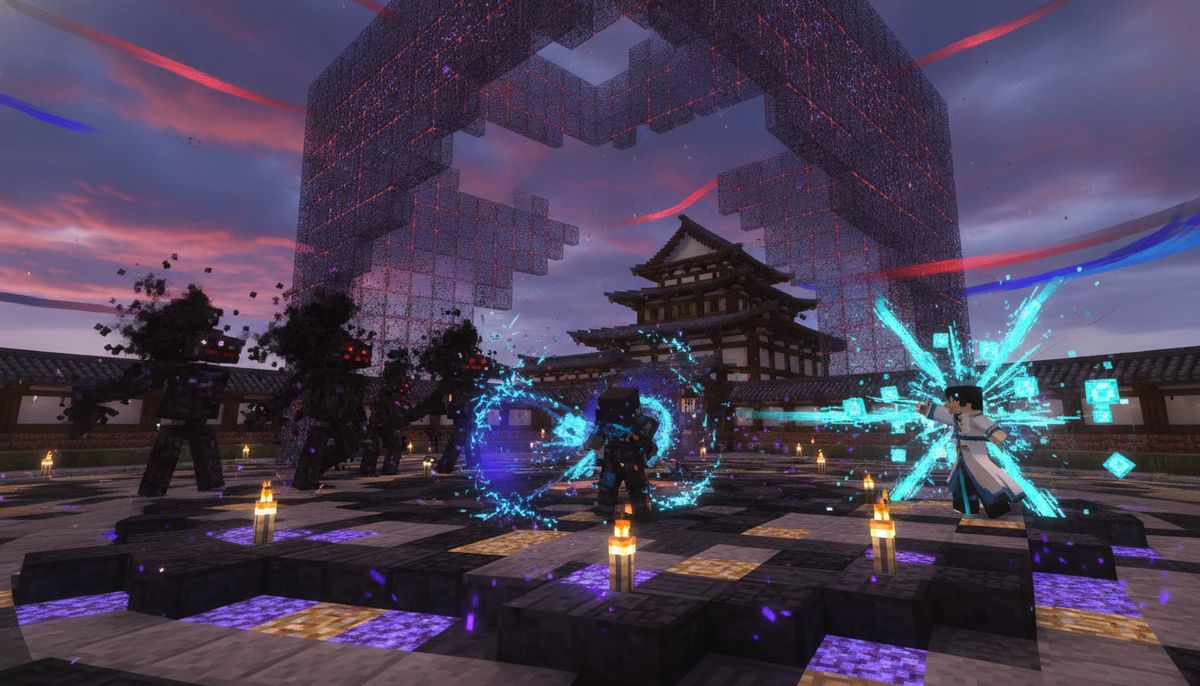
Players can complete quests, defeat bosses, and strive to become the strongest. Domain expansions from major characters like Mahito, Sukuna, and Gojo are fully implemented with visual effects that replicate the anime's signature art style. The September 2026 update added domain clash mechanics, allowing two players to battle for control when their domains overlap.
The addon includes custom structures that spawn throughout your world: abandoned houses with curse spawners, cursed caverns hiding special grade curses, and challenge dungeons packed with monster spawners. Combat feels dynamic thanks to directional dashing, flash-step movement, and character-specific movesets that reward skillful play.
Sorcerers Beyond 3.3 by Onyx
Sorcerers Beyond features four unique origins, multiple clans, nine cursed techniques, and a completely rebuilt progression system. This addon takes a structured approach to character development, making it ideal for players who want long-term goals and meaningful progression.
Players earn Cursed Energy XP by fighting hostile mobs and using abilities in combat, with a maximum level cap of Level 30. The progression gates content intelligently: at Level 8, Clan Admissions unlock, allowing players to join Zenin or Kamo clans, while Level 10 unlocks Technique Awakening, letting players permanently select their Innate Cursed Technique.
| Level Milestone | Unlocked Content |
|---|---|
| Level 5 | Minor passive physical boosts |
| Level 8 | Clan Admissions (Zenin or Kamo) |
| Level 10 | Technique Awakening selection |
| Level 20+ | Ultimate Abilities and Domain Expansions |
| Level 30 | Peak Jujutsu status |
Version 3.3 introduced a new progression system, four unique origins, clan bloodlines, nine cursed techniques with ultimates, and a brand new item system. Updated on September 28, 2026, the addon now includes smoother combat animations and better multiplayer compatibility for shared servers.
Jujutsu Craftin' by IAmEyebags
This addon introduces a Cursed Energy system with unique Cursed Techniques and manga-based interactions between clashing techniques. What sets Jujutsu Craftin' apart is its focus on combat depth through three interconnected stats: Fatigue, Cursed Energy, and Output.
Fatigue starts from 0% and increases each time a technique is cast, with stronger techniques generating higher fatigue. When fatigue reaches 100% and above, players experience Burnout which disables their innate Cursed Technique for 8 seconds. This creates a risk-reward dynamic where spamming powerful moves leaves you vulnerable.
Black Flash occurs 1% of the time naturally, and triggering it increases Output by 20% and removes all Fatigue per hit. Chaining becomes easier with each successful hit: 1% for the first, 30% for the second, 60% for the third, and 90% for the final fourth Black Flash before odds reset.
The character select book provided at spawn contains guides for mechanics, character movesets, and general addon information. Domain clashes let players compete when two domains are cast simultaneously, with the loser determined by who receives more punch damage during the clash.
More Anime-Inspired Addons
Explore superhero powers, fantasy abilities, and combat systems inspired by your favorite series.
Browse Fun Mods →Jujutsu Mechanic by Kupachu
Jujutsu Mechanic adds a lore-accurate Jujutsu Kaisen power system featuring cursed techniques and cursed energy abilities designed to coexist naturally with Minecraft gameplay. This addon prioritizes balance, ensuring that JJK powers enhance rather than replace vanilla Minecraft mechanics.
The June 2026 update added Black Flash variants and an improved momentum system where higher momentum increases damage and Black Flash chance. This momentum-based combat rewards aggressive playstyles while maintaining the risk of overextension.
With over 83,000 downloads, Jujutsu Mechanic appeals to players who want Jujutsu Kaisen elements without completely overhauling their survival experience. The addon works seamlessly alongside other gameplay modifications, making it a strong choice for curated addon packs.
How to Install JJK Addons on Bedrock Edition
Installing addons on Minecraft Bedrock works across iOS, Android, and Windows devices with the same basic process. The files you download will typically be in .mcaddon or .mcpack format.
For iOS and Android:
Use File Manager to locate the downloaded .mcaddon file, click on it, and the import should start automatically once Minecraft PE (Bedrock Edition) is installed on your device. You can transfer files to your mobile device through cloud storage services like Google Drive or Dropbox, or use a USB cable for direct transfer.
Double-click the downloaded .mcaddon or .mcpack files to open them, but make sure the game is completely closed after installing each addon or the file will not install properly.
For Windows 10/11:
Simply open the downloaded .mcaddon or .mcpack file, which will open Minecraft Bedrock and import the addon into the game. The process takes seconds and requires no additional software.
Applying Addons to Your World:
- Create a new world or edit an existing one
- Navigate to the Behavior Packs section in world settings
- Activate the JJK addon from your available packs
- Check the Resource Packs section and activate matching texture packs
- Enable Experimental Features if prompted (most JJK addons require this)
- Launch your world and check the addon book or starter item
Most JJK addons include a character selection book or starter item that appears when you first load the world. This guide explains the controls, available techniques, and progression systems specific to that addon.
If you want to learn more about combining multiple addons safely, check out our guide on how to combine addons on Bedrock, which covers load order and conflict resolution.
Are JJK Addons Safe to Download?
Downloading from verified sources protects your device and ensures addon quality. The most reliable platforms for Bedrock addons are CurseForge, MCPEDL, and creator-hosted pages linked from official social media accounts.
CurseForge implements upload verification, making it one of the safest options. MCPEDL has been hosting Bedrock content for years with an active moderation team. Always verify creator identity through Discord servers or YouTube channels before downloading from third-party mirrors.
Download addons from trusted sources such as CurseForge, MCPEDL, or the creator's own website, as Bedrock addons usually come as .mcpack or .mcaddon files. These file formats are native to Minecraft Bedrock and install directly through the game client.
Warning signs of unsafe downloads include:
- Requests for personal information during download
- Executable files (.exe, .apk) instead of .mcaddon/.mcpack formats
- Ad-heavy redirect sites with no clear download button
- Missing creator attribution or stolen content warnings
Our complete safety guide covers virus protection and legitimate download practices: Are Minecraft Mods Safe?
Performance varies by device. Flagship phones and tablets from 2023 onward handle most JJK addons smoothly. Older devices may experience frame drops during domain expansions or when multiple players trigger cursed techniques simultaneously. Adjusting render distance and disabling fancy graphics helps maintain playable framerates.
Combat Mechanics Across JJK Addons
Understanding how each addon handles combat helps you choose the right one for your playstyle. The core systems differ significantly between the four major options.
Cursed Energy Management:
All four addons implement cursed energy as a resource that fuels techniques. Jujutsu Craftin' scales technique costs based on fatigue, meaning techniques require more cursed energy as fatigue increases. Sorcerers Beyond uses a fixed energy cost per technique but gates access through level requirements.
Output and Damage Scaling:
In Jujutsu Craftin', Output scales technique damage, determines Reverse Cursed Technique healing strength, and decides cursed energy regeneration speed. Landing Black Flash hits increases your Output while reducing enemy Output, creating momentum shifts during PvP battles.
Jujutsu Awakening takes a different approach, tying damage to character-specific movesets rather than universal stat scaling. This makes each playable character feel distinct with unique combo potential.
Domain Expansions:
Every addon includes domain expansions, but implementation varies. Jujutsu Awakening focuses on visual spectacle with fully rendered domain environments. Jujutsu Craftin' includes Simple Domain protection that lasts 7 seconds and requires reactivation for continuous defense against enemy domains.
For players who enjoy technical combat systems, explore our collection of magic and spells addons or check out PvP-focused modifications that complement JJK gameplay.
Multiplayer Compatibility and Server Setup
JJK addons work on private servers and realm hosting, though setup requires both behavior packs and resource packs to be enabled server-side. All players connecting to the server must have matching resource packs installed to see visual effects correctly.
Sorcerers Beyond and Jujutsu Craftin' include multiplayer-specific features like domain clashes and team-based cursed technique interactions. These work best with 2-8 players on stable connections. Larger player counts can cause ability desync, especially when multiple domains activate simultaneously.
Windows users hosting local servers need to place addon files in the server's behavior_packs and resource_packs folders, then reference them in the world configuration files. Mobile players cannot host dedicated servers but can join Windows-hosted sessions or use realm subscriptions for persistent worlds.
If you're building a themed server, our best roleplay addons and multiplayer addon recommendations provide complementary content that enhances social gameplay.
Tips for Getting Started With JJK Addons
Choose Your Playstyle:
Jujutsu Awakening suits players who want exploration and boss fights integrated into their survival experience. Sorcerers Beyond rewards methodical progression and character building. Jujutsu Craftin' appeals to competitive players focused on mastering combat mechanics. Jujutsu Mechanic fits those who want JJK elements without abandoning vanilla Minecraft completely.
Start in Creative Mode:
Spawn in creative first to read the character guide book and test techniques without combat pressure. Most addons include item spawners or command blocks that let you experiment with different characters before committing to a survival playthrough.
Enable Experimental Features:
Nearly all advanced Bedrock addons require experimental gameplay features enabled in world settings. This allows custom entities, modified attack behaviors, and complex particle effects that make domain expansions and cursed techniques possible.
Backup Your Worlds:
Create world backups before installing addons, especially on existing survival worlds. While modern addons rarely corrupt saves, having a backup lets you revert if compatibility issues arise.
Read Update Logs:
Addon creators frequently update their mods with balance changes, new techniques, and bug fixes. Following creator Discord servers or YouTube channels keeps you informed about compatibility patches and feature additions.
Players interested in anime-themed gameplay should explore our complete anime addons collection, which includes modifications from other popular series that pair well with JJK content.
Alternatives and Related Addons
The Jujutsu Kaisen addon ecosystem connects with broader anime and fantasy modifications. Players running JJK addons often combine them with complementary content for fuller gameplay experiences.
Bleach Addon by Onyx: Created by the same developer as Sorcerers Beyond, this addon brings Soul Reaper abilities, Zanpakuto, and Bankai transformations to Bedrock Edition. Learn more in our Bleach addon guide.
Fantasy RPG Systems: If you enjoy the progression elements in Sorcerers Beyond, explore addons that add class systems, skill trees, and quest mechanics through our fantasy RPG addons collection.
Boss Fight Addons: Jujutsu Awakening's boss encounters pair well with other challenging enemy addons. Our boss fight addon guide showcases modifications that add difficult combat encounters.
Weapons and Combat: Expand your arsenal beyond cursed techniques with modern firearms, medieval weapons, or magical artifacts from our weapons collection and best weapons guide.
Maps Designed for JJK: Several custom maps recreate locations from Jujutsu Kaisen anime, providing authentic environments for testing your cursed techniques. Our Jujutsu Kaisen map guide features the Battle Kaisen arena and other themed builds.
For players building complete addon packs around specific themes, check our curated bedrock modpacks guide for bundle recommendations that pair JJK content with survival enhancements.
Performance Optimization for Mobile Players
Running complex addons on mobile devices requires optimization to maintain smooth gameplay. These adjustments help balance visual quality with playable framerates.
Lower your render distance to 8-12 chunks when using JJK addons with domain expansions. The particle effects and custom entities strain mobile GPUs, so reducing visible area prevents lag spikes during combat.
Disable fancy graphics and clouds in video settings. JJK addons add their own visual effects, making vanilla graphic enhancements redundant. The performance gain from simplified rendering outweighs any visual loss.
Close background apps before launching Minecraft. JJK addons with complex progression systems use more RAM than vanilla Bedrock, so freeing system resources prevents crashes during longer play sessions.
Avoid combining multiple large-scale addons simultaneously on mobile. Running JJK content alongside dimension overhauls or massive creature packs creates memory bottlenecks. If you want variety, swap addons between play sessions rather than loading everything at once.
Players using older or budget devices should consider lighter alternatives or wait for optimization updates. Addon creators frequently release performance patches that reduce resource usage without removing features.
Explore our FPS-friendly texture packs guide for visual modifications that complement addons without tanking performance on low-end hardware.
Ready to master cursed techniques in your Minecraft world? Browse our complete collection of fun and themed addons to find JJK modifications and complementary content that transforms Bedrock Edition into your personal Jujutsu training ground.