
Why World Border Addons Are Trending on Minecraft Bedrock
Server administrators and realm owners know the problem well. Minecraft Bedrock Edition currently lacks the /worldborder command that Java Edition players have enjoyed for years. Without native border functionality, Bedrock worlds sprawl endlessly as players wander into unused chunks, creating bloated world files and performance bottlenecks that bring servers to their knees.
World border addons solve this critical gap. These mods bring Java Edition's exclusive world border feature to Bedrock, allowing administrators to set hard limits on exploration. Server administrators gain powerful tools to define, visualize, and enforce boundaries in their worlds, helping to manage server resources, guide player exploration, and create controlled gameplay experiences.
The surge in searches reflects practical necessity. Players spreading too far can cause excessive chunk loading and memory usage, while unlimited exploration makes world backups massive and time-consuming. For minigame creators, event organizers, and survival server operators, world borders have shifted from nice-to-have to essential infrastructure.
BedrockWorldBorder by myGen: The Most Popular Choice
BedrockWorldBorder by mygen has over 39,500 downloads on CurseForge with a recent update in February 2026. This comprehensive addon recreates Java Edition's world border system while adding features that surpass the original.
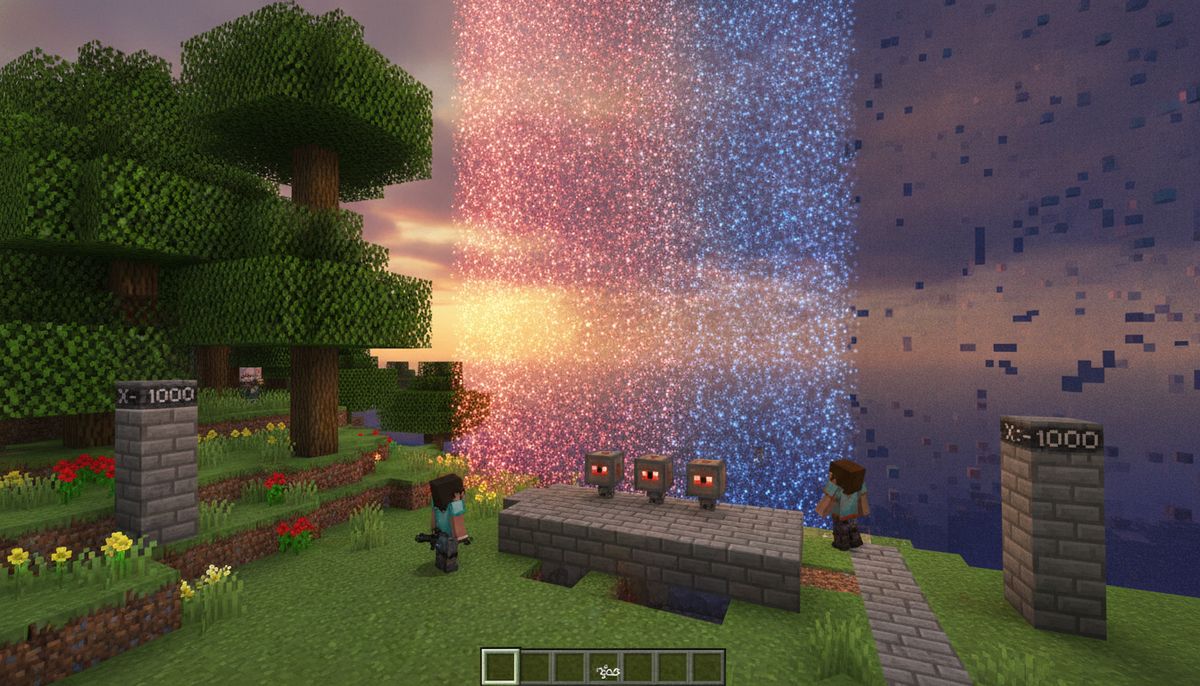
The visual impact alone makes it worth installing. Proper Java Edition-style world borders include towering animated particle walls that stretch 320 blocks into the sky. Players cannot miss these barriers. They look fantastic, they work on every dimension, and your players will absolutely know when they have reached the edge of civilisation.
Configuration happens entirely through an in-game interface. Once in your world, use /worldborder:menu to open the settings GUI. From there, administrators can set border radius, customize center coordinates, choose particle effects, and adjust enforcement behavior without touching a single command block.
Key Features and Customization
Set up independent borders for the Overworld, Nether, and End with their own size, centre point, and style. This per-dimension control allows administrators to create appropriately scaled limits. A 5,000-block Overworld border might pair with a 625-block Nether border, maintaining the 8:1 ratio players expect while keeping all dimensions properly contained.
Version 3.0.0 introduced 11 customizable border styles with a new dropdown in admin UI for easy style selection. Each dimension can display different particle types. The Overworld might show red flames while the Nether uses purple portal particles. Recent updates added customisable border colour options per dimension via the admin UI and adjustable opacity sliders from 0 to 100 percent for border particles per dimension.
Beyond visuals, the addon includes practical enforcement tools. Particle warnings appear when you get within 10 blocks of the border, with distance warnings in chat messages telling you how far you are from the edge. Interaction prevention features can block manipulation outside borders, preventing block breaking, placing, and interaction with blocks like chests, doors, and buttons.
Administrative control extends to player permissions. Players with the border_bypass tag can cross freely, useful for moderators who need to retrieve lost items or investigate issues beyond the boundary. Admins get beyond border warnings instead of being teleported, maintaining oversight without sacrificing mobility.
Dusty's World Border: Achievement-Friendly Alternative
Dusty's World Border by DustyIdeas has over 18,200 downloads on CurseForge with an update in July 2026. This addon distinguishes itself by requiring zero compromises on achievements.
The full menu works without operator, command blocks, or Beta APIs, making it perfect for achievement-friendly worlds. Players who want world boundaries without enabling cheats finally have a solution. This is 100 percent achievement friendly, confirmed across multiple versions.
The technical implementation prioritizes stability. Low-lag design is built to be lightweight and predictable, with a self-test system that checks the addon's own health so issues get caught early instead of turning into a mystery crash. Server operators dealing with resource constraints appreciate this attention to performance.
Safety systems prevent common teleportation disasters. Smart teleport logic finds real safe ground when someone crosses the border, including building an emergency platform if the world does not have one. Players won't suffocate in walls or fall into voids when the border enforces boundaries.
Dynamic Border Features
Movable borders can shrink, grow, or shift the center smoothly over time. This functionality enables shrinking border events similar to popular survival games. Start with a 10,000-block radius, then gradually compress it to 1,000 blocks over several hours, forcing player interaction and combat.
Access requires operator status or the wbadmin tag, though an optional menu password can be set by admins to let trusted players in without either. This flexibility works well for community servers where moderators need border control without full operator privileges.
Everything in the menu is also available as tag-based commands for command blocks and automation. Mapmakers building adventure experiences can script border changes tied to story progression. Imagine borders that expand when players complete objectives or shrink when specific triggers activate, all automated through command chains.
How to Install World Border Addons on Bedrock Edition
Installation follows standard Bedrock addon procedures. Download the .mcaddon file from your chosen source. The file extension signals Minecraft to handle it as an addon package.
For mobile devices running iOS or Android, tap the downloaded .mcaddon file. Double-click the file to automatically import it into Minecraft Bedrock Edition. The game should launch and display an import confirmation message showing the behavior pack and resource pack have been added to your available addons list.
Windows 10 and 11 users follow the same process. Locate the downloaded mcaddon file and double-click it to automatically import. If Windows asks which program to use, select Minecraft for Windows or navigate to the file through the Minecraft launcher's settings.
When creating or editing a world, add the BedrockWorldBorder Behavior Pack and Resource Pack with no Beta APIs required. This applies to both BedrockWorldBorder and Dusty's World Border. Load the behavior pack first through the world's addon settings before launching.
For dedicated servers, the process differs slightly. Upload the addon files to your server's resource and behavior pack folders, then activate the packs in your server's configuration settings. Server operators should consult their hosting provider's documentation for specific folder locations and activation procedures.
After installation, launch your world. Enter the world and type /worldborder:menu to begin configuration for BedrockWorldBorder. Dusty's World Border uses a similar in-game menu system accessible to operators or tagged administrators.
Are World Border Addons Safe and Compatible?
Both BedrockWorldBorder and Dusty's World Border maintain active development with regular compatibility updates. The addons work on version 1.21.90 and up, including versions 26.0 through 26.13, staying compatible with all future versions unless API changes occur.
Security concerns remain minimal for these addons. They function through Minecraft's official scripting API rather than external modification of game files. This approach aligns with Mojang's addon framework, avoiding the file tampering that causes security flags. For general guidance on addon safety, check our article on Are Minecraft Mods Safe? How to Download Without Viruses.
Always backup your world before installing any addons. This precaution applies universally to Bedrock modifications. World corruption rarely occurs with well-maintained addons, but backups provide insurance against unexpected conflicts or bugs.
Achievement compatibility deserves special attention. BedrockWorldBorder requires Beta APIs in some versions, which disables achievements. Dusty's World Border explicitly maintains achievement functionality across all features, making it the clear choice for survival worlds where players want progression tracking alongside boundary enforcement.
Practical Applications for World Borders
Performance management tops the list of use cases. A world border can help improve server performance by limiting the area players can explore and build in, especially helpful for large servers where managing world size is crucial. Realms with limited processing power benefit dramatically from restricting chunk generation to actively used areas.
Minigame design relies heavily on controlled playspaces. Battle royale modes, hunger games variants, and team-based competitions all require defined boundaries. Other uses are typically for gamemodes, minigames, and other similar activities in Minecraft. World borders provide invisible walls without requiring physical barrier construction that breaks immersion.
Drop the center on a town square instead of coordinates 0,0, then expand the ring as the server progresses. This approach concentrates early-game activity around spawn infrastructure, preventing the scattered homestead problem where new players build thousands of blocks apart. Raids feel contained, nether highways do not sprawl forever, and new players can actually find the community instead of wandering into dead space.
Event organization benefits from temporary border adjustments. Snap a smaller ring around an arena for a week-long event, then widen it afterward without breaking anyone's base. PvP tournaments, building competitions, and seasonal festivals gain natural boundaries without permanent world modification.
| Use Case | Recommended Addon | Typical Border Size |
|---|---|---|
| Small survival realm | Dusty's World Border | 3,000-5,000 blocks |
| Large multiplayer server | BedrockWorldBorder | 10,000-20,000 blocks |
| Minigame arena | Either addon | 500-1,000 blocks |
| Battle royale event | Dusty's World Border | 2,000 blocks shrinking to 100 |
| Creative building server | BedrockWorldBorder | 5,000-10,000 blocks |
Alternative Tools and Related Addons
Players seeking complementary functionality should explore other tools that enhance server management. Chunk visualization addons help administrators understand exactly what terrain falls within border limits before setting final coordinates.
Teleportation systems pair well with world borders. When players consistently hit boundaries in specific directions, strategically placed teleport pads can redirect traffic toward underutilized quadrants, distributing player density more evenly across the allowed playspace.
For mapmakers building adventure experiences, world borders combine effectively with custom NPC systems. Check out Best Custom NPC Addons for Minecraft Bedrock Edition for options that can guide players away from borders through dialogue and quest design rather than hard enforcement.
Server Management Tools
Explore more addons that help you control, optimize, and customize your Minecraft Bedrock server or realm experience.
Browse Collection →Multiplayer-focused servers might combine borders with economy systems, spawn protection, and permission management. The combination creates professional-grade server infrastructure rivaling what Java Edition communities have built over years. Our guide to Best Multiplayer Addons for Minecraft Bedrock Edition covers the full ecosystem of server enhancement tools.
Technical Comparison: Which Addon Should You Choose?
BedrockWorldBorder excels in visual customization and administrative control. The 11 particle styles, color selection, and opacity adjustments let administrators match borders to server themes. Medieval servers can use torch particles with warm orange tones, while futuristic builds might prefer cyan portal effects. The bypass tag system and admin-specific warnings provide granular permission management essential for larger communities with complex staff structures.
Dusty's World Border wins on accessibility and achievement preservation. Servers that want boundaries without requiring players to sacrifice progression tracking have only one real option. The no-cheats-required design removes a significant barrier for casual realm owners who want basic border functionality without navigating permission systems or command syntax.
Both addons handle smart teleportation effectively. Neither will dump players into lava or off cliffs when enforcing boundaries. Performance profiles remain comparable, with both using optimized tick handling to minimize server impact.
Version compatibility favors BedrockWorldBorder slightly, with more frequent updates and explicit support for beta versions. Dusty's World Border maintains a more conservative update schedule, prioritizing stability over cutting-edge feature additions.
Budget-conscious server operators can celebrate that both options remain completely free. Neither addon locks features behind premium tiers or subscription models. Download, install, configure, and run without ongoing costs beyond standard server hosting.
Configuration Tips for Optimal Performance
Start conservatively with border sizes. We strongly recommend avoiding having too big worlds since this can create performance issues. Begin with a 5,000-block radius for new servers, expanding only after confirming your hosting can handle the chunk load. Monitor server tick rate and memory usage during peak player hours.
Consider asymmetric borders for worlds with natural chokepoints. If your spawn sits near an ocean, set a tighter border on the water side where players gain little from exploration, while allowing more room inland where interesting terrain exists. Custom center coordinates enable this flexibility in both major addons.
Balance border warning distances with player speed. The default 10-block warning system works well for walking players but gives minimal reaction time for elytra users or mounted players. Expand warning ranges to 50-100 blocks for servers with fast transportation methods, preventing frustrating rapid teleports mid-flight.
Test border behavior in each dimension separately. Nether travel multiplies coordinates by eight, meaning a 1,000-block Nether border effectively creates an 8,000-block Overworld restriction if players use portals for transit. Adjust Nether borders to match your intended Overworld limits while accounting for this scaling factor.
Getting Started with World Borders Today
The absence of native /worldborder commands no longer holds Bedrock Edition back. Modern addons deliver feature parity with Java Edition while introducing innovations like achievement-friendly operation and enhanced visual customization. Server performance, player retention, and world management all improve when administrators set clear exploration boundaries.
BedrockWorldBorder suits established servers with complex administrative needs and players comfortable enabling experimental features. Dusty's World Border serves survival realms, achievement-focused communities, and operators who want plug-and-play functionality without configuration overhead.
Both addons receive active maintenance, ensuring compatibility with future Minecraft updates. The development communities around these projects provide support through Discord servers and GitHub issue trackers, addressing bugs and implementing feature requests from real-world server administrators.
Essential Bedrock Addons
Discover more must-have modifications that bring Java Edition features to Bedrock or add entirely new gameplay mechanics.
Browse Collection →Installation takes minutes. Configuration requires no scripting knowledge. Results appear immediately as towering particle walls define your world's edges. For administrators tired of bloated world files and players wandering into empty chunks, world border addons deliver exactly what Bedrock Edition should have included from the start.
Ready to add professional server boundaries to your Bedrock world? Visit our complete collection of tools to find world border addons alongside other server management essentials. Whether you run a small realm with friends or a large public server, proper world boundaries transform chaotic exploration into focused gameplay that keeps communities together and servers running smoothly.