
Why Everyone Is Searching for the Sun Town Addon Right Now
The Sun Town addon has become one of the most-talked-about horror mods in the Minecraft Bedrock community. Players searching for "minecraft horror mod sun" are discovering terrifying creatures that slowly take your soul into the sun, bringing a level of psychological dread rarely seen in Bedrock addons. The addon has accumulated over 86,500 downloads on CurseForge, with YouTube creators featuring it in survival challenges and horror gameplay videos throughout 2026.
The addon is a port of the Java mod Sun Town made by hopal228, ported to Bedrock by huwbacca, making Doctor Nowhere's analog horror universe accessible to mobile and console players for the first time. The timing is perfect. Analog horror has exploded in popularity, and the Sunman character from Doctor Nowhere's series has become an iconic figure in the genre. Players who grew up watching VHS-style horror shorts now want that same unsettling atmosphere in their survival worlds.
What makes this addon stand out from other horror maps is its simplicity. There are no elaborate escape rooms or scripted jumpscares. Instead, it drops hostile entities into your regular survival world and lets the tension build naturally. You might be mining, building, or exploring when you catch a glimpse of something watching from the treeline. That's when you realize the sun itself has become something to fear.
What the Sun Town Addon Adds to Minecraft Bedrock
The addon adds 5 new mobs and 1 block that completely change how daylight feels in Minecraft. Most horror addons focus on making nights scarier, but Sun Town flips that formula. The sun becomes a source of danger rather than safety.
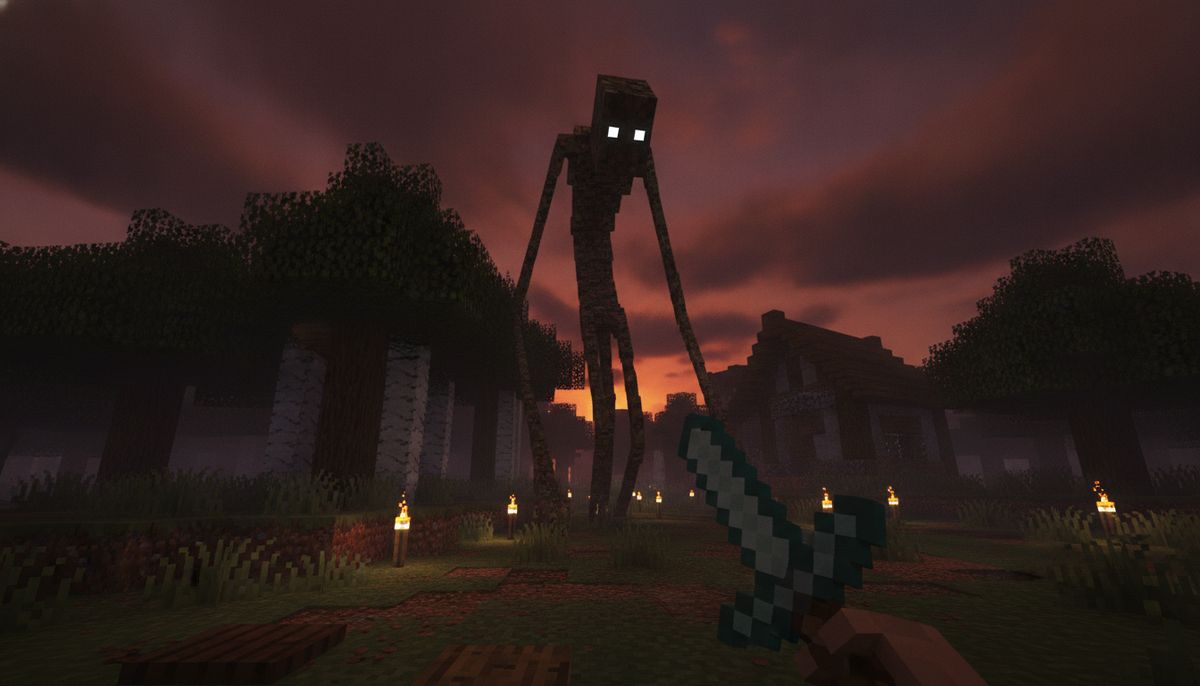
The entities you'll encounter draw directly from Doctor Nowhere's analog horror aesthetic. The Sunman is a towering creature that stalks players during daylight hours across every biome, its massive sun-shaped head visible from a distance. This isn't a mob you can easily ignore or outrun. The Sunman resists fire, explosions, and most conventional weapons, meaning standard diamond gear won't guarantee victory.
Beyond the main Sunman entity, the mod includes the stationary Stalking Sunman, Jeppy Jothers who acts as a friendly shop vendor, and Longboy Bonsai who poses no direct threat. This mix of hostile and passive creatures creates an unpredictable atmosphere. Not every strange figure you encounter will attack, but determining which ones are safe requires getting close enough to identify them.
The economy system adds another layer to survival. Players gather Scrap by smelting dirt to buy items from Jeppy Jothers and collect Stars from fallen creatures to craft The Sun block, which triggers a ritual summon. This means you're not just running from threats—you're also farming resources from them to unlock trading and summoning mechanics.
More Horror Addons for Bedrock
Looking for analog horror creatures and disturbing atmosphere? Explore our collection of horror mods featuring entities from The Mandela Catalogue, Backrooms, and more.
Browse Horror Collection →How the Entities Actually Work in Gameplay
Understanding each mob's behavior is essential for survival. The Sunman spawns in broad daylight across any biome, and its massive silhouette is hard to miss. Unlike zombies that burn in sunlight or skeletons that hide in shade, the Sunman thrives during the day. This inverts Minecraft's core survival loop—suddenly, sunrise isn't a relief.
Jeppy Jothers is a Sun Folk entity that wanders the world, attacking hostile mobs instead of players. This can lead to confusing moments when a new entity appears and starts fighting zombies on your behalf. Right-clicking any Jeppy Jothers entity opens the shop, which uses Scrap as currency with items including an Iron Sword, a Star, an Apple, a Cake, Charcoal, and a Compass.
The summoning block creates controlled encounters. Nine Stars arranged in a 3x3 crafting grid produce The Sun block, and placing it then right-clicking during daytime triggers a scripted summoning sequence with dialogue and a lightning strike. Players who want to fight the Sunman on their own terms can farm Stars from smaller entities, craft the block, and prepare their arena before summoning.
Combat preparation matters here more than in most mob addons. Iron gear is the minimum requirement before the first encounter, because stone and wood weapons will barely scratch these creatures. The health pools and damage resistances mean you can't just spam-click your way through fights like you would with vanilla mobs.
Compatibility and Version Support for Bedrock Edition
The addon is compatible with Minecraft Bedrock versions 1.20+, 1.21+, and 1.21.100+. This broad compatibility means players on mobile, Windows 10/11, Xbox, PlayStation, and Nintendo Switch can all install and run Sun Town without version conflicts. The latest release, version 2.1 updated on June 9, 2026, brought model improvements and balance adjustments.
| Platform | Installation Method | Notes |
|---|---|---|
| Windows 10/11 | Double-click .mcaddon file | Minecraft auto-imports the pack |
| Android | Tap file, select "Open with Minecraft" | May need file manager app |
| iOS | Download in Safari, Share to Minecraft | Alternative: Files app → Copy to Minecraft |
| Xbox/PlayStation | Via Realms only | Console editions don't support sideloaded files |
The addon works seamlessly with other Bedrock content, but combining multiple horror mods can create conflicts. Check out our guide on how to combine addons safely if you're planning to run Sun Town alongside other behavior packs. Generally, Sun Town plays well with texture packs and building addons but may clash with other mods that add aggressive mobs with similar spawn conditions.
Performance is solid across devices. The addon doesn't add new biomes or dimension generation, which means it won't tank your frame rate the way some overhaul mods do. Players on low-end mobile devices report stable gameplay, though adding heavy shader packs on top of Sun Town may cause stuttering.
How to Download and Install Sun Town on Bedrock
Getting Sun Town running on your device takes about five minutes once you know the steps. The addon is distributed as an .mcaddon file, which bundles both the behavior pack and resource pack into one download.
Windows 10/11 Installation
Download the .mcpack or .mcaddon file and save it somewhere easy to find, like your Downloads folder. Simply double-click the downloaded file, and Windows will automatically open it with Minecraft Bedrock Edition, launching the game and importing the addon. After a few seconds, you should see a notification that says "Successfully imported" followed by the addon name.
Android Installation
Once downloaded, tap the file in your notification bar or find it in your Downloads folder, then select "Open with Minecraft" when prompted—if you don't see this option, use a file manager app. The game will launch and import the addon automatically. Make sure Minecraft Bedrock is fully updated before attempting installation.
iOS Installation
Download in Safari or Files, open the file, tap Share, then select Minecraft (or "Copy to Minecraft"), confirm the import, then activate on a world. iOS sometimes requires an extra step through the Files app if Safari doesn't recognize the file type.
Activating the Addon in Your World
Importing the file doesn't automatically enable it. Open Worlds → pencil on your world, turn on required experiments if the pack page lists any, activate the Resource Pack for look and sounds, then activate the Behavior Pack for gameplay. This two-step activation is where most players get stuck—the addon won't appear in-game until both packs are toggled on in your world settings.
For more detailed troubleshooting, see our full guide on how to download and install Minecraft mods on Bedrock Edition. If you're on iOS specifically, check out Minecraft mods for iOS for device-specific tips.
Is the Sun Town Addon Safe to Download?
Legitimate addon files for Bedrock Edition come as .mcpack or .mcaddon formats. Never install .exe or .apk files disguised as Minecraft addons—legitimate addons are always .mcpack, .mcaddon, or .zip files. The Sun Town addon is distributed through CurseForge, one of the most trusted platforms for Minecraft mods and addons.
CurseForge implements file scanning and community reporting systems that catch malicious uploads before they spread. The Sun Town page has been active since early 2026 with thousands of downloads and user comments confirming legitimacy. No reports of malware or suspicious behavior have surfaced in the community discussions.
That said, always download from the official CurseForge page or trusted addon databases. Third-party reupload sites sometimes bundle adware installers with legitimate addon files. If a download site asks you to complete surveys, install browser extensions, or download additional software before accessing the addon, leave immediately.
For a deeper look at addon safety practices, read our article on are Minecraft mods safe, which covers what to watch for, how to verify file types, and which download platforms have earned the community's trust. Bedrock addons are generally safer than Java mods because they don't execute arbitrary code—they're data-driven modifications that Minecraft's engine interprets in a controlled environment.
Tips for Surviving Your First Encounter
Preparation makes the difference between a tense survival experience and constant respawning. The most important early goal is getting iron gear before the first encounter. Don't venture too far from your spawn area until you have at least an iron sword and chest plate.
Build a safe base with a clear view of the surrounding terrain. The Sunman's size makes it visible from a distance, giving you warning time if you're watching for it. Enclosed spaces feel safer but limit your ability to spot threats approaching. Consider a watchtower design with escape routes in multiple directions.
Prioritizing kills on smaller, less dangerous creatures like Sunman Baby and Jeppy Jothers is the safest way to build up a Star supply before engaging the main Sunman—Sunman Baby appears at night in dark areas. This allows you to farm resources for the summoning ritual without confronting the most dangerous entity unprepared.
The shop system provides an alternative progression path. If direct combat feels too risky, focus on gathering Scrap by smelting dirt. The shop provides a reliable source of Stars for players who want to build toward The Sun block without farming combat, letting you unlock the summoning mechanic through trade rather than fighting.
Don't underestimate movement speed. Several players in the community forums recommend keeping a horse or boat nearby for quick escapes. The Sunman's reach and speed make standing your ground a risky proposition unless you have endgame gear.
Alternatives and Other Horror Addons Worth Checking
If Sun Town's analog horror aesthetic appeals to you, several other Bedrock addons explore similar themes. The Dwellers addon adds cave-dwelling entities that hunt you underground, creating claustrophobic tension in mining sessions. For more analog horror content, The Obsessed horror mod brings stalking entities that appear when you least expect them.
Players who enjoyed Sun Town's creature design should also look at The One Who Watches addon, which features a different take on surveillance horror. The Mimicer addon adds shapeshifting entities that disguise themselves as players or mobs, creating paranoia in multiplayer sessions.
For a broader selection, browse our mobs category featuring hundreds of creature addons ranging from friendly companions to nightmare fuel. If you prefer structured horror experiences over free-roam survival, our collection of horror maps includes escape rooms and story-driven worlds designed specifically for scares.
The horror addon scene on Bedrock has grown significantly in 2026. More creators are porting Java horror mods and developing original content inspired by analog horror series, creepypastas, and psychological horror games. Sun Town sits at the intersection of these trends, which explains why searches for "minecraft horror mod sun" have spiked so dramatically.
Why the Analog Horror Aesthetic Works in Minecraft
Doctor Nowhere's influence on the addon creates an atmosphere that feels fundamentally different from typical Minecraft horror. Analog horror relies on unsettling visuals, ambiguous threats, and the sense that something is deeply wrong with the world rather than jump scares or gore. Sun Town translates this perfectly into Minecraft's blocky aesthetic.
The Sunman's design—a massive figure with a glowing sun for a head—reads as both absurd and terrifying. It shouldn't work in Minecraft's visual language, but somehow it does. The creature's presence makes daylight feel corrupted, as if the sun itself has become hostile to life. This subversion of Minecraft's core mechanics (day = safe, night = dangerous) creates psychological tension that persists even when the Sunman isn't visible.
Community response has been overwhelmingly positive. YouTube creators report higher engagement on Sun Town videos compared to standard survival content. Players describe feeling genuinely anxious during daytime sessions, constantly scanning the horizon for that distinctive silhouette. The addon has inspired fan art, lore discussions, and challenges like "survive 100 days with Sun Town enabled."
The success of Sun Town has demonstrated that Bedrock players want more than just reskinned mobs and cosmetic changes. They want addons that fundamentally alter how Minecraft feels to play, that introduce genuine tension and force them to rethink survival strategies they've been using for years. Horror addons like Sun Town deliver that experience without requiring massive overhauls or complex installation processes.
Complete Your Horror Setup
Pair Sun Town with atmosphere-enhancing texture packs and additional creature mods for the ultimate horror survival experience on Bedrock.
Explore Fun Mods →Final Thoughts on Sun Town for Bedrock
The Sun Town addon has earned its trending status by delivering exactly what the search term "minecraft horror mod sun" promises. It's not a half-finished port or a low-effort reskin. The work by hopal228 on the original Java mod and huwbacca's Bedrock port has created something that feels polished, intentional, and genuinely unsettling.
With over 86,500 downloads and consistent updates through June 2026, the addon has proven staying power beyond typical trend cycles. Players return to it for long-term survival worlds rather than one-off scares, which speaks to the quality of its core mechanics and entity behaviors.
If you've been searching for a horror experience on Bedrock that goes beyond cheap jumpscares, Sun Town delivers. The analog horror aesthetic, Doctor Nowhere's creature designs, and the inversion of Minecraft's day-night cycle create an atmosphere that lingers long after you close the game. Just remember to grab that iron gear before your first sunrise.
For more Minecraft Bedrock content, check out our guides on best weapons and guns addons, survival addons, and how to install skins on Bedrock. And if Sun Town proves too intense, our furniture mods and building mods offer a more relaxing alternative to constant dread.