
Why Everyone's Searching for The One Who Watches Right Now
Horror content in Minecraft has exploded in popularity throughout 2026, and The One Who Watches stands at the center of this surge. The original Java mod by Pixel_Coder has accumulated over 5.3 million downloads on CurseForge, sparking massive interest in Bedrock ports. Recent YouTube showcases from December 2025 and early 2026, combined with the official Marketplace release by Mythicus on December 23, 2025, have reignited search traffic and community discussions.
Unlike traditional horror mobs that rely on jump scares and instant kills, this addon creates something far more unsettling. It's psychological horror at its finest.
The timing couldn't be better. Players are searching for deeper, more mature horror experiences on mobile and console platforms where Bedrock Edition dominates. Free community versions compete with the premium Marketplace edition, giving players multiple options depending on their preference for features versus cost.
What Makes The One Who Watches Different
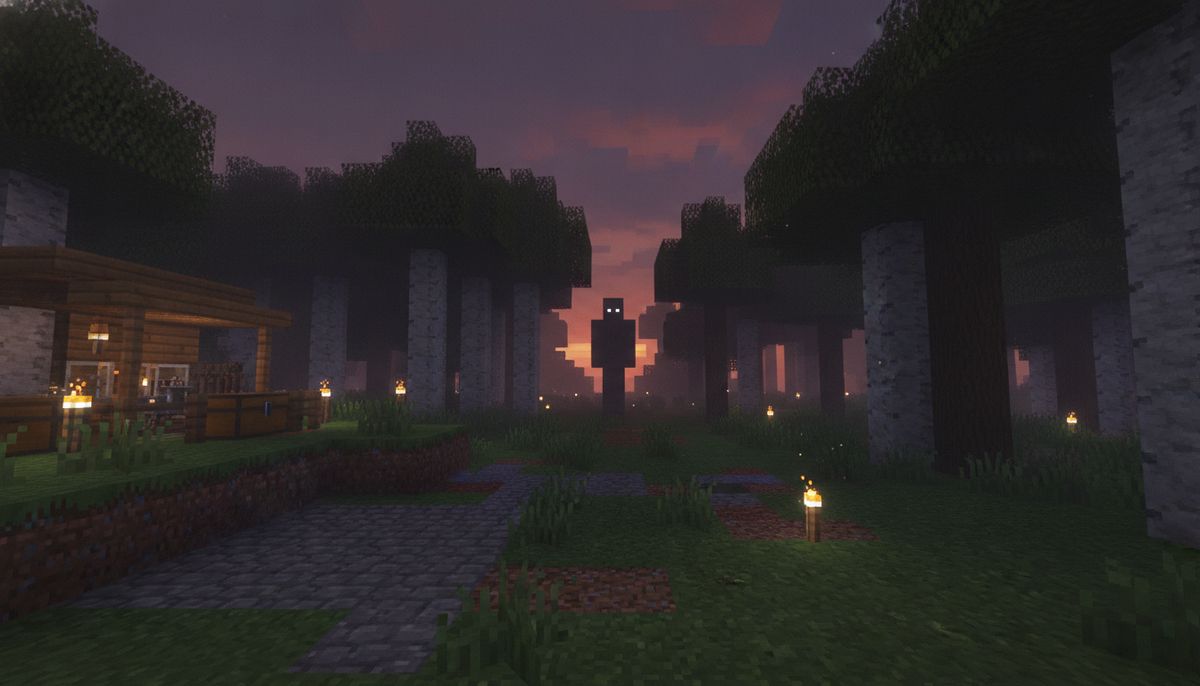
The addon introduces a mysterious, tall entity approximately 3.5 blocks high with white skin and elongated limbs that fundamentally changes how you experience Minecraft survival. The mod aims to make the player feel incredibly uneasy, fearful, and hyper observant. The One Who Watches is a stalker who can kill you but doesn't have to kill you. Sometimes he would much rather torture you or make you go insane.
This entity doesn't follow predictable spawn rules. He will spawn at night and if he spots you then he will try to get closer and closer to you. But the real terror comes from what happens next.
He will make you think you are seeing him in places he is not. These hallucinations create constant paranoia. You'll second-guess every shadow, every movement at the edge of your vision. The entity plays mind games rather than rushing in for quick attacks.
Players must stay vigilant, listen for footsteps, avoid eye contact or proximity, and keep distance, as it's hard to kill and ignores armor, knockback, potions, or shields. Your diamond armor means nothing. Your enchanted weapons barely scratch him. Traditional combat strategies fail completely.
He may let you escape though only because he would much rather see you run in fear then for your life to be over so quick. This calculated cruelty elevates the experience beyond typical horror fun addons.
Free Community Versions vs Marketplace Edition
Multiple Bedrock ports exist, each with distinct features and approaches. Here's what you need to know:
| Version | Creator | Downloads | Key Features | Cost |
|---|---|---|---|---|
| The One Who Watch Reborn | justingelineau4321 | 40,900+ | Animated choking attacks, dynamic scenarios | Free |
| DolphinMasterMB's Interpretation | DolphinMasterMB | 25,800+ | Enhanced paranoia effects, hallucinations | Free |
| 100% Original Port | Dreadmc15 | 9,100+ | Faithful to Java version | Free |
| Official Marketplace | Mythicus | 4.6 star rating | Advanced AI, jumpscares, structures | 660 Minecoins |
The most feature-rich free version is The One Who Watch Reborn. DolphinMasterMB did the coding, with Spacedummy making the resources and entity design, and Simple Pufferfish refining animations. The entity evolves over time and eventually starts to hunt you down.
The free version includes uncensored details that were modified for the Marketplace release. However, the official Marketplace version benefits from professional polish and official Minecraft integration.
Players on a budget should start with the free CurseForge versions. Those wanting the most stable, supported experience may prefer the paid Marketplace option.
How to Install on Bedrock Edition
Installation differs slightly between platforms but follows the same basic principles. All versions work on Android, iOS, Windows 10/11, Xbox, and PlayStation consoles running Minecraft Bedrock.
iOS and Android Installation
Download the .mcaddon file from your chosen source. The file will typically open automatically in Minecraft once downloaded. If it doesn't, navigate to your device's file manager, locate the downloaded file, and tap it. Minecraft will launch and import both the behavior pack and resource pack.
Create a new world or edit an existing one. In the world settings, scroll to the Add-Ons section. Make sure you turn on Experimental Gameplay if the addon does not work. Activate both the behavior pack and resource pack for the addon.
Always toggle all experiments on in your world for the addon to function correctly. This is crucial for proper entity behavior and animations.
Windows Installation
Download the .mcaddon file and double-click it. Windows will automatically launch Minecraft Bedrock Edition and import the addon. Follow the same activation process in world settings.
Alternatively, manually extract the addon contents to the appropriate Minecraft folders if you're comfortable with file management. The behavior pack goes in %localappdata%\Packages\Microsoft.MinecraftUWP_8wekyb3d8bbwe\LocalState\games\com.mojang\behavior_packs\ and the resource pack in the corresponding resource_packs\ folder.
Important Installation Notes
Make sure to delete all older versions of the addon first, then redownload and reinstall the addon after. Check both your Minecraft storage cache and older world resources and behaviors for older versions to delete before attempting a new install.
Version conflicts cause most installation problems. Clean removal of previous versions prevents entity duplication and behavior glitches.
Some addon versions are locked until activated through an in-game screen that appears after installing. Follow the on-screen prompts if this applies to your chosen version.
For detailed troubleshooting on Bedrock addon installation, check our guide on how to download and install Minecraft mods on Bedrock Edition.
Is This Addon Safe to Download?
Safety depends entirely on your download source. CurseForge is the most trustworthy platform for free Bedrock addons, with active moderation and community reporting. The official Minecraft Marketplace offers complete safety but requires payment.
Avoid third-party rehost sites that bundle addons with additional downloads or require surveys. These often contain malware or modified files. Stick to verified creator pages on CurseForge or official Marketplace listings.
The addon itself contains no harmful code. It's built using standard Bedrock addon structure with behavior packs and resource packs. These cannot execute system-level commands or access files outside Minecraft's sandboxed environment.
For comprehensive safety information, read our article on are Minecraft mods safe and how to download without viruses.
One legitimate concern: performance impact. Some users report frame rate drops on lower-end mobile devices. Platform-specific issues include higher spawn rates on PS5 compared to mobile versions, though this may relate to addon conflicts.
Test the addon in a separate world first before adding it to your main survival save.
Survival Tips for Living with The Watcher
Traditional Minecraft strategies won't save you here. This entity requires completely different approaches.
The only thing you can do to avoid him is to listen for footsteps, always be watching for him, and stay as far away from him as possible. Sound becomes your primary early warning system. Play with headphones to detect directional audio cues.
Never approach the entity, even when it appears passive. Even though he may not always seem aggressive do not go near him because he can kill you and he will. Maintaining distance is your only reliable defense.
If it gets too close, it will begin to scream quite loudly and chase after the player, dealing considerable damage to those it manages to catch. When this happens, sprint in a straight line and don't look back. Breaking line of sight sometimes causes him to disengage.
Build secure bases with multiple exits. Single-door shelters become death traps. The entity can move through doors and tight spaces, so traditional lockdown strategies fail. Design bases with escape tunnels and panic rooms.
Light up everything. While the entity spawns primarily at night, darkness increases encounter frequency. Reduce nighttime exploration until you're prepared for confrontations.
Consider playing with friends. Multiplayer spreads the entity's attention across multiple targets, giving individuals more breathing room to gather resources and establish defenses.
More Psychological Horror Experiences
Explore other atmospheric horror addons that prioritize tension and fear over simple jump scares.
Browse Horror Collection →Best Horror Addons to Combine With The One Who Watches
Experienced horror players often layer multiple addons for maximum terror. Strategic combinations work better than random stacking.
The Dwellers Addon adds cave-focused horror entities that complement The One Who Watches' surface activity. Together they eliminate safe zones completely. You're never truly secure above or below ground.
The Obsessed Horror Mod introduces a different stalker with unique mechanics. Running two stalker entities creates unpredictable scenarios where you can't memorize patterns.
Sound enhancement addons amplify the atmospheric experience. Ambient audio mods make footsteps, whispers, and environmental sounds more prominent, heightening the tension created by The One Who Watches.
Consider texture packs designed for horror atmospheres. Dark, desaturated visuals enhance the oppressive mood. Our guide to realistic texture packs includes several options that work well with horror gameplay.
Avoid combining too many entity-adding addons simultaneously. Performance degrades rapidly, and spawn rates become overwhelming. Three to four complementary horror addons represents the sweet spot for most devices.
Check addon compatibility before committing to a world. Some behavior packs conflict with others, causing crashes or entity AI failures. Test combinations in creative mode worlds first.
For curated addon collections designed to work together, explore our Bedrock modpacks guide which includes horror-themed bundles.
What Players Are Saying
Minecraft's official article calls it "an add-on that puts a horrible monster known as 'The Watcher' into Minecraft" and documents the genuinely unnerving experience of encountering the entity.
Community reception varies between versions. The free CurseForge ports receive mixed reviews due to spawn rate inconsistencies and occasional bugs. Some players report the entity attacking immediately rather than stalking, breaking the psychological horror element.
The official Marketplace version maintains an average rating of 4.6 out of 5 stars, indicating strong community approval for the premium implementation.
Content creators have embraced The One Who Watches as showcase material. December 2025 through early 2026 saw a surge of YouTube videos demonstrating both free and paid versions, contributing to the current trending status.
The addon works well in multiplayer scenarios. Friends playing together report heightened tension as they collectively experience paranoia and unexpected encounters. The shared fear creates memorable gaming moments.
Performance optimization remains the primary complaint. Mobile players on older devices experience frame drops during entity encounters. This limits accessibility for some of the Bedrock community's largest demographic.
Alternatives From Our Horror Collection
Not everyone wants constant stalking tension in their survival worlds. Several alternatives offer different horror flavors.
The Goatman Addon provides folklore-inspired horror with cryptid aesthetics. Less psychological, more creature-feature.
The Bloodbath Analog Horror Addon creates VHS-style atmospheric dread without persistent stalker entities. Players explore corrupted environments rather than fleeing pursuers.
For boss-fight focused horror instead of survival terror, check our roundup of the best boss fight addons for Bedrock. These provide structured combat challenges rather than unpredictable stalking mechanics.
Map-based horror experiences offer contained scares without altering your main worlds. Our collection of best horror maps for Bedrock includes escape rooms and story-driven experiences.
If you want horror elements without dedicated stalker entities, explore weapons and armor mods with dark themes. These add visual horror aesthetics while maintaining traditional gameplay.
The One Who Watches represents peak psychological horror for Bedrock Edition. Multiple versions ensure accessibility regardless of budget, though quality varies between implementations. The Marketplace version was created by Mythicus and has been available since December 23, 2025, offering the most polished experience.
Free alternatives led by DolphinMasterMB and the CurseForge community provide feature-rich options for budget-conscious players. Installation remains straightforward across all Bedrock platforms, though experimental features must be enabled.
This addon fundamentally changes Minecraft survival from resource management to psychological endurance. Every shadow becomes suspect. Every sound triggers hypervigilance. Success requires paranoia, spatial awareness, and acceptance that sometimes survival means running rather than fighting.
For players seeking deeper horror experiences beyond vanilla Minecraft's limited scares, The One Who Watches delivers exactly what current trends demand. The entity's design prioritizes sustained fear over cheap thrills, creating memorable moments that linger long after you close the game.
Download your preferred version, enable experimental features, and prepare for survival horror unlike anything else in Minecraft Bedrock Edition.