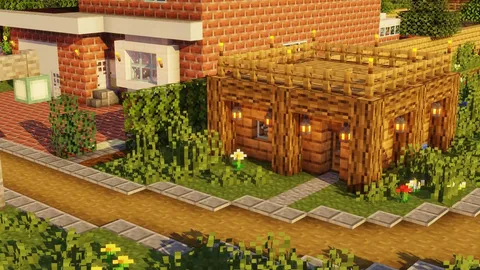
Building across ravines, rivers, and valleys requires speed and precision. Bridge addons transform this tedious task into an instant process, letting you spawn pre-built structures with a single command or item. These mods save hours of manual block placement while adding architectural variety to your world.
The right bridge addon does more than save time. It adds visual interest to terrain, creates strategic pathways in survival mode, and enables ambitious builds that connect distant landmarks. From simple wooden crossings to massive stone viaducts, these addons provide ready-made solutions for every building scenario.
Modern bridge mods for Minecraft Bedrock include features like adjustable lengths, multiple material options, and custom designs ranging from medieval arches to futuristic suspension systems. Some integrate seamlessly with existing terrain generation, while others give you manual control over placement and customization.
Instant Bridge Builder Addons
Quick-build bridge addons focus on speed and convenience. These mods typically use items or commands to generate complete bridge structures instantly, eliminating the need for scaffolding and manual placement.
The One-Click Bridge addon spawns bridges up to 64 blocks long using a simple right-click mechanic. Hold a bridge spawner item, aim at your starting point, and the mod automatically extends the structure to the nearest solid ground. It supports oak, spruce, birch, and stone brick variants, with railings included by default. The addon detects terrain height differences and adjusts bridge elevation accordingly, creating natural-looking slopes.
Bridge Master mod offers more granular control with adjustable lengths from 10 to 128 blocks. Access the configuration menu through a crafted bridge planner item, select your desired length and material, then place the starting anchor block. The mod generates the complete structure instantly, including support pillars every 16 blocks for spans longer than 32 blocks. Material options include all wood types, stone variants, prismarine, and blackstone.
Building Tools and Blocks
Expand your construction capabilities with mods that add new blocks, tools, and building mechanics to streamline large projects.
Browse Collection →Fast Bridge Construction addon takes a different approach with blueprint mode. Place marker blocks at both ends of your intended bridge, then activate the blueprint tool to preview the structure in translucent blocks. Approve the design and the mod converts the preview into solid blocks instantly. This method prevents errors and lets you visualize the final result before committing resources in survival mode.
Medieval and Fantasy Bridge Designs
Medieval-themed bridge addons add architectural authenticity to castle builds and fantasy landscapes. These mods prioritize aesthetic detail with cobblestone arches, hanging lanterns, and weathered textures.
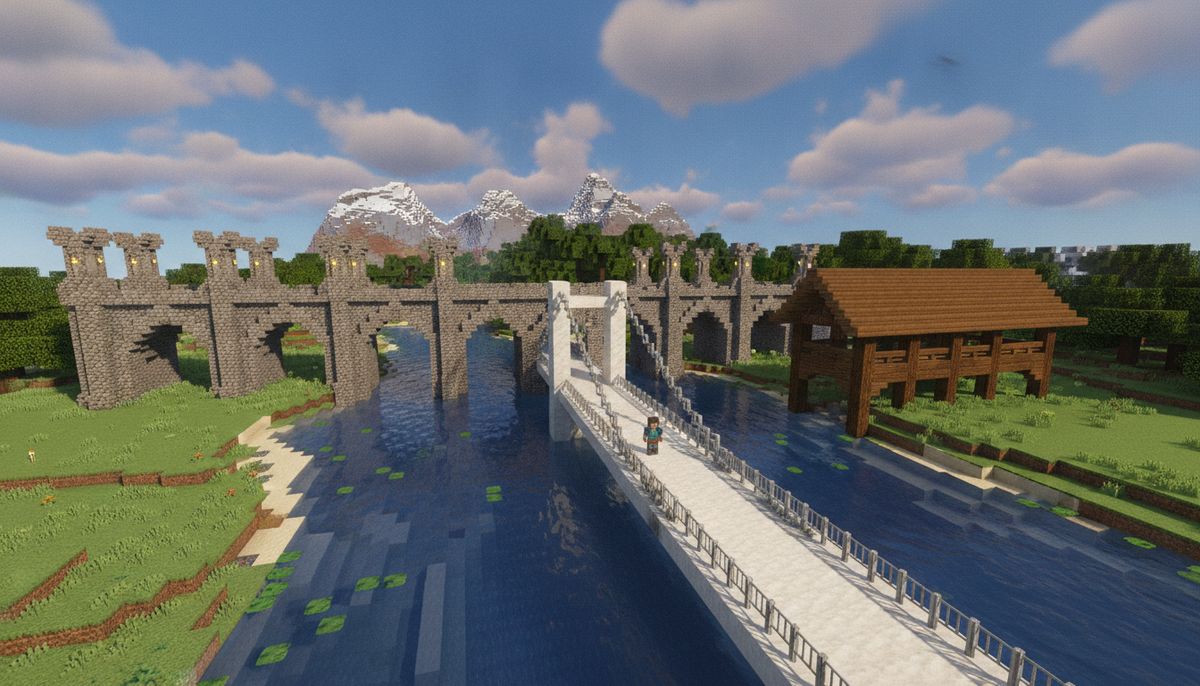
The Castle Bridges mod includes six distinct medieval designs: simple cobblestone crossings, grand stone arches with decorative crenellations, covered wooden bridges with shingle roofs, rope suspension bridges with chain link fencing, drawbridge mechanisms with functional raising and lowering animations, and ruined ancient bridges with missing sections and moss growth. Each design supports lengths from 16 to 80 blocks and automatically generates support structures based on gap width.
Fantasy Realm Bridges addon introduces magical elements like glowing crystal supports, floating platform segments held by invisible force fields, and enchanted wood that emits particle effects. The mod includes eleven unique designs inspired by elven architecture, dwarven stonework, and wizard towers. Bridges can incorporate redstone-activated lighting systems and custom banner placements for faction identification.
Medieval Architecture Pack extends beyond bridges to include complete infrastructure sets. Bridge variants match corresponding castle wall styles, ensuring visual consistency across your build. The pack includes pedestrian bridges, wagon-width roads, and siege ramps with authentic medieval construction details like timber reinforcements and iron rivets.
Modern and Contemporary Bridge Structures
Contemporary bridge addons bring sleek lines and industrial materials to modern city builds. These mods emphasize clean geometry, glass panels, and metal framework.
Metro Bridge Collection provides six modern designs optimized for urban environments. The highway overpass includes four-lane roadways with concrete barriers and street lighting every 8 blocks. The pedestrian skyway features glass-enclosed walkways with aluminum frames and automatic door systems at entry points. The cable-stay bridge uses concrete towers and steel cables in realistic suspension patterns, supporting spans up to 192 blocks.
The Industrial Crossing addon specializes in utilitarian designs using exposed steel beams, riveted metal plates, and chain-link safety fencing. Bridges include built-in conveyor belt systems compatible with item transport mods, making them functional for factory complexes and mining operations. The mod provides three width options: single-lane (5 blocks), double-lane (9 blocks), and heavy transport (13 blocks) with reinforced support columns.
Skyline Bridges mod focuses on aesthetic integration with contemporary architecture. Designs use white concrete, light gray concrete, glass panes, and polished diorite to match modern building palettes. The mod includes elevated walkways with integrated planters containing bamboo and flowers, observation decks with bench seating, and LED-strip lighting using sea lanterns and hidden glowstone. All structures feature clean edges and symmetrical patterns that complement minimalist builds.
Natural and Rustic Bridge Options
Natural bridge addons blend structures seamlessly with organic terrain using wood, stone, and vegetation. These mods prioritize environmental integration over architectural showmanship.
The Woodland Crossing addon creates bridges that appear organically grown rather than constructed. Fallen log bridges use stripped oak and spruce logs with root systems extending into riverbanks. Stone ford paths place flat river rocks across shallow water with moss and lily pad accents. Vine-covered arches incorporate jungle wood and dense foliage, perfect for rainforest biomes. Each design includes ambient details like mushrooms, flowers, and small animal nests.
Rustic Infrastructure mod provides weathered wooden structures with realistic aging effects. Bridges show worn planks with varying textures, support beams with bark still attached, and rope railings instead of formal fencing. The mod includes three condition states: newly built with fresh-cut wood, aged with gray weathering and small gaps, and ancient with extensive moss coverage and partial collapse. You can cycle through conditions using a maintenance tool item.
Canyon Bridge Pack specializes in crossing extreme elevation changes. Designs include switchback ramps with multiple elevation platforms, rope ladder sections for near-vertical descents, and precarious plank bridges suspended by chains. The mod calculates optimal support placement based on ravine geometry and automatically adjusts bridge angles to match cliff faces. Safety railings are optional, allowing for increased difficulty in survival challenges.
Functional Bridge Addons with Special Features
Some bridge addons go beyond simple crossings to include interactive elements and gameplay mechanics. These mods add functionality like storage, transportation, and defense systems.
The Toll Bridge addon introduces economic mechanics to multiplayer servers. Bridges include automatic payment systems using emeralds, gold, or custom currency items. Players without sufficient payment materials receive a temporary slowness effect when attempting to cross. The mod tracks toll revenue in chest storage systems and includes operator controls to adjust pricing and access permissions. Perfect for kingdom roleplay servers with different factions controlling territory.
Transport Bridge Collection integrates with vehicles mods to create specialized road systems. Designs include rail-compatible bridges for minecart networks with powered rails and redstone timers, boat channels with water flow optimization for faster travel, and flight corridors with elytra launchers at entry points. The mod automatically generates appropriate path blocks based on intended transportation method.
Defensive Bridge Pack adds military functionality for PvP scenarios and siege gameplay. Retractable sections use piston mechanisms to create gaps that prevent enemy crossing. Arrow slit railings provide cover while allowing bowfire. Trap bridges include hidden pitfalls that activate when players cross without correct permission items. The pack integrates with weapons mods to add ballista mounting points on tower sections.
House and Structure Mods
Complete your builds with instant houses, castles, and architectural structures that match your bridge designs perfectly.
Browse Collection →Comparison Table of Popular Bridge Addons
| Addon Name | Max Length | Material Options | Special Features | Best For |
|---|---|---|---|---|
| One-Click Bridge | 64 blocks | 5 types | Auto-terrain detection | Quick builds |
| Bridge Master | 128 blocks | 12 types | Adjustable support pillars | Large gaps |
| Castle Bridges | 80 blocks | Medieval materials | Drawbridge animations | Fantasy builds |
| Metro Bridge Collection | 192 blocks | Modern materials | Street lighting systems | City projects |
| Woodland Crossing | 48 blocks | Natural materials | Environmental blending | Survival aesthetics |
| Toll Bridge | 96 blocks | Customizable | Payment systems | Multiplayer servers |
| Canyon Bridge Pack | Variable | Rock and rope | Vertical cliff scaling | Extreme terrain |
Installation and Compatibility Considerations
Bridge addons require proper installation to function correctly on Bedrock Edition. Most mods come as .mcaddon or .mcpack files that import directly through the file manager on mobile devices or by double-clicking on Windows systems. Always check the minimum game version requirement, as many modern bridge mods need Minecraft Bedrock 1.19 or higher to access updated block types and mechanics.
Compatibility issues arise when multiple structure-generating addons load simultaneously. Bridge mods that use similar spawning items or command triggers may conflict, causing crashes or preventing structures from generating. Test addon combinations in creative mode worlds before adding to survival saves. The load order matters for behavior packs—place bridge addons below world-generation mods but above cosmetic packs in the active packs list.
Some bridge addons include experimental gameplay requirements. These mods need "Holiday Creator Features" or "Custom Biomes" toggles enabled in world settings. Activating experimental features disables achievement earning permanently for that world. Create backups before enabling experimental options, as they sometimes cause world corruption in older game versions.
Performance impacts vary based on bridge complexity and spawn frequency. Addons that generate extensive support structures or include animated elements consume more resources than simple static bridges. Mobile devices with limited RAM may experience lag when spawning bridges longer than 100 blocks. Reduce particle effects and lighting elements in mod configuration files if performance issues occur.
Customization and Advanced Options
Advanced bridge addons include configuration files that let you modify materials, dimensions, and features. These settings files typically appear in the behavior pack folder after first activation. Open them with text editors to adjust values like maximum bridge length, default material type, and support pillar spacing.
The Bridge Customizer Tool mod provides in-game editing without manual file changes. Access the customization menu through a crafted editing tablet item. The interface shows sliders for length adjustment, dropdown menus for material selection, and toggle buttons for optional features like railings, lighting, and decorative elements. Changes apply to all subsequently spawned bridges while leaving existing structures unmodified.
Material substitution lets you replace default blocks with custom alternatives. Edit the material mapping section in addon configuration files to swap oak planks for crimson planks or stone bricks for deepslate tiles. Some mods support texture pack integration, automatically adopting block textures from active resource packs to maintain visual consistency.
Schematic export functionality in premium bridge addons allows saving custom designs for reuse. After modifying a bridge design through in-game tools, activate the export function to generate a structure file. Import this schematic in other worlds or share with other players. Schematic compatibility varies—verify that recipient players use the same base addon version to prevent block ID mismatches.
Practical Building Tips and Recommendations
Start with simple bridge addons before graduating to complex multi-feature mods. The One-Click Bridge addon provides excellent introduction to instant building mechanics without overwhelming configuration options. Master basic placement and material selection before exploring advanced customization tools.
Match bridge styles to surrounding architecture for cohesive builds. Medieval bridges pair naturally with castle and fortress structures detailed in our Best Castle and Fortress Addons for Minecraft Bedrock guide. Modern bridges complement urban projects covered in our Best City and Town Addons for Minecraft Bedrock article. Consistent architectural themes make worlds feel intentional rather than random.
Plan bridge placement before generation to avoid terrain conflicts. Clear vegetation and remove obstructing blocks from intended support pillar locations. Some addons forcibly replace existing blocks during generation, potentially destroying valuable builds or terrain features. Preview mode features help identify conflicts before committing to final placement.
Consider functional needs beyond aesthetics. Bridges connecting farms to storage areas benefit from wider designs that accommodate multiple players in multiplayer worlds. Defensive bridges near faction borders should include features from protective mods. Scenic bridges over decorative water features prioritize appearance over practicality.
Combine bridge addons with terrain modification tools for dramatic results. Spawn a canyon using world generation mods, then add suspension bridges across the gap for spectacular vistas. Integrate with realistic texture packs to enhance material appearance and create photorealistic crossings.
Resource management matters in survival mode. Some bridge addons require payment in actual blocks matching the bridge materials, consuming items from your inventory during generation. Others spawn structures freely, creating balance concerns on survival servers. Check addon descriptions for resource consumption mechanics before installation.
Test bridge weight limits on multiplayer servers with entity-heavy gameplay. Mods that add numerous mob spawns or extensive furniture items may create lag when players congregate on bridge structures. Server administrators should configure entity limits near bridge locations to maintain performance.
Regular addon updates ensure compatibility with new Minecraft versions. Bridge mods that haven't updated since 1.18 may exhibit block rendering issues or broken mechanics in 1.20+. Check developer update histories before installing, and maintain backup worlds before updating existing addons to new versions.