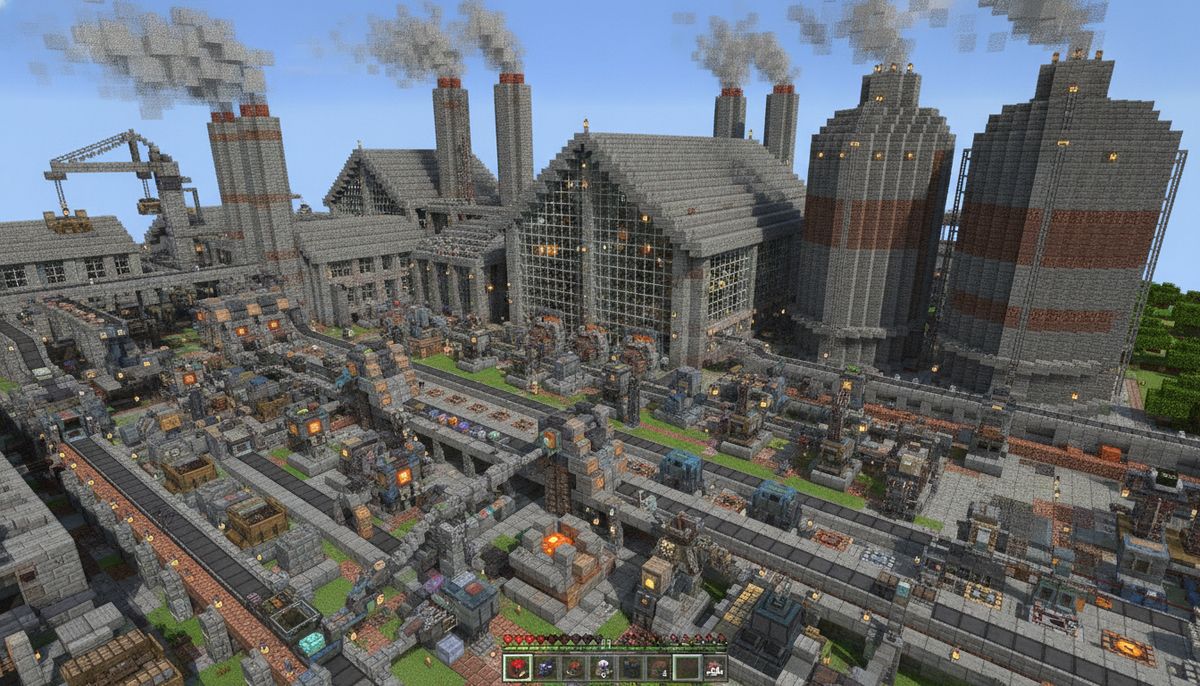

Industrial automation transforms simple Minecraft survival into complex production chains. Factory addons bring conveyor belts, ore processors, power systems, and automated crafting to Minecraft Bedrock. These mods let you build sprawling manufacturing complexes that turn raw materials into finished products without manual intervention.
The best industrial addons combine functional machinery with engaging gameplay loops. You'll research new technologies, design efficient layouts, and troubleshoot bottlenecks in your production lines. Some mods focus on realism with power grids and thermal management. Others emphasize creative building with decorative machines and futuristic aesthetics. Both approaches add depth to late-game progression when standard redstone contraptions feel limited.
Factory gameplay pairs naturally with other technical mods. Players who enjoy redstone automation will appreciate the expanded possibilities. The combination creates sandbox opportunities that rival dedicated automation games while maintaining Minecraft's signature accessibility.
Factory Plus - Complete Industrial System
Factory Plus stands as the most comprehensive industrial addon for Bedrock Edition. This mod introduces over 150 machines, tools, and automation components organized into distinct technological tiers. You'll start with basic coal generators and manual processors, gradually unlocking electric furnaces, ore multipliers, and advanced synthesizers.
The power system uses RF (Redstone Flux) energy with visible power lines connecting machines. Each device displays its power consumption and production rates in the interface. Generators include coal-fired plants producing 40 RF/tick, solar arrays generating 20 RF/tick during daylight, and nuclear reactors outputting 500 RF/tick with proper coolant management. Power cables transfer energy up to 16 blocks before requiring a transformer to extend range.
Ore processing features multiple stages for maximum efficiency. Raw iron ore goes into a crusher producing two crushed iron. The washer converts crushed ore into purified dust. Finally, the electric furnace smelts dust into ingots with 20% bonus yield compared to vanilla smelting. This three-stage chain effectively doubles your ore output while consuming power at each step.
Conveyor belts move items automatically between machines. Standard belts transfer one item every two seconds. Fast conveyors reduce that to one second but require double the power. Sorting machines filter items onto different belt paths based on type. Combine these with hopper connections and storage controllers for fully automated production lines.
The addon includes decorative industrial blocks like steel beams, reinforced glass panels, and concrete flooring. These construction materials help create authentic factory aesthetics. Warning stripe blocks, caution signs, and hazard lights add visual polish to your industrial complexes.
More Technical Addons
Explore redstone contraptions, automated farms, and engineering tools for technical players.
Browse Collection →Industrial Craft Bedrock - Energy and Machines
Industrial Craft Bedrock ports the classic Java mod's core features to Bedrock Edition. The addon centers around EU (Energy Units) as its power system. Machines consume EU from generators and storage devices connected via copper cables. Different voltage tiers (Low, Medium, High) require appropriate cabling to prevent energy loss.
Starting machinery includes the generator burning coal and charcoal, the electric furnace smelting 50% faster than vanilla, and the macerator crushing ores into two dusts each. The extractor produces rubber from tree sap. The compressor creates plates from ingots for advanced recipes. Each machine has specific EU/tick consumption rates displayed when hovering over them.
Resource processing chains add meaningful progression. Copper ore becomes essential for cables and circuits. Tin combines with copper to create bronze alloy. Rubber trees drop resin that processes into rubber sheets. These intermediate materials gate access to higher-tier machines, preventing immediate access to endgame automation.
Advanced machines require proper voltage management. Connect low-voltage machines directly to generators. Medium-voltage devices need transformers to step up power. High-voltage equipment demands dedicated reactor setups. Improper voltage causes machines to explode, losing the block and nearby items.
The nuclear reactor provides massive power output with significant risk. Fuel rods generate heat and EU simultaneously. Coolant cells absorb excess heat to prevent meltdown. Reactor chambers expand capacity for more fuel and cooling components. Miscalculated designs cause catastrophic explosions, destroying large areas and leaving radiation effects.
Electric tools replace traditional items. The electric drill mines faster than diamond pickaxes and recharges with EU rather than breaking. The electric chainsaw harvests wood instantly. The electric hoe tills 3x3 areas. These tools connect to charging stations powered by your electrical grid, eliminating traditional tool durability.
Tech Factory - Futuristic Automation
Tech Factory emphasizes sleek futuristic aesthetics alongside automation features. Machines feature glowing holographic interfaces and clean white-blue color schemes. The visual design makes your factory feel more like a sci-fi research station than a dirty industrial plant.
The molecular assembler serves as the centerpiece machine. It breaks down items into basic components, then recombines those components into different items. One iron sword becomes ingots and sticks. Those materials reassemble into armor or tools. Advanced recipes let you transmute cheap resources into rare ones, though the power costs scale dramatically.
Energy generation includes photon collectors that absorb light particles, generating 5 EU per light level. These passive generators work day and night near light sources including torches, glowstone, and the sun. Antimatter reactors produce extreme power from exotic fuel created in particle accelerators. A single antimatter pellet runs standard machines for hours.
Smart storage systems organize items automatically. The digital storage network connects terminals and drives. Terminal interfaces let you search and request items from anywhere in the network. Drives store massive quantities using data compression—one drive holds 64 stacks of each item type. This eliminates traditional chest sorting while adding a techy aesthetic.
Teleportation pads transport items and players between linked locations. Place paired pads anywhere in your world. Items dropped on one pad instantly appear at its partner. This solves long-distance logistics without minecart systems or flying machines. Player teleportation consumes significant energy based on distance traveled.
Holographic projectors display 3D models of machines and structures. Use these for planning factory layouts before construction. The projections show exact block placement and power routing. They also serve as purely decorative elements for control rooms and command centers.
Mechanisms and Machines - Versatile Production
Mechanisms and Machines takes a modular approach to industrial automation. Rather than pre-built machine blocks, this addon provides components you assemble into custom contraptions. Gears, pipes, motors, and sensors combine in different configurations for specialized functions.
The component crafting system uses an assembly table. Place base materials and components to create machine parts. Motor assemblies require iron blocks, redstone, and copper wiring. Gear systems need iron ingots shaped into cogwheels. Pipe sections connect with flanges and valves. This crafting depth makes each machine feel earned rather than simply placed.
Mechanical power transfers through rotating shafts and gears. Waterwheels and windmills generate rotational force. This mechanical energy powers saws, mills, and presses through connected drive shafts. Gear ratios affect speed and torque—smaller gears spin faster with less power, larger gears provide more force at lower speeds.
Fluid handling introduces liquid logistics to your factory. Pipes transport water, lava, and modded liquids like oil and fuel. Pumps move fluids upward against gravity. Tanks store liquids for buffering production. Fluid processors transform liquids through heating, cooling, or chemical reactions. Oil refining produces fuel, lubricant, and plastic polymers from crude oil deposits.
The automation controller acts as a programmable block. Set input and output rules for connected machines. Create production schedules that activate different machines at specific times. Conditional logic checks storage levels before starting production runs. This adds light programming elements without requiring actual code knowledge.
Decorative options include exposed piping, pressure gauges, valve wheels, and industrial lighting fixtures. These blocks have no functional purpose but help create detailed factory environments. Catwalks and ladders provide safe navigation around dangerous machinery.
Conveyor Madness - Transport Systems
Conveyor Madness specializes exclusively in item transportation. While other mods include belts as one feature, this addon makes conveyors its entire focus. The result is the most sophisticated item transport system available for Bedrock Edition.
Basic conveyors move items horizontally at standard speed. Upgrade modules increase speed in 25% increments up to 200% faster. Vertical conveyors lift items to higher levels without complex hopper chains. The corner conveyor changes direction smoothly without items spilling off. Merge and split conveyors combine multiple input lines or divide one line into several outputs.
Sorting systems provide exact control over item routing. Color-coded filter modules attach to conveyors, diverting specific items onto branch paths. Priority filters check for rare items first before allowing common items to pass. Overflow conveyors activate alternate routes when primary paths are blocked or full.
Express lanes transport items at triple normal speed but can't change direction. Use these for long straight runs between factory sections. Buffer zones store items temporarily when machines downstream can't accept input. This prevents production jams and keeps earlier processing stages running smoothly.
Detection systems trigger redstone signals when items pass. Item counters track throughput rates for monitoring production efficiency. Gate conveyors stop or start movement based on redstone input. Combine these with comparators and observers for complex automated logic.
The mod includes maintenance mechanics that add management gameplay. Conveyors wear out over time based on items transported. Worn belts move slower and occasionally drop items. Apply lubricant to reduce wear rates. Replace belt surfaces when they reach critical condition. This adds an ongoing upkeep element to massive factory setups.
Conveyor aesthetics offer multiple styles including industrial rubber belts, metal roller tracks, and futuristic magnetic levitation. Customize your factory's appearance while maintaining identical functionality.
MineFactory Reborn - Agricultural Automation
MineFactory Reborn bridges agriculture and industry by automating farming processes. While primarily focused on crop and animal production, the machines and systems apply equally well to industrial manufacturing setups.
The planter and harvester form the basic farming duo. Planters automatically place seeds in tilled soil within a 9x9 area. Harvesters collect mature crops and replant automatically. Provide power and an item output, and these machines run indefinitely. Upgrade chips expand range to 15x15 or 21x21 areas for massive automated farms.
Animal automation includes the breeder, which feeds animals to trigger breeding automatically. The rancher collects milk from cows, wool from sheep, and eggs from chickens without manual interaction. The veterinary station heals injured animals and prevents despawning. These machines let you maintain productive livestock without constant attention.
The sludge boiler processes waste products into random resources. Farming operations produce sludge as a byproduct. Boil this sludge for a chance at clay, sand, dirt, or rarely soul sand and mycelium. This turns waste into useful materials, rewarding efficient factory design.
Meat and crop processing adds food production chains. The meat packer converts raw meat into preserved food with better hunger restoration. The fruit picker works on trees, collecting apples and modded fruits. The composter turns excess crops into bonemeal for faster growth cycles. These machines connect farming directly to food manufacturing.
Laser systems mine and build automatically. The laser drill slowly excavates ores from bedrock given sufficient power. The laser builder places blocks from an inventory according to template patterns. These endgame machines automate mining and construction, though their high power consumption requires substantial infrastructure.
Sewage and fertilizer systems create feedback loops. Animals produce sewage collected by pipes. Process sewage into fertilizer that speeds crop growth. Apply fertilizer to maximize harvest rates. This interconnected system rewards planning complete production cycles rather than isolated machines.
Complementary Mods
Combine factory mods with building blocks, furniture, and decoration options for complete industrial complexes.
Browse Collection →Creating Efficient Factory Layouts
Successful factory design requires planning beyond simply placing machines. Consider these practical approaches when building industrial complexes.
Centralize power generation in dedicated buildings. Route power cables underground using conduit blocks to keep the surface clean. Place battery banks near high-consumption machines to buffer power during demand spikes. Include redundant generators so maintenance or failures don't shut down your entire operation.
Organize production by resource type rather than machine function. Build a copper processing hall handling all copper-related machines. Create a separate iron production wing. This logical grouping reduces transport distance and simplifies troubleshooting. You'll immediately know where to check when copper production slows.
Design with expansion in mind. Leave empty spaces between machine rows for adding conveyors or additional equipment. Build modular sections that repeat rather than one massive custom layout. When you need to double capacity, simply copy an existing module rather than redesigning everything.
Implement multiple production stages as separate floors. Ground level handles ore input and initial crushing. Second floor runs smelting and refining. Top floor stores finished products. Vertical organization keeps similar processes together while maintaining clear progression from raw to finished goods.
Include visual monitoring systems even if not strictly necessary. Place hoppers with comparators showing fullness levels. Add indicator lights showing machine status. Create a control room with displays tracking production rates. These touches make factories feel alive while helping identify problems quickly.
Balance throughput across your entire chain. One fast machine creates bottlenecks if the next stage processes slower. Calculate items per minute for each stage and match capacities. Sometimes running two slower machines in parallel beats one faster machine for overall efficiency.
Consider aesthetics alongside function. Industrial builds look better with consistent block palettes. Mix stone bricks, iron blocks, and concrete in your chosen color scheme. Add pipes along walls even if they're decorative. Include safety railings around dangerous equipment. These details transform utilitarian factories into impressive showcases.
Compatibility and Performance Considerations
Running multiple industrial addons simultaneously requires attention to compatibility. Not all mods work together seamlessly. Factory Plus and Industrial Craft Bedrock use different power systems that don't convert between each other. Running both means building separate power grids for each mod's machines.
Check addon descriptions for explicit compatibility statements. Some creators test their mods together and note which combinations work. Others warn against specific conflicts. Missing this information wastes time troubleshooting crashes that have documented solutions.
Performance degrades with excessive automation. Each active machine consumes processing resources. Fifty running machines causes more lag than fifty placed but inactive machines. Design your factory with on-demand production rather than constantly running everything. Use redstone controls to activate sections only when needed.
Conveyor belts particularly impact performance when moving many items simultaneously. Limit visible item entities by using faster belts that transport items quickly rather than slowly. Implement storage buffers that hold items rather than having them constantly move on belts. Consider the realistic category for performance-optimized alternatives.
World backup becomes critical with complex factory mods. Industrial addons can corrupt worlds if removed improperly. Always backup before installing new automation mods. Create separate backups before major factory expansions. The time spent backing up prevents catastrophic losses from mod conflicts or corruption.
Mobile devices handle industrial mods differently than PCs. Smartphones and tablets have less processing power for complex automation. If playing on mobile, choose one comprehensive mod rather than combining multiple smaller addons. Reduce active machine counts and entity limits in addon settings when available.
Recommended Starting Approach
New players should begin with a single comprehensive mod rather than combining multiple systems. Factory Plus or Industrial Craft Bedrock provides enough content for hundreds of hours without overwhelming complexity. Master one mod's mechanics completely before adding others.
Start small with manual processing before jumping to full automation. Place a few machines and hand-feed them materials. Understand power generation requirements and consumption rates. Add one conveyor belt at a time rather than building entire transport networks immediately. This gradual approach prevents confusion and wasted resources from poorly planned layouts.
Follow the built-in progression when available. Most industrial addons gate advanced machines behind earlier tech. Don't skip tiers by looking up recipes. The intended progression teaches mechanics naturally while providing achievable goals. Rushing to endgame machines often leaves you stuck unable to produce required components.
Combine industrial mods with complementary addons for better gameplay. Add ores mods to increase resource variety for processing. Include tools addons with industrial equipment for consistent theming. Consider vehicles for transporting materials between distant factories. These combinations create cohesive modded experiences rather than isolated features.
Join multiplayer servers with friends to share factory building responsibilities. One player focuses on power generation while another designs sorting systems. Division of labor makes complex automation more manageable and more fun. Search for servers featuring your chosen industrial addon in their modpack.
Watch tutorial content specific to Bedrock addons rather than Java mods. Despite similar names, Bedrock versions often have different recipes, mechanics, and capabilities. Java tutorials cause confusion when features don't exist in Bedrock ports. Look for content creators specifically covering Bedrock Edition industrial gameplay.
The industrial and factory addons available for Minecraft Bedrock Edition transform survival gameplay into engaging automation challenges. These mods provide depth for technical players while remaining accessible enough for newcomers to automation gameplay. Whether you prefer realistic industrial machinery or futuristic technology, the addon ecosystem offers options for every factory-building preference.