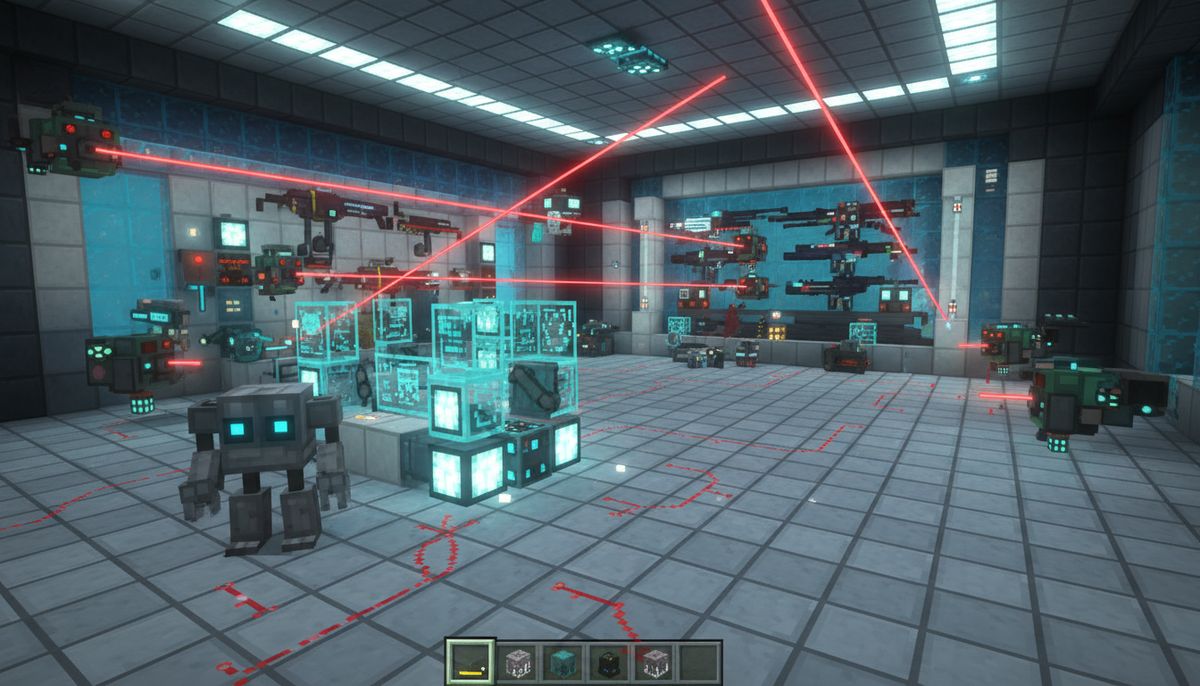

Minecraft's blocky aesthetic is iconic, but sometimes you want to push your world into the future. Tech and futuristic addons transform Bedrock Edition into a sci-fi playground where you can build robots, wield laser weapons, and construct sprawling automated factories. These mods replace medieval tools with plasma cutters, wooden swords with energy rifles, and simple farms with complex machinery networks.
The best tech addons go beyond simple retextures. They introduce new game mechanics, crafting chains, and progression systems that reward experimentation. You'll find addons that let you pilot mechs into battle, others that add entire tech trees of machinery, and some that completely overhaul how you interact with your world. The variety available for Minecraft Bedrock has exploded in recent years, giving mobile and console players access to content that rivals Java's industrial mods.
This guide covers the top futuristic addons that actually work, focusing on those with active development, stable performance, and genuine gameplay depth. Whether you're building a cyberpunk city or engineering automated production lines, these mods deliver the tools you need.
Advanced Tools and Equipment
Discover cutting-edge tools that enhance mining, building, and resource gathering with futuristic efficiency.
Browse Collection →Industrial Machinery and Automation Addons
Industrial addons bring factory-building mechanics to Bedrock Edition. These mods introduce conveyor belts, power systems, ore processing, and automated crafting. The Factory Tech addon stands out with over 40 machines including generators, electric furnaces, quarries, and item transporters. Power management matters here—you'll need to generate electricity using coal generators or solar panels before running your machines.
The Mechanical Engineering addon takes a different approach with steam-powered machinery. Boilers convert coal and water into steam pressure, which drives pistons, presses, and automated hammers. The visual feedback is excellent, with animated machine parts and steam particle effects. Machines must be placed correctly and connected with pipe networks, adding spatial puzzle elements to your factory design.
For players who want deeper complexity, the Advanced Factory addon introduces multi-block structures. A single industrial blast furnace requires 27 blocks arranged in a specific pattern. These massive machines process ores at 4x speed and unlock unique alloys like titanium and tungsten. The crafting chains extend significantly—to build a quarry, you'll first need circuit boards, which require refined copper, which needs an arc furnace, which demands steel production.
Automation extends to farming with the Agricultural Tech addon. Mechanical harvesters collect crops in a 9x9 area, auto-planters handle replanting, and powered sprinklers accelerate growth. Combine these with item sorters and storage systems, and you can build fully automated food production that requires zero manual input. The addon includes crop analyzers that display growth percentages and soil quality metrics.
Performance matters with these addons. Large factory setups with dozens of active machines can strain mobile devices. Most industrial mods include config options to reduce particle effects and limit simultaneous machine operations. Desktop players rarely encounter issues, but mobile users should start small and expand gradually while monitoring frame rates.
Robots and AI Companions
Robot addons introduce programmable helpers that follow commands, fight for you, or automate tasks. The RoboCraft addon lets you build robots from components—chassis, processing units, power cores, and functional modules. A basic worker robot costs 8 iron ingots, 4 redstone, and 2 gold. Once crafted, you can install mining modules for automated resource gathering or combat modules for defense.
Programming happens through an interaction menu. Set patrol routes by marking waypoints, assign tasks like "mine stone" or "harvest wheat," and adjust behavior settings. Advanced robots support multiple task queues, letting them mine during the day and return to base for charging at night. The addon tracks robot battery levels—dead robots stop functioning until recharged at a charging station.
The Mech Suits addon takes a different direction, letting you pilot enormous combat robots. Craft a mech frame using steel blocks and diamond cores, then customize it with weapon mounts and armor plating. Piloted mechs move slowly but tank significant damage. Equip laser cannons for ranged combat or pile drivers for devastating melee attacks. Mechs consume fuel cells during operation, making extended combat expensive.
Companion bots from the AI Assistant addon follow you like pets but offer practical benefits. Engineering bots carry extra inventory space—30 slots of mobile storage. Combat bots draw enemy aggro and deal reasonable damage with built-in energy weapons. Medical bots automatically heal nearby players when health drops below 50%. You can own multiple bots simultaneously, though each requires maintenance with circuit repairs every few in-game days.
Robot behavior varies significantly between addons. Some use simple follow-and-attack AI similar to wolves. Others implement pathfinding algorithms that navigate complex terrain and avoid hazards. The best robot mods let you upgrade AI chips to unlock smarter behaviors like returning home when damaged or coordinating attacks with other robots.
Futuristic Weapons and Combat Gear
Energy weapons replace traditional weapons with sci-fi alternatives. The Laser Weapons addon adds 12 weapon types including pistols, rifles, shotguns, and heavy cannons. Laser pistols fire instantly with no projectile travel time, dealing 6 hearts of damage. Plasma rifles charge for one second before releasing explosive projectiles. Sniper lasers feature zoom functionality and deal 15 hearts on headshots.
Durability systems work differently. Instead of breaking, energy weapons consume power cells. A standard power cell provides 64 shots for pistols or 32 for rifles. You'll craft power cells from redstone, copper, and glowstone. Some weapon mods include rechargeable batteries that restore charge when placed in special charging blocks, eliminating consumable ammunition entirely.
The Sci-Fi Arsenal addon focuses on explosive weaponry. Photon grenades create blinding flashes that stun mobs for 10 seconds. EMP grenades disable enemy shields and robot opponents. Rocket launchers fire tracking missiles that home in on targeted entities. Careful with the damage radius—these weapons can crater your builds if used carelessly.
Shield technology appears in multiple addons. Energy shields absorb damage before your health bar takes hits. Basic shields block 10 hearts of damage before needing a 30-second recharge. Advanced variants offer 20-heart protection and faster recharge rates. Shields won't block certain damage types like fall damage or fire, maintaining some vanilla challenge.
Melee weapons get futuristic upgrades too. Energy swords slice through mobs with ease, dealing 12 hearts per swing. Vibro-blades ignore armor values entirely. Plasma axes function as both tools and weapons, harvesting wood at triple speed while dealing combat damage. The best combat addons balance their powerful weapons with expensive crafting requirements and ongoing resource consumption.
Compatibility with armor mods matters for balanced gameplay. Most weapon addons assume vanilla armor values. Pair them with tech armor mods for a cohesive experience where both offense and defense scale together.
Advanced Armor and Equipment
Tech armor addons replace leather and iron with powered exosuits and energy shields. The Powered Armor addon introduces four armor tiers: standard, enhanced, advanced, and quantum. Each tier requires increasingly rare materials. Quantum armor uses nether stars and end crystals, but provides 40 armor points—double diamond armor—plus status effect immunities.
Powered armor requires energy. Each piece has an internal battery that depletes during use. Taking damage drains energy faster. When depleted, armor provides zero protection until recharged. Charging stations require construction from tech components and consume fuel or electricity. This creates interesting risk-reward dynamics—do you risk a dangerous expedition with 50% charge remaining?
Special abilities differentiate tech armor from vanilla sets. Jetpack boots allow limited flight by holding jump. Helmets provide night vision and underwater breathing. Chest plates store extra inventory slots. Leg armor increases movement speed by 30%. The full quantum set combines all abilities plus a cloaking device that makes you nearly invisible for 30 seconds.
The Nano-Tech Armor addon takes a different approach with modular customization. Base armor pieces provide minimal protection but accept upgrade modules. Install oxygen modules for space exploration, thermal modules for fire immunity, or reinforcement modules for extra defense. Each armor piece holds three module slots, letting you tailor gear to specific challenges.
Some armor mods include heads-up displays. The HUD shows coordinates, health bars for targeted mobs, equipment durability, and even miniature maps. This information density helps in combat but can clutter screens on mobile devices. Most addons let you toggle HUD elements or adjust transparency.
Weight systems appear in realistic tech mods. Heavy armor slows movement and prevents jumping. You'll need to balance protection against mobility. Some addons let you remove armor pieces mid-combat, creating tactical decisions about when to prioritize defense versus maneuverability.
Vehicles and Transportation Tech
Futuristic vehicles expand far beyond minecarts and boats. The Hover Vehicles addon adds cars that float above ground, requiring no roads. Craft a hover chassis from steel ingots and energy cores, then add seats and storage modules. Basic hovers reach 20 blocks per second. Racing models hit 40 blocks per second but sacrifice cargo capacity.
Flying vehicles open up aerial exploration. The Anti-Gravity Craft addon lets you build custom aircraft by combining hull blocks, propulsion units, and control systems. Small fighters require 50 blocks and seat one player. Transport ships can use 300+ blocks and carry entire squads plus cargo. Flight controls map to standard movement keys with jump for altitude gain and sneak for descent.
Mechs bridge vehicles and armor. The Titan Mechs addon spawns pilotable robots standing 8 blocks tall. Enter them like boats, then control movement and combat systems. Mechs walk slowly but climb vertical surfaces and wade through deep water. Built-in weapons include shoulder-mounted cannons and arm-mounted lasers. Fuel cells power movement and weapons separately—running out of weapon fuel leaves you mobile but defenseless.
Teleportation devices eliminate travel entirely. The Warp Tech addon adds teleporter pads that save coordinates and transport you instantly. Short-range teleporters work within 1000 blocks and cost minimal energy. Long-range versions reach anywhere in your world but consume expensive fuel cells. Multiplayer servers often restrict teleporter placement to prevent griefing.
Vehicle customization separates good vehicle mods from great ones. The Modular Vehicles addon lets you attach weapons, shields, boosters, and storage containers to vehicle frames. Build a flying fortress with mounted turrets, or create a fast scout vehicle with no weapons but triple engine power. Each addition affects vehicle stats like speed, handling, and fuel efficiency.
Some vehicle addons introduce fuel systems. Hover cars run on energy cells, spacecraft need rocket fuel, and mechs consume power cores. This adds resource management to transportation. You'll need to establish fuel production chains to support a vehicle fleet. Other mods skip fuel entirely, letting vehicles operate without consumables for simplified gameplay.
Energy Systems and Power Generation
Power generation forms the backbone of tech mod progression. Solar panels provide renewable but slow energy—a single panel generates 1 energy unit per second during daylight. You'll need arrays of 20+ panels to power modest factory setups. The Environmental Tech addon adds advanced solar towers that generate 10x more power but require expensive construction materials including diamond blocks and beacons.
Generators burn fuel for faster energy production. Coal generators produce 5 units per second while consuming one coal every 30 seconds. Lava generators offer 15 units per second with bucket fuel. Nuclear reactors from the Advanced Power addon generate 100 units per second but demand complex cooling systems and rare uranium fuel. Reactor meltdowns occur if cooling fails, creating massive explosions that devastate surrounding terrain.
Energy storage matters as much as generation. Basic batteries hold 1000 energy units. Medium capacitors store 10,000 units. Quantum energy cells reach 100,000+ capacity but cost nether stars to craft. Without adequate storage, excess generated power disappears. Large factory setups need multiple storage units to buffer energy for high-demand operations.
Wireless power transmission appears in advanced tech mods. Energy transmitters send power to receivers within a 64-block radius, eliminating cable clutter. Transmission efficiency decreases with distance—a receiver 32 blocks away only receives 75% of transmitted power. Strategic transmitter placement optimizes large facilities.
Power cables connect generators to machines in most addons. Different cable tiers handle different energy throughput. Basic cables transfer 10 units per second. Advanced cables manage 100 units per second. Overloading cables causes power loss and potential explosions. You'll need to calculate total machine consumption and install appropriately rated cables.
Energy measurement varies between addons. Some use arbitrary "energy units," others reference real-world measures like kilowatts or joules. The numbers don't matter much—focus on relative values and consumption rates. A machine consuming 5 units per second needs a generator producing at least 5 units per second to run continuously.
Practical Tips for Tech Addon Players
Start small with tech mods. Installing five industrial addons simultaneously creates overwhelming complexity and potential conflicts. Pick one core addon that appeals to you—maybe robots or weapons—then build your mod list around it. Test each addition before committing to a major build project.
Read crafting recipes carefully. Tech mods often include in-game guidebooks or crafting references. The Recipe Viewer addon helps tremendously, showing all crafting recipes including modded items. Many tech addons use custom crafting blocks rather than standard tables, adding another layer to progression systems.
Resource requirements scale dramatically. Basic tech items might need iron and redstone, but advanced gear demands diamonds, emeralds, and rare materials. Establish efficient mining operations early. Consider pairing tech addons with ores mods that add more resource variety and generation.
Performance optimization prevents frustration. Limit active machines to what you actually need. Turn off machines when not in use—many addons continue running processes for all placed machines regardless of proximity. Reduce render distance in large factory areas. Mobile players should avoid placing hundreds of entities in one location.
Backup your world before installing new tech addons. While most are stable, complex mods occasionally conflict or cause corruption. Regular backups let you experiment freely without risking hours of progress.
Test addon compatibility in creative mode first. Build sample setups, craft advanced items, and verify everything functions as expected. This trial run reveals conflicts before you invest survival resources. Check if power systems from different mods work together, or if you'll need to choose one power standard.
Plan factory layouts with expansion in mind. Tech progressions often unlock better machines that replace earlier versions. Leave space around initial builds for upgrades. Modular designs with clear sections for power generation, processing, and storage make reorganization easier.
Community resources help tremendously. Many popular tech addons have YouTube tutorials, Discord servers, or wiki documentation. These resources explain complex systems better than in-game tooltips. Don't hesitate to consult guides when stuck on crafting chains or machine configurations.
Balance tech power with gameplay challenge. Laser weapons that one-shot the ender dragon eliminate progression satisfaction. Look for mods with configurable difficulty or those that introduce new challenges alongside new tools. The best tech mods enhance gameplay without trivializing existing content.
Experiment with addon combinations. Tech weapons pair excellently with vehicle mods for mobile combat platforms. Industrial automation complements survival addons from our Best Survival Addons for Minecraft Bedrock — Backpacks, Tools, Farming collection. Creative combinations often create emergent gameplay mechanics the individual mod creators never intended.
Building Your Tech World
Design matters in tech builds. Futuristic bases benefit from clean lines, metal blocks, and strategic lighting. Quartz, concrete, and iron blocks form excellent foundations. Glass panes create high-tech viewing areas into factory floors. Redstone lamps provide industrial lighting that fits the aesthetic better than torches.
Cable management separates amateur builds from professional factories. Run power cables under floors or through walls rather than across open spaces. Color-coded cable sections help track power distribution. Some building-focused tech addons include decorative cable covers that hide functional cables behind clean panels.
Zoning organizes complex facilities. Dedicate specific areas to power generation, resource processing, storage, and manufacturing. Physical separation prevents clutter and makes troubleshooting easier. When a machine malfunctions, you'll know exactly which zone needs attention.
Security matters in multiplayer. Many tech mods include lockable doors, secured storage, and access control systems. The Security Systems addon adds keypads, ID cards, and biometric scanners. Protecting valuable machinery and resources becomes crucial on servers where griefing occurs.
Lighting effects enhance atmosphere dramatically. Energy machines often emit ambient light in various colors. Arrange glowing equipment deliberately to create visual interest. Blue and white lighting suggests high-tech cleanliness, while red and orange implies industrial power. The best tech bases balance functional lighting with aesthetic glow effects.
Underground facilities work exceptionally well for tech bases. Excavate large caverns for factory floors, using natural stone as walls. This approach hides industrial sprawl from surface views while providing secure, controlled environments. Deep facilities also connect easily to mining operations, shortening resource transport distances.
Theme consistency ties everything together. Pure sci-fi bases use only modern materials and avoid wood entirely. Industrial themes mix metal with exposed brick and weathered concrete. Cyberpunk aesthetics combine neon lighting with dark blocks and verticality. Choose your theme early and stick to it for cohesive results.
For more building inspiration, check out our guide on Best Building Mods for Minecraft Bedrock — Blocks & Tools which includes several tech-themed block packs that complement these addons perfectly.
Tech and futuristic addons fundamentally change how you play Minecraft Bedrock. They add progression depth, combat variety, and automation possibilities that vanilla gameplay never offers. The learning curve exists, but mastering these systems delivers immense satisfaction. Your first successful factory line, your first mech combat victory, your first fully automated base—these moments justify the complexity. Start with one appealing addon, learn its systems thoroughly, then expand your tech empire from there.