
Why Distant Horizons is Trending on Bedrock
The search for "minecraft mod distant horizons" has exploded in 2026. Players want to see further without lag spikes or crashes. Java Edition users have enjoyed the original Distant Horizons mod for years, but Bedrock players were left out. That changed in January 2026 when THEDUDE1205 released an unofficial Bedrock port as a texture pack.
The pack has accumulated over 268,000 downloads on CurseForge, with installation tutorials flooding YouTube and TikTok throughout the year. Mobile players, Windows users, and even console gamers are searching for ways to extend their view distance. The reason is simple: standard Minecraft render settings force you to choose between seeing far or maintaining playable FPS. This pack promises both.
Distant Horizons uses a Level of Detail (LOD) system that renders simplified chunks outside of the normal render distance, allowing for increased render distance without harming performance. The Bedrock version brings this technology to platforms that desperately need it—phones, tablets, and budget Windows devices that struggle with vanilla render distances above 12 chunks.
What is Distant Horizons for Bedrock Edition
Distant Horizons started as a Java Edition mod that became one of the most popular performance-enhancing tools in the community. The technology uses LOD (Level of Detail), the same tech used in AAA titles like The Witcher 3 or Skyrim, creating simplified "ghost" versions of terrain instead of rendering every detail.
The Bedrock Edition port replicates this concept as a texture pack rather than a true mod. The pack supports increased viewing distance without slowing down the device by compressing distant images to lower resolution and smaller sizes. Blocks far from the player render as simplified, low-poly versions. Up close, everything looks normal. At a distance, you see the shape and color of the terrain without the full detail.
THEDUDE1205 first released version 0.0.1 in January 2026, with the latest version 0.0.2 updated in May 2026. The pack works on Android, iOS, and Windows 10 or 11 Bedrock platforms. Players report major FPS improvements compared to maxing out the vanilla render distance slider.
Key Features and Performance Benefits
The Distant Horizons Bedrock texture pack delivers several advantages over standard settings:
Massive Visual Range Without Performance Loss
Players can push their visible distance well beyond the game's built-in limit. The tool compresses distant images to lower resolution and smaller sizes, reducing the load on the device and allowing for wide-area viewing without lag. Your phone or tablet no longer needs to fully render chunks 20, 30, or 40 blocks away.
LOD Rendering Technology
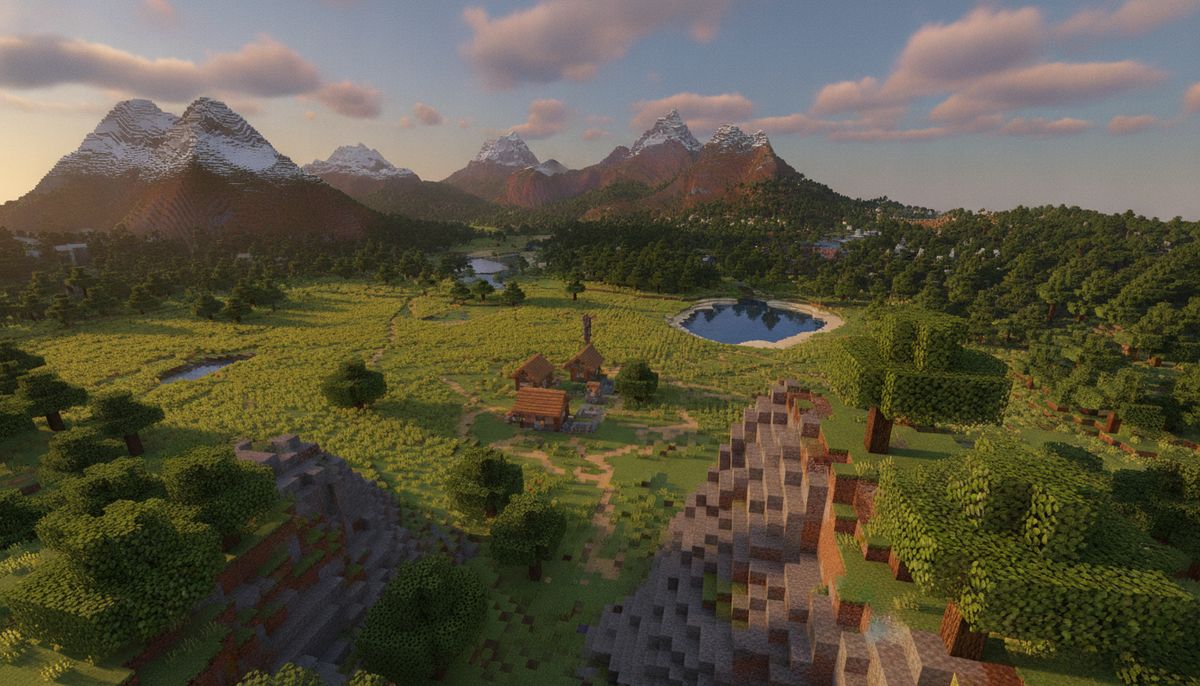
The pack increases Level of Detail to render terrain far away from the player, and the LOD renders at different stages based on distance—the further away from the player, the less detail is rendered. This allows mountains, forests, and biome boundaries to appear in the distance without consuming your device's resources.
Dimension Support
The pack functions in the Overworld, Nether, and End dimensions. You'll see distant terrain in all three, though some players report heavier load when looking across large ocean surfaces.
No Visual Changes Up Close
Users report no visual changes to nearby blocks, but huge FPS improvements overall, calling it "the best rendering texture pack". Your immediate surroundings remain crisp and detailed. The changes only apply to distant chunks.
Spyglass Integration
When you use the spyglass, the pack automatically switches to normal textures, so you can still zoom in without the textures being ugly. This preserves the quality of zoomed-in views while maintaining performance benefits during normal play.
Platform Compatibility and Requirements
| Platform | Compatibility | Notes |
|---|---|---|
| Android | ✅ Full support | Works on most devices; FPS boost varies by hardware |
| iOS (iPhone/iPad) | ✅ Full support | Install via .mcpack file |
| Windows 10/11 | ✅ Full support | Easiest installation process |
| Xbox | ❌ Not supported | Marketplace-only texture packs allowed |
| PlayStation | ❌ Not supported | Marketplace-only texture packs allowed |
| Nintendo Switch | ❌ Not supported | Marketplace-only texture packs allowed |
The pack requires Minecraft Bedrock Edition version 1.21 or newer for optimal performance. Older versions may experience compatibility issues or visual glitches.
FPS-Boosting Texture Packs
Looking for more performance optimization? Browse our collection of texture packs designed to improve frame rates on low-end devices.
Browse Texture Packs →How to Install Distant Horizons on Bedrock
Installation differs by platform but follows a similar pattern. Make sure Minecraft is closed before you begin.
Windows 10 and Windows 11
Simply double-click the .mcpack file and Minecraft should automatically launch and begin importing the pack, showing an "Import Successful" confirmation.
- Download the Distant Horizons Bedrock .mcpack file
- Navigate to your Downloads folder
- Double-click the .mcpack file
- Minecraft opens automatically and imports the pack
- Go to Settings > Global Resources
- Find Distant Horizons in "My Packs"
- Select it and press Activate
- Restart Minecraft to apply changes
Close Minecraft first if it is already running, as importing while the game sits on a loaded world is where most failed imports come from.
Android Devices
On Android, open the .mcpack file using a file manager or directly through the browser, and Minecraft will launch and start importing the pack.
- Download the .mcpack file to your device
- Open your Files app or Downloads folder
- Tap the .mcpack file
- Select "Open with Minecraft" if prompted
- Wait for the import notification to complete
- Open Minecraft and go to Settings > Global Resources
- Activate the pack from "My Packs"
- Load or create a world to see the changes
iOS (iPhone and iPad)
Download the .mcpack file using Safari or the Files app, then follow similar steps to Android.
- Download the Distant Horizons .mcpack file
- Open the Files app and navigate to Downloads
- Tap the .mcpack file
- Choose "Copy to Minecraft" or "Open in Minecraft"
- Allow Minecraft to import the pack
- Go to Settings > Global Resources
- Activate the pack from the available list
- Return to the main menu and load a world
Make sure the file extension is MCPACK and the resource pack version matches the game version for successful installation.
Is Distant Horizons Bedrock Safe and Legitimate
Texture packs modify visual elements without altering game code, making them much safer than traditional mods. The Distant Horizons Bedrock port is hosted on CurseForge, a trusted Minecraft community platform. THEDUDE1205 maintains the pack with regular updates, and the large download count indicates widespread community trust.
That said, always download from verified sources like CurseForge or reputable Bedrock addon sites. Avoid random third-party mirrors or sites that bundle the pack with suspicious files. Our article on Are Minecraft Mods Safe? How to Download Without Viruses covers red flags to watch for when downloading any Minecraft content.
Texture packs cannot inject malware or compromise your device the way executable mods can on Java Edition. Bedrock's .mcpack format is a compressed archive containing texture files and JSON metadata. The game's built-in import system scans these files before installation.
Console players on Xbox, PlayStation, and Switch should note that sideloading custom texture packs is not possible on those platforms. You're limited to the in-game Marketplace, and there's no sideloading texture packs directly onto these platforms like you can on PC or mobile.
Known Limitations and Compatibility Issues
No texture pack is perfect, and Distant Horizons Bedrock has some rough edges:
Resource Pack Conflicts
The pack has limited compatibility with other resource packs, with some players reporting that Distant Horizons causes certain glass textures to become invisible. If you use connected glass packs or other visual mods, test them together before committing to a long play session.
Leaf Rendering Issues
Some leaves like Azalea leaves are broken, with oak leaves switching to simple graphics mode instead of the intended 4-pixel textures. These bugs are cosmetic and don't affect gameplay, but builders working with foliage-heavy projects may notice visual inconsistencies.
Ocean Performance
When looking over an ocean, some players experience lag and recommend making ocean blocks even lower quality. Large bodies of water contain many identical blocks, which can still strain performance even with LOD rendering.
Active Development Status
The pack remains in early development with version 0.0.2 as the latest release. Expect updates to fix bugs and expand compatibility. Check CurseForge for the newest version before installation.
Comparing Distant Horizons to Alternatives
Several other texture packs and addons aim to improve Bedrock performance:
Sodium-Style Packs
Bedrock ports inspired by the Java Edition Sodium mod focus on optimizing existing render distances rather than extending them. Our guide to the Sodium Mod for Minecraft Bedrock — FPS Boost Guide covers similar performance-focused options.
Low-Poly Chunk Packs
Other packs like "Low Poly Chunks" make distant blocks use bare-bone textures, achieving similar visual range increases through simplified models.
FPS-Focused Texture Packs
If you prioritize frame rates over viewing distance, check our list of Top 15 FPS-Friendly Texture Packs for Low-End Devices. These packs reduce texture resolution across the board rather than implementing LOD technology.
Shaders with Built-In LOD
Some shader packs for Bedrock include fog adjustments and atmospheric tweaks that simulate greater viewing distance. These work differently than Distant Horizons but can complement each other for enhanced visuals.
Distant Horizons stands out by specifically targeting render distance rather than overall performance optimization. If seeing further is your priority, this pack delivers. If you want general FPS improvements, combine it with a low-resolution texture pack or explore our Best Realism Addons for Minecraft Bedrock collection for more options.
Tips for Getting the Best Results
Start with Default Render Distance
Set your in-game render distance to 8-12 chunks before activating Distant Horizons. The pack extends beyond this base value, so you don't need to max it out manually. Lower base render distances improve performance while the pack handles distant terrain.
Adjust Pack Load Order
In the active pack list, packs higher up override the ones below them for any texture both define, so if you have a full pack and a small tweak pack, put the tweak pack above the full one. Place Distant Horizons below other visual packs to prevent conflicts.
Test in Different Biomes
Performance varies by terrain type. Flat plains render faster than mountainous dimension zones with complex geometry. Test the pack in your most frequently visited areas to gauge real-world performance.
Combine with Performance Addons
Pair Distant Horizons with FPS-boosting addons or texture packs for maximum efficiency. Low-resolution base textures combined with LOD distant rendering create an optimal balance between visual quality and performance.
Monitor Device Temperature
Extended viewing distances increase GPU load. If your device overheats during gameplay, reduce your base render distance or take breaks to let hardware cool down.
Community Reception and Social Media Buzz
Distant Horizons exploded across Minecraft Bedrock communities in early 2026. TikTok creators showcased before-and-after comparisons, demonstrating the dramatic difference in visible terrain. YouTube tutorials walked mobile players through installation, often pairing the pack with other performance mods.
The pack resonates with builders who need to see their large-scale projects from a distance and explorers who want to spot biome boundaries before reaching them. Survival players appreciate being able to spot villages, desert temples, or ocean monuments from further away.
CurseForge comments praise the FPS improvements, though some users request better documentation and more frequent updates. The creator actively responds to bug reports, suggesting the pack will continue evolving.
More Building and Exploration Addons
Expand your Minecraft experience with our curated collections of building tools, exploration mods, and visual enhancements for Bedrock Edition.
Browse Realistic Mods →Alternatives from Our Catalog
If Distant Horizons doesn't meet your needs or you want to explore other performance and visual options, our catalog includes dozens of alternatives:
- Best Building Mods for Minecraft Bedrock — Expand your creative toolkit with new blocks and tools
- Best Cave and Mining Addons — Transform underground exploration with enhanced cave systems
- Best Survival Addons for Minecraft Bedrock — Add backpacks, tools, and quality-of-life improvements
- Gamma Texture Pack for Minecraft Bedrock — Another popular pack for enhancing visibility
- VHS Texture Pack for Minecraft Bedrock Edition — Retro visual effects for a unique aesthetic
The Bedrock modding community continues to innovate around performance limitations. Distant Horizons represents a major step forward for mobile and low-end device players who previously had no way to extend their view distance without crippling lag.
Final Thoughts
Distant Horizons for Bedrock Edition brings long-requested LOD rendering to mobile, Windows, and iOS platforms. With over 268,000 downloads since its January 2026 release, the pack has proven its value to the community. Players on phones and tablets finally have a way to see distant terrain without upgrading their hardware or switching to Java Edition.
The pack isn't perfect. Resource pack compatibility remains limited, and some visual bugs persist in version 0.0.2. But for players frustrated by fog walls and short render distances, Distant Horizons delivers a dramatic improvement. Installation takes minutes across all supported platforms, and the performance gains are immediate.
Whether you're building a castle, exploring for rare biomes, or simply want to enjoy Minecraft's landscapes without hardware constraints, this texture pack deserves a spot in your addon collection. Check our texture packs category for more visual enhancements and performance tools.