Why the Portal Gun Rick and Morty Addon Is Trending Right Now
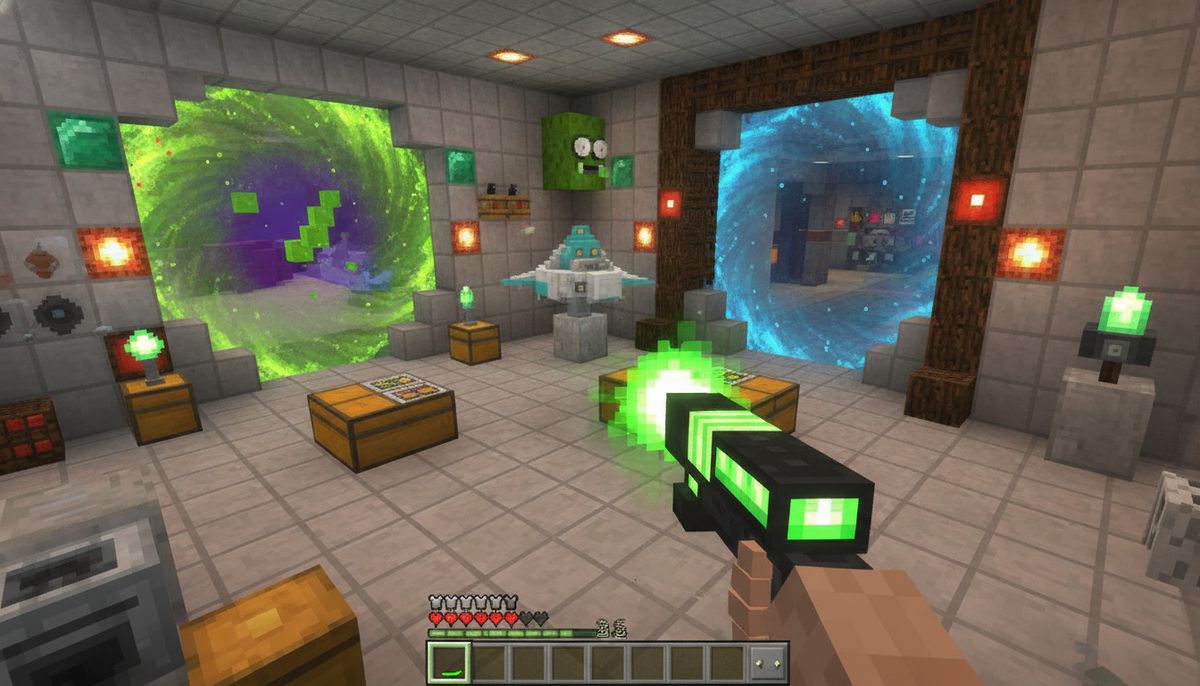
Rick and Morty fans have been flooding Minecraft Bedrock searches for portal gun addons, and it's easy to understand why. The Portal Gun Add-On brings fully functional portal guns to Minecraft Bedrock, allowing you to create portals, travel across your world, and even explore custom dimensions. With over 638,700 downloads on CurseForge as of October 2026, this mod has become one of the most popular science fiction addons available for mobile and Windows players.
Created by JhonFX, the addon captures the interdimensional chaos of the hit Adult Swim series. Players can shoot portals into walls, floors, and ceilings to teleport instantly across massive distances. The timing couldn't be better—social media platforms like TikTok are filled with Bedrock players showcasing their portal setups, from elaborate hub rooms connecting their bases to creative traps that send hostile mobs into lava pits.
The addon has evolved far beyond a simple teleportation tool. Recent updates introduced new portal gun variants with interdimensional, interspatial, and extradimensional fluid types, plus brand-new menus with a unique look for each gun, new icons, a 3D view of your Portal Gun, ID/mode/charge info, and a battery bar in your fluid's color. These continuous improvements keep players coming back, making the Portal Gun addon a persistent trend rather than a flash-in-the-pan download.
Core Features That Set This Addon Apart
The Portal Gun addon stands out from generic teleportation mods because of its attention to detail and mechanical depth. Features include choosing from multiple Portal Gun skins, configuring your Portal Gun's behavior, creating Portal Fluid and refilling your gun whenever necessary, and tracking your Portal Gun if it's dropped or lost after death.
One of the most impressive aspects is the multi-portal system. By default, each gun opens only one pair of portals at a time, but enabling Multi-Pair Mode allows a single gun to manage up to ten distinct portal pairs at once. This opens up strategic possibilities for survival players and creative builders alike. You could maintain a network of portals connecting your main base, farms, mining sites, and distant biomes simultaneously.
Gun security features mean the first player to use a gun becomes its owner and can lock it, set a password, authorize players, and transfer ownership, with anyone using a locked gun without permission getting shocked and dropping the gun. This makes the addon viable for multiplayer servers where you don't want other players hijacking your carefully placed portal network.
The latest version also introduced a dimension-browsing menu. A new Browse Dimensions menu allows you to browse every dimension in pages of 16, search by name or ID, pick one to open, and favorite dimensions by tapping the star next to a dimension (up to 16), with favorites showing up first in yellow and listed in every dimension dropdown. This quality-of-life improvement makes navigating complex modded worlds far more manageable.
Visual polish matters too. Recent updates added translucent portal fluid, softer glow, a faster entry animation, and a burst of fluid particles when closing a portal. The addon feels cohesive and professional rather than cobbled together.
Crafting and Using Your Portal Gun
The crafting system requires gathering specific materials before you can start dimension-hopping. You'll need chips, dark matter dust, phase matter, empty tubes, beakers, portal gun bases, travel solutions, quantum isotope, and cosmetic accessories, with the filled tube becoming Portal Fluid that you place in the offhand and interact with the portal gun base to assemble the finished device.
First, synthesize the R-426 quantum isotope, from which you'll obtain one of two types of liquid (interdimensional or dimensional). The Prototype Portal Gun is now built with the new cheaper Basic Chip (the old one is now the Advanced Chip). This tiered system gives players a progression path from basic portal guns to more advanced models like Evil Morty's variant.
Once assembled, simply interact to shoot a portal, or Shift + Interact to open the Portal Gun's menu. The gun menu can set a destination with coordinates and a dimension name using the format x y z dimension_id, such as 100 64 200 overworld or minecraft:overworld. This means you can create portals to any location in any dimension, including custom dimensions from other addons.
Alternative Rick and Morty Addons Worth Exploring
JhonFX's Portal Gun isn't the only Rick and Morty content available for Bedrock Edition. Several other creators have released complementary addons that expand the multiverse experience.
Flask's Rick and Morty Project lets you travel between 5 custom Rick and Morty dimensions and fight 7 bosses, with dual-linked Portal Guns in 5 tiers (Prototype to Rick Prime) powered by craftable portal fluids, 7 epic boss battles including Cromulon, Evil Morty, Phoenixperson, Cronenberg Abomination, Gromflomite Queen, Scary Terry, and Pickle Rick. This addon has reached over 17,400 downloads and offers a more RPG-focused take on the franchise with custom biomes and challenging combat encounters.
For players who want Rick's technology beyond just portal guns, Rick and Morty Technology features Rick Prime's Kill Bot that spawns up to three Kill Bots to protect you with a remote to control them and switch between modes, and Evil Morty's Eye Patch to take control of mobs or players by crouching and right-clicking to open settings and switch between modes. With 5,300 downloads, this addon brings items like Rick Prime's Bomb and Rick's Space Cruiser to your survival worlds.
If you're interested in exploring more themed content, check out our collection of superhero addons or browse our popular mods section for trending downloads across all categories.
Installing the Portal Gun Addon on Bedrock Edition
Getting the Portal Gun working on Minecraft Bedrock Edition requires following platform-specific steps, but the process remains straightforward across devices.
Windows Installation
Download the latest version of the Portal Gun Add-On that is compatible with your version of Minecraft Bedrock, and once downloaded, you should have the addon .mcaddon file—on Windows, simply open the .mcaddon file with Minecraft, and the addon will be imported automatically.
After importing, launch Minecraft and create a new world or edit an existing one. Navigate to the Behavior Packs section in world settings and activate the Portal Gun addon from the Available packs list. Some addons require enabling Experimental Features, so check the toggle if the addon prompts you.
Android and iOS Installation
Download the world or Add-On file to your Android device, then go to the Settings app and select Storage > Explore (at the bottom)—if you do not have a settings app, you can install a file explorer app like ES File Explorer—then select the file and the Add-On should open in Minecraft.
For iOS devices, your device will prompt you to open the file with Minecraft—tap Open in Minecraft, which will launch Minecraft with your selected file. The import notification appears at the top of the screen once successful.
Mobile players should ensure they download files to internal storage rather than SD cards, as Minecraft may not detect files stored on external media. After importing, the activation steps mirror the Windows process through world settings.
Compatibility Notes
The Portal Gun addon supports game versions 26.50 and 26.40, with the last update released on October 25, 2026. Always verify that the addon version matches your current Minecraft Bedrock build before downloading. Outdated addons can cause crashes or prevent worlds from loading properly.
Console players face limitations. PlayStation and Nintendo Switch versions of Bedrock Edition do not support third-party addons outside of the official Marketplace. Xbox players can access some addons through the MC Addons Manager app, though the selection remains more limited than Windows or mobile options.
More Fun and Crazy Addons
Explore our complete collection of entertaining mods that add humor, chaos, and unique gameplay to Bedrock Edition.
Browse Fun Mods →Is the Portal Gun Addon Safe to Download?
Safety concerns are valid when downloading community-created content. The Portal Gun addon by JhonFX is hosted on CurseForge, one of the most reputable platforms for Minecraft content. CurseForge implements malware scanning and content moderation to protect users from malicious files.
That said, always follow basic safety practices. Download addons only from trusted sources like CurseForge, MCPEDL, or directly from creator pages. Avoid third-party reupload sites that may bundle addons with unwanted software. Check the download count and user reviews before installing—the Portal Gun's 638,700+ downloads and active update history indicate a well-maintained project with community trust.
Before installing any addon, create a backup of your world. While rare, addon conflicts or bugs can corrupt save files. Minecraft Bedrock includes a built-in world backup feature accessible from the world settings menu. This precaution takes seconds and can save hours of lost progress.
For a deeper dive into addon safety practices and red flags to watch for when downloading mods, read our guide on Are Minecraft Mods Safe?
Tips for Maximizing Your Portal Gun Experience
Getting the most out of the Portal Gun addon requires understanding its strategic applications beyond basic teleportation.
Build a central hub room. Set up a dedicated portal room at your main base with instant access to the Nether, the End, and distant points of interest. Label each portal destination with signs or item frames to avoid confusion when you're managing multiple active portal pairs.
Optimize villager trading. Effortlessly relocate villagers directly to your base, making it incredibly easy to set up a trading hall. Traditional methods of transporting villagers across long distances involve minecarts, boats, or painstaking block-by-block movement. Portal guns reduce this to seconds.
Create combat advantages. Instantly teleport dangerous mobs away into hazards, deep lava pits, or the bottom of the ocean. This works exceptionally well in raid defense scenarios or when clearing out hostile mob farms. Some creative players have designed portal-based traps that funnel enemies into kill chambers.
Understand range limitations. Portal guns have a max range and projectile falloff, meaning you can't shoot them infinitely far away. Plan your portal placement accordingly. For extremely distant locations, create intermediate portal stations to bridge the gap.
Combine with other addons carefully. While the Portal Gun addon works with many other mods, conflicts can arise with addons that heavily modify dimensions or teleportation mechanics. Test new addon combinations in a separate creative world before adding them to your main survival save. Our article on How to Combine Addons Safely on Bedrock covers compatibility testing in detail.
Comparing Portal Gun Variants
The addon includes several different portal gun models, each with unique aesthetics and capabilities. Understanding the differences helps you choose the right tool for your needs.
| Portal Gun Type | Fluid Type | Special Features | Recommended For |
|---|---|---|---|
| Prototype | Basic (Blue) | Entry-level, cheaper crafting | Early game players |
| Standard Rick | Interdimensional | Balanced performance | General use |
| Evil Morty | Extradimensional | Unique interface, enhanced range | Advanced players |
| Rick Prime | Multiple variants | Top-tier performance | Endgame content |
Evil Morty's Portal Gun Interface stands out visually with its distinctive design pulled directly from the show's antagonist. Each Portal Gun has its own unique interface, giving players variety beyond simple stat differences.
The fluid system adds another layer of progression. You'll need different materials to craft interdimensional versus extradimensional portal fluid, creating natural milestones as you gather resources and build more powerful versions of the gun.
Exploring Custom Dimensions with Portal Guns
One of the Portal Gun addon's most exciting features is seamless integration with custom dimension addons. The portal can lead to any point on the map or to another dimension with no restrictions, and entering coordinates and the world ID manually or through a terminal command will link a portal to any location including custom biomes from other mods and addons for Minecraft Bedrock.
This compatibility transforms how you experience dimension-expanding addons. Instead of building traditional Nether portals or searching for naturally generating structures, you can create direct pathways to specific coordinates in custom realms. This works particularly well with addons like Flask's Rick and Morty Project, which adds five unique dimensions inspired by the show.
Players who enjoy dimension-hopping should explore our guide to the Best Dimension and World Addons for Minecraft Bedrock, which covers biome overhauls, alternate realms, and pocket dimensions that pair beautifully with portal gun technology.
Community Creations and Portal Gun Builds
The Minecraft Bedrock community has embraced the Portal Gun addon with creative builds that push its mechanics to impressive limits. Content creators on platforms like YouTube and TikTok showcase elaborate portal networks that connect sprawling base complexes, allowing instant access to farms, storage systems, and recreational areas scattered across thousands of blocks.
Some builders have constructed portal-based minigames. Parkour challenges that require precise portal placement mid-jump test player reflexes. PvP arenas where combatants can reposition portals during fights create dynamic battlegrounds where map knowledge and portal placement skill matter as much as combat prowess.
Survival players have documented portal-optimized world designs where key resources are connected via permanent portal links. Ocean monuments, End cities, and Nether fortresses become part of an interconnected transit system rather than isolated destinations requiring lengthy travel each visit.
These community innovations demonstrate the addon's versatility beyond its core teleportation function. It becomes a tool for world design, enabling base layouts and gameplay styles impossible with vanilla Minecraft transportation methods.
Other Science Fiction and Tech Addons to Try
If the Portal Gun addon appeals to your love of futuristic technology, Bedrock Edition offers numerous other sci-fi mods worth exploring.
The TACZ Addon for Minecraft Bedrock brings advanced firearms and tactical combat to the game, letting you build modern military bases and engage in gunfights with customizable weapon loadouts. It pairs well with the Portal Gun for players who want a mix of teleportation and combat enhancement.
For players interested in industrial automation rather than interdimensional travel, check out the Best Factory and Industrial Addons for Minecraft Bedrock. These mods introduce conveyor belts, machinery, and production chains that contrast nicely with the Portal Gun's instant transportation.
Space enthusiasts should browse the Best Space Exploration Addons for Minecraft Bedrock, which add rockets, space stations, and alien planets. Combining space travel addons with portal guns creates a truly cosmic gameplay experience.
If you prefer keeping your tech grounded in medieval fantasy rather than science fiction, the Best Magic and Spells Addons for Minecraft Bedrock offer teleportation through mystical means like ender pearls, warp scrolls, and ritual circles.
Frequently Asked Questions About Portal Gun Installation
Common questions arise when players first attempt to install the Portal Gun addon. Here are answers to the most frequent issues:
The .mcaddon file won't open. Ensure Minecraft Bedrock Edition is installed and set as the default application for .mcaddon files. On Windows, right-click the file, select "Open with," and choose Minecraft. On mobile, you may need to use a file manager app to navigate to your downloads and manually select "Open with Minecraft."
The addon appears in my pack list but doesn't work in-game. Verify that both the behavior pack and resource pack are activated for your world. Some features require both components. Additionally, check that you've enabled any necessary Experimental Features in the world settings. The Portal Gun addon typically requires the "Holiday Creator Features" toggle.
Portals don't appear when I shoot them. Confirm that you've crafted Portal Fluid and assembled the gun correctly. The addon includes item tracking, so if the gun is dropped or lost after death, it can be tracked. Make sure you're not in a dimension or area where portal placement is blocked by other mods.
Performance issues or lag when using portals. Portal effects and particle systems can strain lower-end devices. Reduce your render distance in video settings and close other resource-intensive apps. Consider using performance-optimizing texture packs like those featured in our Top 15 FPS-Friendly Texture Packs guide.
Final Thoughts on the Portal Gun Craze
The Portal Gun Rick and Morty addon represents exactly what makes Minecraft Bedrock's modding scene exciting. Community creators like JhonFX take inspiration from beloved media franchises and transform those ideas into functional, polished gameplay experiences that rival official content.
With over 638,700 downloads and active development through October 2026, this addon has proven staying power beyond temporary trends. Regular updates add features like security systems, dimension favorites, and visual improvements that keep longtime users engaged while attracting new players who discover it through social media showcases.
Whether you're building a vast survival world that needs efficient transportation, creating elaborate custom maps with hidden portals, or just want to experience Rick Sanchez's chaotic dimension-hopping in block form, the Portal Gun addon delivers. Combined with other Rick and Morty themed content or used standalone, it fundamentally changes how you navigate Minecraft worlds.
Ready to start teleporting? Head to our fun mods collection to download the Portal Gun addon and discover dozens of other entertaining additions to your Bedrock experience.