
Minecraft खिलाड़ी Gamma Texture Packs क्यों खोज रहे हैं
Minecraft खिलाड़ियों को Bedrock प्लेटफॉर्म पर एक समस्या का सामना करना पड़ा है। अंधेरी गुफाओं की खोज करना, नेदर में नेविगेट करना, और रात में निर्माण करना सभी को उचित प्रकाश की मांग करते हैं। खिलाड़ियों ने बेहतर दृश्यता के लिए fullbright shader packs पर भरोसा करते थे, लेकिन जब Mojang ने एक बड़ा बदलाव पेश किया तो वह विकल्प गायब हो गया।
Minecraft Bedrock 1.16 अपडेट ने RenderDragon इंजन लाया, जो अब बाहरी shaders का समर्थन नहीं करता, जिससे fullbright packs काम करना बंद कर दिया। हजारों खिलाड़ियों जो उन चमक उपकरणों पर निर्भर थे, अचानक फिर से मशालें रखने या अंधेरी वातावरण में आंखें सिकोड़ने लगे। इसने एक नए समाधान का उदय किया: gamma texture packs।
ये packs RenderDragon की सीमाओं को पूरी तरह से दरकिनार कर देते हैं। वे गेम के gamma (brightness) को 100% से अधिक बढ़ाते हैं, एक अलग तकनीकी दृष्टिकोण का उपयोग करते हुए जो Bedrock की वर्तमान प्रतिबंधों के भीतर काम करता है। खोज प्रवृत्ति survival खिलाड़ियों, खनिकों, और builders से वास्तविक मांग को दर्शाती है जो गेम फाइलों को संशोधित किए बिना या cheats सक्षम किए बिना स्पष्ट दृश्यता चाहते हैं।
Gamma Texture Packs वास्तव में क्या करते हैं
Gamma texture packs पारंपरिक texture packs की तरह काम नहीं करते जो ब्लॉक या आइटम को फिर से बनाते हैं। वे स्क्रीन पर एक रंगीन ओवरले जोड़ते हैं, जिससे अंधेरे में चीजों को देखना और RenderDragon के साथ काम करना आसान हो जाता है। इसे स्थायी रूप से रात दृष्टि चश्मे पहनने के रूप में सोचें—सिवाय इसके कि आपको potions, experimental features, या game modifications की आवश्यकता नहीं है।
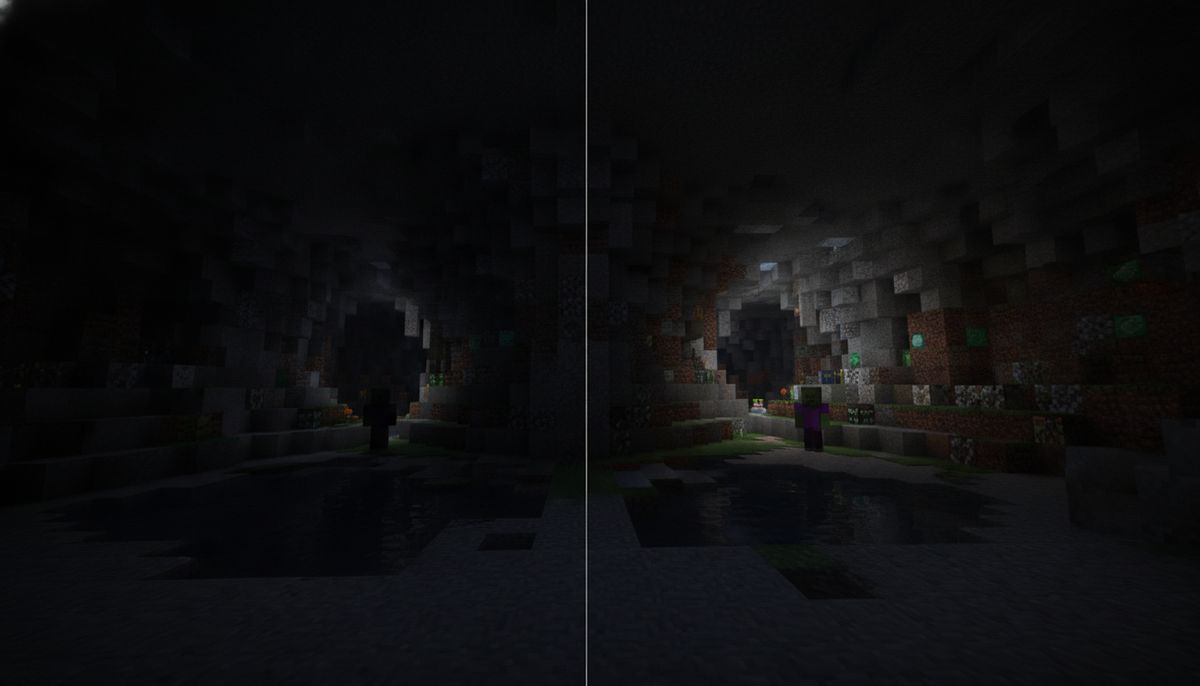
तकनीकी विधि में आपके पूरे field of view में एक अर्ध-पारदर्शी सफेद या हरे रंग की ओवरले लागू करना शामिल है। यह ओवरले इसके नीचे सब कुछ को उज्ज्वल करता है, Minecraft की मानक brightness slider को अतिक्रम नहीं कर सकने वाले बढ़े हुए gamma levels की नकल करता है। अंधेरी गुफाएं दिखाई देती हैं। नेदर के छायादार कोने प्रकाशित हो जाते हैं। रात की वातावरण को अब हर कुछ ब्लॉक पर मशालों की आवश्यकता नहीं होती है।
गेम इतना उज्ज्वल हो जाता है कि आप मशालों के बिना अंधेरे क्षेत्रों की खोज कर सकते हैं। आप गुफा की दीवारों में embedded हीरा अयस्क को देखेंगे, hostile mobs को पहचानेंगे इससे पहले कि वे आपको प्राप्त करें, और बिना लगातार प्रकाश स्रोतों को रखने के जटिल भूमिगत प्रणालियों को नेविगेट करेंगे। यह अंधकार को पूरी तरह से खत्म नहीं करता है—अत्यंत अंधेरे धब्बे कुछ हद तक मंद रहते हैं—लेकिन सुधार महत्वपूर्ण है।
मुख्य विशेषताएं और Pack Variants
कई creators ने मामूली विविधताओं के साथ gamma packs जारी किए हैं। Lakhii द्वारा Gamma Brightness pack के CurseForge पर 18,600 से अधिक downloads हैं, जबकि Blue_Print का Night Vision texture pack 161,200 से अधिक downloads पर पहुंचा। ये संख्याएं दर्शाती हैं कि इस समाधान की आवश्यकता कितनी व्यापक हो गई है।
अधिकांश gamma packs दो overlay विकल्प प्रदान करते हैं:
White Overlay Mode: मानक विकल्प जो सब कुछ को समान रूप से उज्ज्वल करता है। कुछ खिलाड़ियों को लगता है कि यह extended sessions के दौरान आंखों में तनाव का कारण बनता है, विशेष रूप से छोटी स्क्रीन वाली mobile devices पर।
Green Overlay Mode: सफेद के बजाय हरे रंग की प्रकाश ओवरले बनाता है, जो सहायक है यदि आप सफेद तनाव पसंद नहीं करते। हरा tint कठोर चमक को कम करता है जबकि clarity बनाए रखता है। यह variant अक्सर Nether और End dimensions में बेहतर प्रदर्शन करता है जहां लाल और बैंगनी ब्लॉक रंग palette पर हावी होते हैं।
कई packs UI elements को भी संशोधित करते हैं प्रभाव को बढ़ाने के लिए, हालांकि ये संशोधन गेम अपडेट के साथ conflict कर सकते हैं। Gamma++ pack को version 1.19.0+ के लिए बनाया गया था, और नए versions में UI सिस्टम परिवर्तन इसे ठीक से काम न करने का कारण बन सकते हैं।
संगतता और आवश्यकताएं
Gamma texture packs का सबसे बड़ा लाभ उनकी minimal requirements है। ये packs Minecraft के सभी versions 1.16 से नवीनतम तक समर्थन करते हैं और Minecraft Bedrock और Minecraft Pocket Edition दोनों पर काम करते हैं। iOS और Android पर mobile खिलाड़ी Windows 10 और console खिलाड़ियों जितनी आसानी से उन्हें use कर सकते हैं।
ये केवल resource packs हैं, आपको cheats सक्षम करने या experimental features की आवश्यकता नहीं है। यह कई कारणों से महत्वपूर्ण है। Survival worlds achievement eligibility बनाए रखते हैं। Multiplayer servers आपको modified clients के लिए flag नहीं करते। Realms इन packs को बिना समस्याओं के स्वीकार करते हैं। Installation प्रक्रिया मानक texture pack प्रक्रियाओं को mirror करती है, जो इन्हें उन खिलाड़ियों के लिए भी सुलभ बनाती है जिन्होंने कभी Minecraft को customize नहीं किया है।
Gamma packs अन्य texture packs के साथ संगत हैं, जिससे आप उन्हें stack कर सकते हैं। यदि आप realistic textures, cartoon shaders, या custom block designs चला रहे हैं, तो आप बिना conflict के gamma pack को शीर्ष पर layer कर सकते हैं। ओवरले विधि अन्य visual modifications के ऊपर बैठती है, इसलिए compatibility issues दुर्लभ हैं।
Packs platforms में काम करते हैं:
- Windows 10 और Windows 11 Bedrock Edition
- Xbox One, Xbox Series S, और Xbox Series X
- PlayStation 4 और PlayStation 5
- Nintendo Switch
- iOS (iPhone और iPad)
- Android phones और tablets
Console खिलाड़ियों को ध्यान देना चाहिए कि जबकि packs सही तरीके से कार्य करते हैं, installation विधियां PC और mobile से अलग हैं। कुछ console versions को automatic .mcpack imports के बजाय manual file placement की आवश्यकता होती है।
Bedrock Edition पर Gamma Packs कैसे इंस्टॉल करें
Installation प्लेटफॉर्म द्वारा थोड़ा अलग है लेकिन समान मूल चरणों का पालन करता है। हमेशा trusted community sites से packs डाउनलोड करें—Are Minecraft Mods Safe? How to Download Without Viruses पर हमारी guide check करें site recommendations के लिए।
Windows 10 और Windows 11
बस .mcpack file पर डबल-क्लिक करें और Minecraft को स्वचालित रूप से लॉन्च होना चाहिए और pack को import करना शुरू करना चाहिए, फिर confirmation message की प्रतीक्षा करें: "Import Successful"। Pack आपके resource packs list में तुरंत दिखाई देगा।
यदि double-clicking काम नहीं करता है, तो manual installation का उपयोग करें। Win+R दबाएं, %localappdata%\Packages\Microsoft.MinecraftUWP_8wekyb3d8bbwe\LocalState\games\com.mojang\resource_packs paste करें, और Enter दबाएं। Pack folder को इस directory में डालें। Minecraft को restart करें और pack Settings में Global Resources के अंतर्गत दिखाई देगा।
Android Devices
Mobile devices पर, file manager का उपयोग करके .mcpack file को खोलें या directly browser के माध्यम से और Minecraft लॉन्च होगा और pack को import करना शुरू करेगा। Android इस प्रक्रिया को सीधा बनाता है—अधिकांश browsers .mcpack files को Minecraft के साथ स्वचालित रूप से जोड़ते हैं। यदि आपका device नहीं करता है, तो Downloads पर नेविगेट करें, file को tap करें, और share menu से "Open with Minecraft" चुनें।
Import के बाद, Settings पर जाएं, Global Resources तक scroll करें, pack को "My Packs" के अंतर्गत खोजें, और Activate को tap करें। Pack सभी worlds पर लागू होता है जब तक कि आप प्रति world अलग packs assign नहीं करते।
iOS (iPhone और iPad)
Safari या किसी अन्य browser में texture pack डाउनलोड करें, फिर जब download complete हो, download icon को tap करें और file खोलें, या Files app खोलें और .mcpack file को tap करें। यदि Minecraft automatically खुला नहीं होता है, तो Share icon को tap करें और app list से Minecraft चुनें।
iOS file handling Android से अधिक restrictive है। iOS पर manual installation अधिक सीमित है, और .mcpack files का उपयोग करना recommended method है। iOS system directories में files को manually रखने का प्रयास न करें—यह jailbreaking के बिना काम नहीं करेगा।
Pack को Activate करना
Import के बाद, pack को activation की आवश्यकता है:
- Minecraft खोलें और Settings पर जाएं
- Global Resources तक scroll करें (सभी worlds के लिए) या एक specific world को edit करें और Resource Packs चुनें
- "My Packs" के अंतर्गत अपना gamma pack खोजें
- Pack icon को tap या click करें
- "Activate" चुनें
यदि pack काम नहीं करता है, तो Minecraft की settings खोलें और अपना HUD Opacity और अपनी Game Brightness बढ़ाने का प्रयास करें। दोनों settings optimal results के लिए maximum पर होनी चाहिए। कुछ users बेहतर performance की रिपोर्ट करते हैं जब in-game brightness को gamma pack लागू करने से पहले 100% पर सेट किया जाता है।
FPS-Friendly Texture Packs
Performance optimization की तलाश में हैं? Lightweight packs ब्राउज़ करें जो mobile और low-end devices पर smooth framerates को बनाए रखते हैं।
Browse Collection →सुरक्षा और Legitimacy
Gamma texture packs पूरी तरह से सुरक्षित हैं जब CurseForge, PlanetMinecraft, या MCPEDL जैसी reputable sources से डाउनलोड किए जाते हैं। वे executable files को modify नहीं करते, code inject नहीं करते, या Minecraft की core systems को alter नहीं करते। Resource packs केवल visual assets को बदलते हैं—textures, UI elements, और overlays—जिन्हें Minecraft पहले से ही natively समर्थन करता है।
आप texture pack को servers और Realms पर उपयोग कर सकते हैं। Server administrators client-side resource packs का पता नहीं लगा सकते, और gamma overlays का उपयोग करना अधिकांश server rules का उल्लंघन नहीं करता। कुछ competitive PvP servers fullbright tools को ban करते हैं, लेकिन gamma packs एक gray area में मौजूद हैं—वे resource packs हैं, modifications नहीं। उपयोग से पहले specific server rules check करें।
Achievements सक्षम रहते हैं। Multiplayer सामान्य रूप से कार्य करता है। World saves vanilla Minecraft के साथ compatible रहते हैं। यदि आप तय करते हैं कि आपको pack पसंद नहीं है, तो Settings से इसे deactivate करें और आपका गेम तुरंत मानक brightness पर revert हो जाएगा।
मुख्य safety concern download sources में शामिल है। third-party app stores, random Discord links, या personal information के लिए request करने वाली sites से बचें। established mod hosting platforms पर stick करें। हमारा Are Minecraft Mods Safe? लेख trustworthy download sources की पहचान के लिए verification methods को cover करता है।
विकल्प और Complementary Packs
Gamma packs एक specific problem को solve करते हैं—visibility—लेकिन अन्य visual preferences को address नहीं करते। इन विकल्पों या companion options पर विचार करें:
Performance-Focused Textures: Gamma overlays minimal performance impact जोड़ते हैं, लेकिन यदि आप low-end device पर हैं, तो उन्हें optimized textures के साथ जोड़ें। Low-end devices के लिए Top 15 FPS-Friendly Texture Packs पर हमारी guide check करें जो आपकी framerate को tank नहीं करेंगे।
Realistic Lighting Packs: कुछ खिलाड़ी natural darkness को maintain करते हुए texture quality को enhance करना पसंद करते हैं। realistic texture packs browse करें जो gamma modifications के बिना visual fidelity को improve करते हैं। ये अच्छी तरह काम करते हैं जब आप pure utility के बजाय atmosphere चाहते हैं।
X-Ray Resource Packs: यदि आपका लक्ष्य general visibility के बजाय ores खोजना है, तो X-ray packs ब्लॉक को transparent बनाते हैं। ये अक्सर survival servers पर banned होते हैं, लेकिन single-player mining sessions के लिए काम करते हैं। Maximum ore-spotting ability के लिए gamma overlays के साथ combine करें।
Cave-Specific Addons: Permanent brightness के बिना enhanced mining की तलाश में? cave और mining addons को explore करें जो नए ores, mining equipment, और underground structures जोड़ते हैं। ये gameplay को change करते हैं जबकि natural lighting को बनाए रखते हैं।
Shader Alternatives: True RenderDragon shaders अभी भी exist करते हैं लेकिन complex installation की आवश्यकता होती है। अधिकांश mobile users gamma packs को simpler और अधिक stable पाते हैं। Windows players MaterialBinLoader के साथ comfortable actual shader modifications के साथ प्रयोग कर सकते हैं, हालांकि ये officially supported नहीं हैं।
आप gamma packs को अन्य texture modifications के साथ layer कर सकते हैं। Medieval texture pack चला रहे हैं? Gamma को top पर जोड़ें। Connected textures का उपयोग कर रहे हैं? ओवरले interfere नहीं करेगा। Exception UI-modifying packs में शामिल है—multiple UI changes conflict कर सकते हैं, visual glitches या crashes का कारण बन सकते हैं।
लोकप्रिय Gamma Pack विकल्पों की तुलना
| Pack Name | Creator | Downloads | Overlay Options | Version Support |
|---|---|---|---|---|
| Night Vision (Gamma Method) | Blue_Print | 161,000+ | White, Green | 1.16 - latest |
| Gamma Brightness | Lakhii | 18,600+ | White | 1.16 - latest |
| Gamma++ | klpopz | 3,900+ | Multiple tints | 1.19.0+ |
तीनों packs समान core approach का उपयोग करते हैं लेकिन execution में भिन्न हैं। Blue_Print का pack सबसे अधिक downloads और consistent updates प्रदान करता है। Lakhii का version simplicity पर focus करता है एक single-color overlay के साथ। klpopz से Gamma++ अधिक customization प्रदान करता है लेकिन नवीनतम Bedrock updates के साथ compatibility issues हो सकते हैं।
Night Vision pack अंधेरे स्थानों में crystal-clear visibility प्रदान करता है और exceptionally अच्छी तरह perform करता है, और जैसा कि अभी है, यह सर्वश्रेष्ठ fullbright resource pack उपलब्ध है। User reviews consistently इसकी mobile और console platforms में stability की प्रशंसा करते हैं।
Best Results के लिए व्यावहारिक Tips
पहले Settings को Adjust करें: Pack को activate करने से पहले in-game brightness और HUD opacity को max out करें। यह ओवरले के प्रभावी ढंग से काम करने के लिए foundation प्रदान करता है।
दोनों Overlay Colors को Test करें: White overlays अधिक aggressively brighten करते हैं लेकिन eye strain का कारण बन सकते हैं। Green tints लंबे play sessions के दौरान आंखों पर easier feel करते हैं। दोनों को try करें और personal preference के आधार पर pick करें।
Environment पर विचार करें: Gamma packs caves और Nether में सर्वोत्तम काम करते हैं। Daytime के दौरान Overworld unnaturally bright हो जाता है—लगभग washed out। कुछ खिलाड़ी location के आधार पर packs को on और off toggle करते हैं।
UI Packs के साथ Layer करें: यदि आप पहले से ही custom UI modifications चला रहे हैं, तो commitment से पहले compatibility test करें। UI conflicts menu glitches या text rendering problems का कारण बन सकते हैं।
नियमित रूप से Update करें: Minecraft Bedrock को frequent updates मिलते हैं जो कभी-कभी resource packs को break करते हैं। अपने pack के page को periodically check करें updated versions के लिए, विशेषकर major Bedrock releases के बाद।
Worlds को Backup करें: हालांकि gamma packs world data को modify नहीं करते, किसी भी modification को install करने से पहले saves को back up करना अच्छा अभ्यास है। Resource packs सुरक्षित हैं, लेकिन cautious से बेहतर है।
Performance Monitoring: बहुत पुरानी devices पर, ओवरले framerate को slightly impact कर सकता है। यदि आप stuttering देखते हैं, तो pack को disable करने या render distance को compensate करने का प्रयास करें।
संबंधित Addons खोजने योग्य
Gamma packs survival-focused modifications के साथ अच्छी तरह pair करते हैं। यदि आप extensively खनन कर रहे हैं, तो tools addons पर विचार करें जो बेहतर pickaxes, drills, या ore detectors जोड़ते हैं। Underground में अधिक content की तलाश में? ores packs browse करें जो नए minerals और crafting materials introduce करते हैं।
Base building के बाद अपने mining sessions पर focused खिलाड़ियों को furniture addons का आनंद मिल सकता है underground bases को decorate करने के लिए। Dark environments में efficient construction के लिए gamma visibility के साथ creative building tools को pair करें।
Complete gameplay overhauls में interested उन लोगों के लिए, हमारी Bedrock Modpacks: 10 Curated Addon Bundles by Theme guide themed collections को cover करती है जो gamma packs के साथ काम करते हैं।
adventure maps को explore करना gamma visibility से benefit करते हैं। कई custom maps में dark dungeons, horror elements, या puzzle chambers feature होते हैं जहां enhanced brightness atmospheric design को spoil किए बिना navigate करने में मदद करता है।
Complete Texture Pack Collection
Minecraft Bedrock के लिए सैकड़ों texture packs discover करें—realistic से cartoon, medieval से futuristic, और सब कुछ in between।
Browse Collection →Gamma Texture Packs पर अंतिम विचार
Gamma texture packs के उदय से दर्शाता है कि कैसे Minecraft का community problems को solve करता है जब official options गायब हो जाते हैं। RenderDragon के introduction ने fullbright capabilities को हटाया, लेकिन creators ने overlay-based solutions के साथ adapt किया जो नई technical limitations के भीतर similar results achieve करते हैं।
ये packs simple quality-of-life improvements से परे एक genuine purpose serve करते हैं। छोटी screens वाले mobile खिलाड़ियों को enhanced visibility से benefit होता है। Survival players torch placement में spent समय को minimize करते हैं। Builders large underground projects पर काम करते समय अपने spaces का स्पष्ट views पाते हैं। Speedrunners resources को faster identify करते हैं।
Installation process सभी Bedrock platforms में straightforward है। मौजूदा texture packs के साथ compatibility मतलब आप utility के लिए visual customization को sacrifice नहीं करते। Achievement support सुनिश्चित करते हैं कि survival worlds valid रहते हैं। Server compatibility आपको multiplayer में restrictions के बिना इन्हें use करने देता है।
चाहे आप torch spam से tired हों, dark Nether fortresses से frustrated हों, या बस nighttime builds के दौरान बेहतर visibility चाहते हों, gamma texture packs reliable brightness enhancement deliver करते हैं। वे Bedrock resource packs की सबसे downloaded categories में से एक को represent करते हैं अच्छे कारण के लिए—वे एक universal player need को solve करते हैं गेम stability को compromise किए बिना या technical expertise की आवश्यकता के बिना।
Trusted sources से एक gamma pack डाउनलोड करें, अपने platform के लिए installation steps का पालन करें, और Minecraft को night vision clarity के साथ experience करें जो Bedrock की वर्तमान engine limitations के भीतर काम करता है।