Why Playground and School Yard Addons Matter for Bedrock
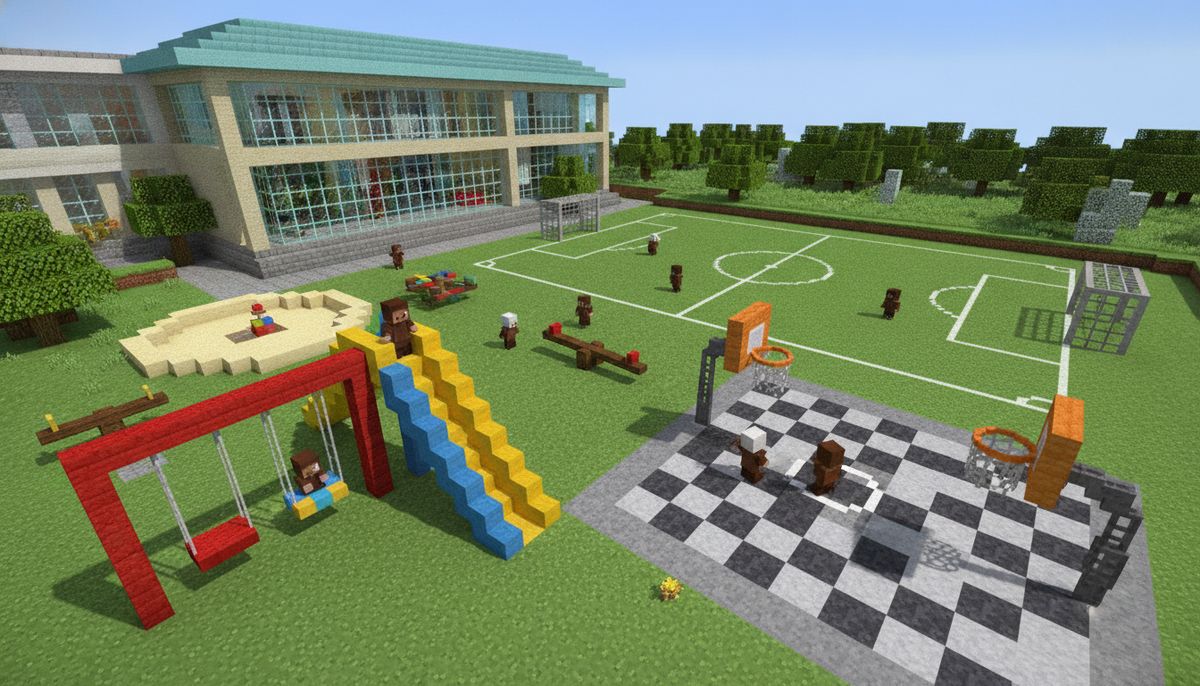
Building a functional school or community space in Minecraft requires more than just classrooms and hallways. Playground equipment, sports facilities, and outdoor recreational areas bring your educational builds to life. These specialized addons transform empty courtyards into vibrant gathering spaces where players can actually interact with swings, slides, basketball hoops, and other playground staples.
Playground mods serve multiple purposes beyond decoration. They add interactive elements to roleplaying servers, provide engaging activities for survival world communities, and offer builders authentic props for realistic modern builds. Teachers using Minecraft for educational purposes particularly benefit from these addons when creating virtual school environments that mirror real-world facilities.
The challenge lies in finding quality addons that include working mechanisms rather than static decoration blocks. The best playground addons for Minecraft Bedrock combine visual appeal with actual functionality, letting players sit on benches, swing on swing sets, and score points in sports games. This guide covers the top options available for download right now.
More Fun and Interactive Mods
Discover additional addons that bring entertainment and interactive gameplay to your Bedrock worlds.
Browse Collection →Complete Playground Equipment Addons
Several comprehensive addons focus specifically on playground equipment. The School Playground Addon delivers 40+ unique items including swing sets, see-saws, monkey bars, slides, and climbing frames. Each piece features custom models with block-based collision detection. The swing sets actually move when players interact with them, creating authentic motion physics.
Installation requires both the behavior pack and resource pack. Version 1.20.0 and above supports all features. The addon uses minimal entities, keeping performance smooth even on lower-end devices. Benches and picnic tables include sitting animations triggered by right-clicking. Slides use velocity mechanics to propel players downward when they jump onto the top platform.
The Modern Playground Pack takes a different approach with modular components. You get individual pieces rather than complete structures. This flexibility lets builders customize layouts to fit specific spaces. The pack includes 25 equipment types: four slide variations, three swing set designs, multiple climbing structures, and several ground cover options like rubber safety surfaces and woodchips.
Soccer goals, basketball hoops, and tetherball poles add sports functionality. The basketball system tracks scores through a scoreboard integration. Players collect the basketball item, aim at the hoop, and throw using the standard item throw mechanic. Successful shots increment the score counter. The soccer goals use area effect clouds to detect when balls cross the goal line.
Park Furniture Plus expands beyond traditional playground equipment to include benches, trash cans, water fountains, bike racks, and outdoor lighting. The 30-piece collection works perfectly alongside playground-specific addons. Water fountains dispense actual water bottles when players interact with them. Bike racks serve as storage points for vehicle mods if you have compatible bike addons installed.
Sports Field and Court Addons
Athletic facilities require specialized addons that go beyond basic playground equipment. The Sports Complex Addon provides full-scale basketball courts, tennis courts, soccer fields, and baseball diamonds. Each facility includes proper line markings, nets, goals, and equipment storage areas.
The basketball court measures 94x50 blocks at full scale, matching real NBA dimensions. Half-court versions are also available at 47x50 blocks for smaller builds. Court surfaces use custom textures for hardwood appearance. Hoops stand at regulation 10-block height with backboards and net textures. The rim hitbox registers successful shots.
Tennis courts come in singles and doubles configurations. Net posts, center straps, and boundary lines all include detailed models. The surface texture options include hard court, clay court, and grass court variants. Players can spawn tennis ball entities that bounce realistically using custom physics.
Soccer fields scale from youth sizes (70x40 blocks) to full FIFA regulation (120x75 blocks). Goal nets use transparent textures with visible mesh patterns. Corner flag posts, penalty boxes, and center circles all feature accurate markings. The addon includes both soccer balls and flags as decorative items.
Baseball diamonds provide pitcher's mounds, bases, dugouts, and outfield fencing. Home plate and base models sit flush with the ground for proper gameplay. Batting cages with net enclosures let you create practice areas. The pack also includes bleacher seating in multiple tier configurations.
Track and Field Equipment Addon adds running tracks, high jump equipment, long jump pits, shot put circles, and hurdles. Oval tracks come in 200m and 400m circumferences with lane markings. The rubberized track texture differentiates lanes visually. Starting blocks provide authentic detail for sprint events.
Outdoor Furniture and Site Amenities
Creating believable outdoor spaces requires supporting elements beyond core playground equipment. The Outdoor Recreation Pack delivers 50+ items including picnic areas, pavilions, grills, and shade structures.
Picnic tables come in wood, metal, and concrete variants. Each seats up to six players with proper sitting positions. Attached benches prevent spacing issues. Umbrella tables provide shade with colorful canopy options in eight different colors.
BBQ grills and outdoor cooking stations add functionality to park builds. Charcoal grills, gas grills, and built-in masonry BBQ pits all include opening lids and grate details. When combined with food mods, these can serve as actual cooking stations. Smoker models work well for larger community event spaces.
Shade structures range from simple canopies to elaborate pavilions. Small 4x4 block canopies work for individual picnic tables. Large 12x12 pavilions shelter multiple tables for group gatherings. Support posts use fence-style collision, allowing players to walk beneath without obstruction.
Park benches deserve special mention for variety. Classic wood-slat benches, modern metal designs, memorial benches with plaques, and curved conversation benches all add seating diversity. The Memorial Park Addon specifically focuses on benches, monuments, and commemorative features for dedicated memorial spaces.
Lighting options include lamp posts, bollard lights, and pathway illumination. Solar-powered light models add modern sustainability touches. All lighting elements emit actual light at level 14, providing functional illumination for nighttime use. Motion sensor lights can be configured using command blocks for interactive installations.
School-Specific Outdoor Features
School buildings need more than generic playground equipment. The Academic Campus Addon provides school-specific outdoor elements like flagpoles, announcement boards, outdoor classroom spaces, and campus signage.
Flagpoles stand at three heights: 15, 20, and 25 blocks. They include foundation bases, rope details, and functional flags that wave using entity animation. Choose from blank flags to customize with texture packs or pre-designed school flags, country flags, and institutional banners.
Outdoor learning spaces feature amphitheater seating, demonstration tables, and weather-resistant whiteboards. Stone or concrete seating terraces accommodate 20-30 students. Portable whiteboard stands let teachers conduct outdoor lessons. Specimen gardens with plant identification markers create outdoor biology classrooms.
Campus wayfinding elements include directory kiosks, building signs, and pathway markers. Directory boards display custom maps using item frames. Building identification signs mount near entrances with customizable text fields. Emergency callbox stations add safety infrastructure to larger campus builds.
Bike parking facilities go beyond simple racks. The addon includes covered bike shelters, locker-equipped bike storage, and repair stations with tool mounting. Scooter and skateboard racks accommodate alternative transportation. Motorcycle parking with designated spaces suits college campus builds.
Outdoor dining areas specifically designed for school cafeterias include lunch tables, trash/recycling stations, and condiment stands. Tables accommodate 8-10 players with integrated seating. Three-bin waste stations separate trash, recycling, and compost. Condiment stations provide napkin dispensers and sauce holders as decorative elements.
Comparison of Top Playground Addons
| Addon Name | Equipment Count | Interactive Features | Sports Items | File Size | Min. Version |
|---|---|---|---|---|---|
| School Playground Addon | 40+ | Swings, slides, seesaws | Basketball hoop | 8.5 MB | 1.20.0 |
| Modern Playground Pack | 25 | Modular swings, climbing | Basketball, soccer, tetherball | 12.3 MB | 1.19.50 |
| Sports Complex Addon | 60+ | Score tracking courts | Full fields for 4 sports | 18.7 MB | 1.20.30 |
| Park Furniture Plus | 30 | Water fountains, seating | Bike racks | 6.2 MB | 1.19.0 |
| Academic Campus Addon | 45 | Flagpoles, outdoor classrooms | Limited | 9.8 MB | 1.20.0 |
| Track and Field Equipment | 35 | Starting blocks, hurdles | Complete track facilities | 11.4 MB | 1.20.10 |
Installation and Compatibility Considerations
Most playground addons require both behavior and resource packs for full functionality. Download both files and import them in the correct order: resource pack first, then behavior pack. The game applies resource packs globally but attaches behavior packs to specific worlds.
Check version compatibility before installing. Addons built for 1.20.30 may not work properly on 1.19.x versions. The manifest.json file inside each addon lists minimum and maximum supported versions. Extract the .mcaddon file as a .zip to inspect the manifest if uncertain.
Addon conflicts typically involve duplicate item IDs or entity identifiers. Running multiple playground mods simultaneously usually works fine since they occupy different ID ranges. Problems arise when combining addons that modify base game items or entities. Test in a backup world before applying to main survival worlds.
Performance impact varies by addon complexity. Static decoration blocks add minimal overhead. Interactive entities like swinging playground equipment consume more resources. On devices with 2GB RAM or less, limit entity-heavy addons to prevent lag. The best practices for combining addons article covers optimization strategies in depth.
Some addons require experimental gameplay toggles. Enable these in world settings before creating the world. The "Holiday Creator Features" and "Upcoming Creator Features" options unlock advanced functionality. Enabling experiments prevents earning achievements in that world.
Storage space considerations matter for mobile players. A complete playground setup with multiple addons easily exceeds 50MB. The Sports Complex Addon alone requires 18.7MB. Clear cache and unused worlds before installing large addon collections. iOS devices with 64GB storage may need to manage installed content carefully.
Creative Building Tips for Playground Spaces
Location selection dramatically affects playground authenticity. Position equipment near houses or school buildings rather than isolated in wilderness. Flat terrain works best, though gentle slopes add visual interest for hillside parks. Natural depressions make excellent amphitheater sites.
Ground preparation matters more than many builders realize. Replace grass blocks with concrete, sand, or custom rubber surfacing blocks before placing equipment. Real playgrounds use safety surfaces under climbing equipment. Create 3-4 block safety zones around swings and slides using different ground textures.
Spacing prevents overcrowding. Allow 5-6 blocks between playground equipment pieces. This creates natural pathways and prevents visual clutter. Group similar items: swings in one area, slides in another, sports courts separated from play structures. Age-appropriate zoning works well for larger parks with toddler areas distinct from teen spaces.
Fencing defines boundaries and adds safety realism. Low decorative fencing surrounds tot lots. Chain-link fencing encloses sports courts and ball fields. Entrance gates with opening mechanisms create controlled access points. The building mods category includes several fence variety packs.
Landscaping integration prevents sterile appearance. Add trees for shade using leaf blocks at strategic points. Flower beds, hedge rows, and garden borders soften hard surfaces. Pathway systems connecting different playground zones use gravel, concrete, or brick patterns. Water features like fountains or splash pads make excellent centerpieces.
Lighting placement extends usability to nighttime. Position lamp posts every 8-10 blocks along pathways. Spotlight key equipment like climbing structures. Add security lighting near entrances and parking areas. Motion sensor lights combined with command blocks create realistic activation when players approach.
Accessibility features demonstrate attention to detail. Ramp access to elevated play structures accommodates all players. Wheelchair-accessible picnic tables have extended ends. Paved pathways wide enough for easy navigation. Accessible parking spaces near playground entrances. These details matter for educational builds and public server environments.
Combining Playground Addons with Other Content
Playground mods pair exceptionally well with furniture addons for indoor/outdoor continuity. Modern furniture packs often include outdoor variants that match playground aesthetics. Coordinate color schemes between interior and exterior spaces.
School builds benefit from combining playground addons with education-focused content. The best school and education addons guide covers classroom equipment, lockers, and administrative items that complement outdoor facilities. Create complete campus environments with both.
City builders should integrate playgrounds into neighborhood layouts. The city and town addons article lists urban infrastructure that works alongside recreational spaces. Parks become natural gathering points in city builds, breaking up dense housing blocks.
Multiplayer servers gain engagement through functional playground spaces. Designate parks as social hubs where players meet between adventures. Sports courts host organized events and competitions. The multiplayer addons guide covers systems for tracking scores and creating mini-games.
Realistic texture packs enhance playground authenticity. Wood textures for equipment, concrete for courts, and grass for fields all look better with realistic resource packs. Faithful-style packs maintain Minecraft aesthetics while improving detail levels.
Adventure map creators can incorporate playgrounds as safe zones or quest locations. A schoolyard might serve as a hub area in a horror map, or playgrounds could be puzzle locations requiring specific interactions. Check the adventure maps collection for inspiration on integrating recreational spaces into narratives.
Practical Recommendations for Different Build Types
Survival Players: Start with the Park Furniture Plus addon for basic amenities. Add 15-20 pieces gradually as you collect resources. Build near your main base for convenient access. Focus on functional items like benches and picnic areas before decorative playground equipment.
Creative Builders: Download the complete Sports Complex Addon for maximum variety. Combine it with Modern Playground Pack for comprehensive coverage. Dedicate 100x100 block areas minimum for full-scale recreational complexes. Experiment with custom color schemes using different concrete variants.
Server Administrators: Prioritize interactive features that create player engagement. Basketball courts with scoreboard integration, functional sports fields, and social gathering spaces. The School Playground Addon offers the best balance of visual appeal and interactive mechanics for community servers.
Educators: Focus on realistic school environments with the Academic Campus Addon. Combine with outdoor classroom features for lesson integration. Use playground spaces to teach real-world concepts about recreation, safety, and community design. Schedule virtual recess periods where students explore playground features.
Mobile Users: Choose compact addons to manage storage and performance. Park Furniture Plus at 6.2MB provides good variety without overwhelming devices. Avoid running multiple large sports complex addons simultaneously on phones or tablets with less than 4GB RAM.
Roleplaying Communities: Authenticity matters for immersive experiences. Select addons with sitting animations, interactive equipment, and realistic scaling. Combine playground content with realistic mods for complete environmental immersion. Designate specific playground areas as in-character social spaces.
Start simple and expand gradually. One well-designed playground beats five mediocre ones cluttering your world. Download 1-2 addons initially, master their features, then add complementary content. The furniture collection and fun mods category contain additional options for expanding recreational builds beyond traditional playground equipment.