
Why Everyone Is Searching for the Omnidroid Addon Right Now
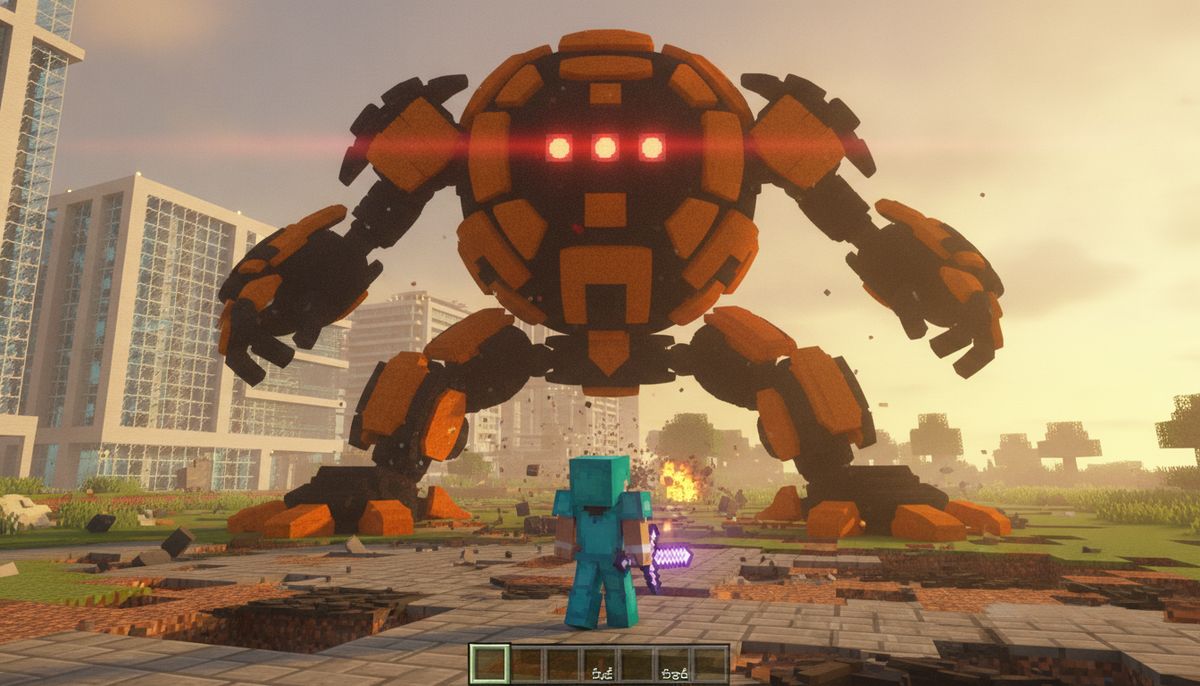
The Omnidroid, originally created by SwayleMC for Java Edition with over 35,000 downloads, has exploded across Minecraft Bedrock communities. Mobile players are hunting for this addon after TikTok videos from July 2026 and October 2025 YouTube demonstrations showed the terrifying mechanical boss in action. The robots are based on The Incredibles' superhero-killing battle machines created by Syndrome as part of Operation Kronos, bringing cinematic boss fights to survival worlds.
The search spike comes from players tired of easy vanilla bosses. Once you have maxed Netherite gear, the Wither and Ender Dragon feel trivial. This addon delivers 10 escalating tiers of mechanical nightmares, with the final version sporting 10,000 HP and attacks that make even geared-up players sweat. The addon installs as a simple .mcaddon or .mcpack file, making it accessible on iOS, Android, and Windows without complicated setup.
Content creators are pairing the Omnidroid with superhero addons for epic crossover battles. Watching Iron Man-style heroes clash with Syndrome's robots has fueled massive organic search traffic. The mod's compatibility with Minecraft Bedrock 1.20 through 1.21 versions means nearly every mobile player can run it.
What Makes the Omnidroid Addon Different
Most boss addons drop a single tough mob and call it done. The Omnidroid addon builds an entire progression system. It introduces 10 escalating tiers of massive mechanical bosses, forcing you to adapt tactics as you climb the robot roster. Lower tiers test your basics. Higher tiers demand arena preparation, potions, and perfect positioning.
The baseline version starts with 1,000 HP and a nasty knockdown attack. That sounds manageable until you realize knockdown creates distance, and the robot closes gaps fast. By the fifth tier at 5,000 HP, these machines throw you across the map and unleash devastating area-of-effect arm spin attacks. You cannot facetank these like traditional bosses.
The final tier transforms combat entirely. At 10,000 HP, the top-level Omnidroid flings players like ragdolls, sweeps with rotating strikes, and transforms into a high-speed ball to crush everything. The ball mode is particularly brutal—it tracks players, smashes through blocks, and forces constant repositioning. Standard boss arenas fail here. You need open space to dodge or enclosed traps to slow it down.
In the Java version, players can adjust speed, laser shoot time, or health through an in-game config command, though Bedrock port features vary by version. Some ports include customization; others lock settings to maintain balance.
Complete Feature Breakdown
The Omnidroid addon delivers more than just a health bar increase across tiers. Each version introduces new attack patterns and behavioral tweaks that change how you fight.
| Tier | Health | Primary Abilities | Combat Strategy |
|---|---|---|---|
| 1-3 | 1,000-3,000 HP | Knockdown attacks, basic melee | Circle-strafe, ranged weapons |
| 4-6 | 4,000-6,000 HP | Player throws, area sweeps | Arena boundaries, potion buffs |
| 7-9 | 7,000-9,000 HP | Combo attacks, increased aggro | Team coordination, healing stations |
| 10 | 10,000 HP | Ball mode, ragdoll throws, sweeps | Full endgame gear, environmental traps |
The robot can pick you up, throw you, or stomp on the player, creating unpredictable fight momentum. Unlike scripted boss sequences, Omnidroid combos these abilities dynamically. One moment you are dodging sweeps; the next you are airborne after a throw. Recovery time matters. Miss your landing, and a stomp finishes you.
The design pulls directly from The Incredibles films, where each Omnidroid learned from previous battles. Higher tiers feel smarter—they anticipate movement, punish pattern repetition, and exploit terrain. Players report tier 8 and above actively baiting shield drops before executing devastating combos.
The addon can be combined with other superhero addons to create epic battles in Minecraft. Load the Omnidroid alongside hero power mods, and you recreate movie-style showdowns. This compatibility drives heavy multiplayer usage and roleplay scenarios.
How to Install the Omnidroid Addon on Bedrock Edition
Installation follows standard Bedrock addon procedures but requires specific file handling. The process works identically on iOS, Android, and Windows 10/11 once you have the correct file format.
Step 1: Download the Addon File
Download the .mcaddon or .mcpack file from a trusted source. Verify the file extension before opening. Both formats work, but .mcaddon handles behavior and resource packs simultaneously, while .mcpack may separate them. Most Omnidroid distributions use .mcaddon for simplicity.
File size typically ranges from 250-300 KB for the base addon. Larger files may include extra textures or animations. Check version compatibility—look for "1.20-1.21" or specific version numbers matching your game build.
Step 2: Import to Minecraft
On mobile (iOS/Android), tap the downloaded file. Your device prompts "Open in Minecraft." Confirm, and the game launches automatically, importing the addon to your library. On Windows, double-click the file or right-click and select "Open with Minecraft."
The import screen appears briefly. Wait for confirmation before proceeding. If import fails, verify you have sufficient storage and the latest Minecraft Bedrock update installed.
Step 3: Enable in World Settings
Create a new world or edit an existing one. Navigate to the bottom section where Resource Packs and Behavior Packs appear. Enable both packs and turn on Experiments if needed. The Omnidroid requires experimental gameplay toggles for custom entity behavior.
Experimental mode carries risks—backup your world before enabling. Some addons conflict when experimental features overlap. Test in a disposable world first.
Step 4: Spawn and Battle
The Omnidroid does not spawn naturally. You typically receive a spawn egg through creative inventory or crafting recipes included in the addon. Check the addon description for spawn mechanics—some versions require command blocks, others include naturally spawning conditions in specific biomes.
Prepare before summoning. Stock healing, armor, and weapons. Build an arena with escape routes. Lower tiers forgive mistakes; higher tiers do not.
For detailed addon installation troubleshooting, consult our guide on how to download and install Minecraft mods on Bedrock Edition.
Is the Omnidroid Addon Safe to Download?
Addon safety depends entirely on your download source. The original Java mod by SwayleMC on CurseForge has over 35,000 downloads and established legitimacy. Bedrock ports from known creators like CraftPorts carry similar reliability when distributed through recognized platforms.
Red flags include file sizes drastically larger than expected (megabytes instead of kilobytes for behavior packs), requests for device permissions beyond file access, and download links requiring survey completions. Legitimate addon files never ask for contacts, location, or camera access.
Verify the file format before opening. Minecraft addons end in .mcaddon, .mcpack, or occasionally .zip containing behavior/resource folders. Executable files (.exe, .apk) or documents (.doc, .pdf) disguised as addons are malware. Delete immediately.
Community reputation matters. Creators with YouTube channels, multiple published addons, and active comment sections demonstrate legitimacy. SwayleMC, the original Java creator, has multiple successful projects. Ports from established Bedrock addon developers follow similar patterns.
Check our full safety guide at Are Minecraft Mods Safe? How to Download Without Viruses for comprehensive protection strategies.
Combat Tips and Strategy for Each Tier
Fighting the Omnidroid requires adapting tactics as you climb tiers. What works against tier 1 fails spectacularly at tier 7.
Early Tiers (1-3): Learning Mechanics
These versions teach you attack patterns without overwhelming punishment. Focus on mastering dodge timing. The knockdown attack has a visible wind-up—watch the arms. Circle-strafing works here because tracking speed is moderate.
Ranged weapons dominate early fights. Bows with Power V and piercing crossbows let you maintain safe distance. Save melee for openings after dodge rolls. Enchantments matter less than positioning—unenchanted diamond gear suffices with proper movement.
Mid Tiers (4-6): Gear and Arena Prep
Health pools exceed 5,000 HP, turning fights into endurance tests. Bring Sharpness V Netherite swords or axes. Strength II potions accelerate clear times. Area-of-effect arm spin attacks force you to build arena boundaries—use obsidian walls to contain sweeps while maintaining dodge space.
Team fights become viable here. Designate one player for aggro management while others deal damage. Rotate healing responsibilities. Multiplayer synergy counters the throw mechanic since scattered players reduce wipe potential.
Top Tiers (7-10): Endgame Challenge
The final tier at 10,000 HP transforms into a high-speed ball, sweeping areas with rotating strikes. Ball mode tracks players through walls. Build trap channels to redirect charges. Lava pools, cobweb corridors, and vertical shafts slow ball-form momentum.
Totems of Undying become mandatory. Budget at least two per player for tier 10. Enchant everything—Protection IV on all armor pieces, Respiration for water escapes, Feather Falling for throw landings. Golden apples (normal and enchanted) provide crucial mid-fight healing.
Environmental tactics shine here. Lure the Omnidroid into pre-built TNT traps or redstone crusher systems. Pure melee combat at tier 10 is possible but demands flawless execution. Most players mix traps with direct damage.
Boss Fight Addons
Explore more challenging boss encounters beyond vanilla Minecraft. From dragons to mechanical titans, these addons test your endgame gear and combat skills.
Browse Collection →Combining with Other Superhero and Boss Addons
The Omnidroid's real strength emerges when paired with complementary addons. Players create crossover scenarios matching Marvel or DC heroes against Syndrome's machines.
Superhero addons typically add powers, suits, and abilities. Load those alongside the Omnidroid, and you transform Minecraft into a battle arena. Iron Man suits versus tier 8 Omnidroids create cinematic spectacle. Spider-Man web mechanics counter throw attacks. Thor's lightning synergizes with team compositions.
Check compatibility before combining. Some addons conflict over entity IDs or behavior pack priority. Test combinations in creative mode first. Most modern Bedrock addons play nicely together, but conflicts still occur.
Our Best Superhero Addons for Minecraft Bedrock Edition guide covers top hero mods that pair well with boss fights. For more mechanical challenges, browse weapons and armor mods that enhance combat depth.
Boss stacking works too. Run the Omnidroid with other boss fight addons to create multi-tier raid events. Coordinate spawn eggs to stage progressive encounters. Survival servers use this to design endgame content beyond vanilla offerings.
Alternatives and Similar Boss Addons
Not sold on the Omnidroid? Bedrock offers dozens of challenging boss alternatives. Some match the difficulty; others provide different mechanics.
The Kaiju Craft Revamp Addon delivers Godzilla-scale monsters with comparable health pools. Fights focus on terrain destruction rather than precision dodging. Great for players preferring spectacle over technical combat.
Horror fans gravitate toward The One Who Watches Addon or Dwellers Addon. These mods trade straightforward boss fights for psychological tension and ambush mechanics. Lower health but higher fear factor.
For pure combat depth without movie tie-ins, check our Top 10 Minecraft Mobs Mods for Bedrock roundup. Several entries add custom bosses with unique mechanics—magic-based, ranged specialists, or swarm controllers.
The Omnidroid stands out for its tier progression system. Most boss addons provide one or two variants. Ten escalating versions create a campaign feel rarely seen in Bedrock mods. That progression hooks players who enjoy long-term goals.
Mobs and Creatures
Discover hundreds of custom creatures and hostile mobs that expand your Minecraft world. From peaceful companions to terrifying monsters, refresh your survival experience.
Browse Collection →Performance and Compatibility Notes
The Omnidroid addon runs smoothly on most devices, but higher tiers stress lower-end hardware. The ball transformation and area sweeps render multiple entities and particle effects simultaneously. Phones older than three generations may experience frame drops during tier 8-10 fights.
Reduce particle settings in video options if lag occurs. Turn off fancy graphics and clouds. Lower render distance to 8-10 chunks during boss fights. These tweaks maintain playable framerates on mid-range devices.
Multiplayer performance varies by server specs. Dedicated servers handle the addon better than Realm hosting. Peer-to-peer connections struggle with tier 10 due to entity sync requirements. For large groups fighting top-tier Omnidroids, host on a dedicated server or Windows 10 world with strong upload speeds.
The addon's experimental gameplay requirement can conflict with world generation mods. Dimension addons, biome overhauls, and structure generators sometimes clash with experimental toggles. Test compatibility before committing to a long-term survival world. Backup frequently when running multiple experimental addons.
Version specificity matters. While the addon supports 1.20-1.21, specific builds within those versions may behave differently. If you experience crashes or spawn failures, check your exact game version against the addon's compatibility notes. Update Minecraft Bedrock to the latest stable release for best results.
Community Reception and Content Creation
YouTube creators and TikTok showcases drove the Omnidroid's viral spread. October 2025 YouTube videos demonstrated V8 and V9 variants, generating millions of views. Comments on those videos overflow with download requests and fight strategy debates.
The addon's cinematic origin helps content appeal. Non-Minecraft audiences recognize The Incredibles, broadening video reach beyond typical mod showcases. Creators stage elaborate battles, build movie-accurate arenas, and script roleplay scenarios around Syndrome's robot army.
Community modifications exist. Players adjust spawn rates, tweak health values, or add custom drops through behavior pack edits. These unofficial variants circulate Discord servers and forums, creating sub-communities around preferred difficulty levels.
Criticism focuses on difficulty spikes between tiers. Some players find the jump from tier 6 to tier 7 steeper than earlier progressions. Others want more visual distinction between robot versions—current tiers look similar beyond size scaling. Creator SwayleMC accepts feedback on the Java version; Bedrock porters incorporate suggestions into their adaptations.
Overall reception remains overwhelmingly positive. The addon fills Bedrock's boss content gap without requiring Java Edition. Mobile players especially appreciate accessible endgame challenges that do not demand expensive hardware or complex modding knowledge.
Why This Matters for Bedrock Players
Minecraft Bedrock historically lagged behind Java in custom content depth. Java players enjoy extensive mod libraries through Forge and Fabric. Bedrock relied on official marketplace offerings and simpler addons—until creators like SwayleMC and porters like CraftPorts bridged that gap.
The Omnidroid proves Bedrock can handle complex boss mechanics, multi-tier progression, and cinematic content. It validates mobile and console Minecraft as legitimate platforms for hardcore survival challenges. You no longer need a gaming PC to experience meaningful post-Ender Dragon content.
This shift empowers Bedrock's massive player base. Mobile Minecraft dominates global player counts. Addons like the Omnidroid cater to that majority, delivering PC-quality experiences on phones and tablets. The addon economy expands as creators see demand for sophisticated Bedrock content.
For survival purists, the Omnidroid extends world longevity. After conquering vanilla bosses, many players abandon worlds for lack of challenge. Ten escalating Omnidroid tiers provide weeks of progression. Combine with other survival addons for truly endless gameplay.
The addon also showcases what is possible when creators collaborate across platforms. Java mod talent ported to Bedrock multiplies content availability. This trend accelerates as porting tools improve and cross-platform demand grows.
Getting Started with Your First Fight
Ready to battle your first Omnidroid? Start small. Summon tier 1 in a creative test world. Study its attack patterns without survival pressure. Note the knockdown telegraph, melee range, and movement speed.
Switch to survival with diamond gear. Fight tier 1 legitimately. Apply lessons from creative observation. You will likely die the first attempt—that is expected. Learn from each death. Adjust arena design, potion load-out, or weapon choice.
Progress to tier 2 and 3 using the same iterative approach. Do not rush to higher tiers. Each version teaches skills needed for the next. Skipping ahead results in frustration and wasted resources.
Document your fights. Record or screenshot successful strategies. Build a personal guide tracking what works per tier. Share findings with friends or community forums. Collaborative strategy refinement makes higher tiers more achievable.
Most importantly, match the challenge to your enjoyment. If tier 5 feels perfect, stop there. Not every player needs to defeat tier 10. The addon succeeds by offering options. Some want brutal difficulty; others prefer accessible endgame content. Ten tiers accommodate everyone.
Browse our complete collection of mobs addons to find your next challenge after mastering the Omnidroid. For installation help, visit our Minecraft Bedrock Addons guide. Mobile players should check platform-specific instructions in our Minecraft Mods for Android and iOS articles.
The Omnidroid awaits. Ten tiers of mechanical terror. 10,000 HP of pure challenge. Grab your gear and prove you can outsmart Syndrome's deadliest creation.