
What is the Skibidi Toilet Addon and Why Is Everyone Searching for It?
Skibidi Toilet is a viral YouTube series created by animator Alexey Gerasimov that has racked up billions of views since its debut in February 2023. The series features human-headed toilets engaged in a war with humanoids, specifically Cameramen, Speakermen, and TV Men who have electronics for heads. The series garnered tens of millions of views per episode, with some episodes exceeding hundreds of millions of views, making it a cultural phenomenon among Generation Alpha.
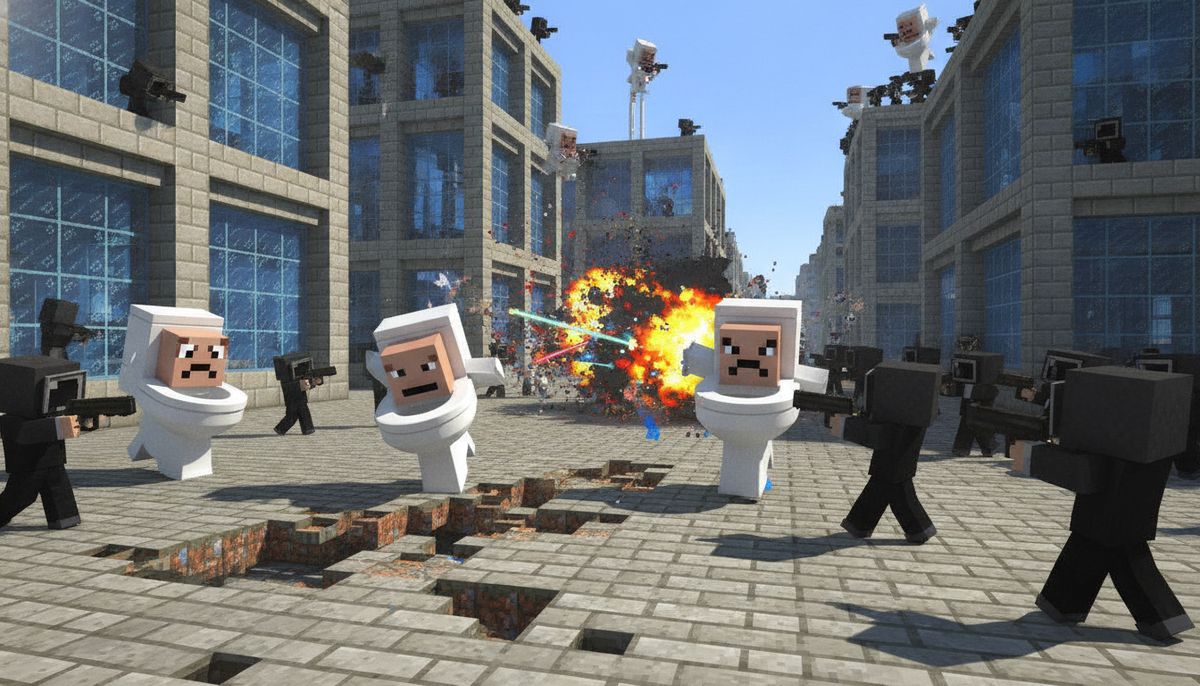
The Skibidi Toilet addon for Minecraft Bedrock brings this absurd, action-packed universe directly into your game. Players have been searching for it relentlessly because it delivers exactly what the viral series promises: chaotic battles, bizarre mobs, and the chance to pick sides in an all-out war between toilets and humanoid factions. The addon transforms your Minecraft world into a battlefield where you can recruit armies, fight boss battles, and experience the same surreal humor that made the YouTube series explode.
Multiple versions of Skibidi Toilet addons exist, but the standout is Skibidi Toilet Cold War by Rafael1989. This mod has become the go-to choice for fans who want the full experience with advanced combat mechanics and massive boss encounters.
Key Features of Skibidi Toilet Cold War Addon
Skibidi Toilet Cold War by Rafael1989 has accumulated over 43,100 downloads and was updated 23 days ago, making it one of the most actively maintained Skibidi addons available. Here's what makes this particular version stand out from the pack.
Dynamic JavaScript Combat System
The addon features a JavaScript combat system with unique elite abilities including ultimates, combos, and elemental effects. Forget basic mob fights where characters just stand and punch. Dynamic battles move across the map with NPCs creating distance, knocking each other back, and spreading fights through the terrain. This creates genuine combat scenarios instead of static brawls.
Over 30 Bosses with Unique Abilities
The addon includes over 30 bosses with unique abilities and animations. G-Man Skibidi Toilet appears as a rare boss that can shoot lasers and fly, making encounters genuinely challenging. Bosses feature phases and mid-fight transformations, so you can't just spam attacks and expect to win. Each boss requires different strategies, and some transform mid-battle to keep you on your toes.
Titan versions of characters come with increased size and strength, serving as ultimate challenges that test your army-building and tactical skills.
Choose Your Side: Alliance vs Toilets vs Astros
Total war erupts between the Alliance (Cameramen, Speakermen, and upgraded variants) and the Astros, with Toilets acting as a third hostile force. This three-way conflict creates unpredictable battles where alliances shift and chaos reigns. You're not just fighting one enemy type but navigating a complex web of hostile factions that attack each other as much as they attack you.
The Alliance consists of heroic Cameramen and Speakermen who fight to protect the world. CameraHeads can fight toilets or ally with them, while SpeakerMen and TV Men bring audio and visual capabilities to combat. On the opposing side, Toilets swarm in various forms, from basic units to specialized variants. The Astros represent a third hostile faction that adds another layer of danger to your world.
Recruitment System and Army Building
The addon includes a recruitment system where you use gold to recruit allies and fight alongside your own army. This transforms survival gameplay from solo combat into strategic warfare. Gather gold, recruit your preferred faction members, and build an army strong enough to take on boss encounters or defend against wave invasions.
The recruitment mechanic adds depth beyond typical mobs addons. You're not just summoning creatures but creating strategic forces that fight alongside you in dynamic battles.
Progressive Wave Invasion Mode
Progressive wave invasion mode can be activated using the /function game/start command. This feature creates escalating challenges where increasingly difficult enemies spawn in waves. It's perfect for players who want structured combat challenges or cooperative defense scenarios with friends.
Wave mode tests both your combat skills and resource management. Build defenses, position your recruited army strategically, and prepare for boss waves that culminate each invasion tier.
How to Download and Install the Skibidi Toilet Addon on Bedrock Edition
Installing addons on Minecraft Bedrock works differently than Java Edition mods, but the process is straightforward once you understand the file types. Here's how to get Skibidi Toilet running on iOS, Android, and Windows.
Understanding Addon File Types
Bedrock addons come as .mcpack files containing a single behavior pack or resource pack, or as .mcaddon files which bundle both behavior and resource packs together. You may find two .mcpack or .mcaddon files where one is the addon (Behavior Pack) and the other is the texture pack (Resource Pack), and both must be installed for the addon to work properly.
The Skibidi Toilet Cold War addon typically comes as separate files for behavior and resources, so make sure you download and install both components.
Installation Steps for Windows 10 and 11
Download a Bedrock addon as a .mcpack file, then open the file by double-clicking it on Windows, which causes Minecraft to launch and import it automatically. When opening a .mcpack, a pop-up notification alerts you that you've successfully imported the pack, which then becomes available when editing worlds in either the Behavior Pack tab or Resource Pack tab.
After importing:
- Launch Minecraft Bedrock Edition
- Create a new world or edit an existing one
- Navigate to the Behavior Packs section and activate the Skibidi Toilet behavior pack
- Go to Resource Packs and activate the Skibidi Toilet resource pack
- Enable Experimental Features if prompted (many advanced addons require this)
- Start your world and check that the addon loaded correctly
For detailed installation guidance, check out our complete guide on how to download and install Minecraft mods on Bedrock Edition.
Installing on Android Devices
To install an addon in MCPE Android, download a compatible Bedrock addon file, open it with Minecraft, wait for the "Successfully imported" message, then go to Play > Edit World > Behavior Packs and Resource Packs and tap Activate. If the file downloads as .mcaddon.zip or .mcpack.zip, rename it and remove the extra .zip from the end.
The process mirrors Windows installation but uses your mobile file browser:
- Download the addon files to your device
- Open your file manager (Downloads folder)
- Tap the .mcpack or .mcaddon file
- Select "Open with Minecraft"
- Wait for the import success message
- Edit your world and activate both behavior and resource packs
Android users sometimes encounter issues with file extensions. Do not unpack .mcaddon or .mcpack files, and if the browser added .zip, rename the file back to its original extension.
iOS Installation (iPhone and iPad)
On iOS devices, tap the downloaded .mcpack in the Files app or use "Open in Minecraft" from the download notification, which imports automatically. The Files app serves as your gateway to addon installation on Apple devices.
iOS follows the same activation steps as other platforms once files import. Navigate to world settings, enable both pack types, and toggle any required experimental features before loading your world.
For platform-specific troubleshooting and additional methods, our guide on Minecraft mods for iOS covers iOS installation challenges and workarounds.
Activation Requirements and Experimental Features
Many Skibidi Toilet addons use advanced JavaScript features that require experimental gameplay options. After importing the addon, edit your world settings and look for the "Experiments" section. Enable options like "Holiday Creator Features" or "Beta APIs" as prompted by the addon description.
The Skibidi Toilet Cold War addon is optimized and tested on low-end devices including Motorola G04 with no lag even during large battles, so performance shouldn't be a concern even on budget phones.
Is the Skibidi Toilet Addon Safe to Download?
Addon safety is a legitimate concern, especially with trending content that attracts sketchy download sites. The Skibidi Toilet Cold War addon by Rafael1989 is available on reputable platforms like CurseForge and MCPEDL, both established sources for Bedrock content.
Addons from trusted sources like MCPEDL and the official Minecraft Marketplace are safe, so always download from reputable websites. Never install .exe or .apk files disguised as Minecraft addons, as legitimate addons are always .mcpack, .mcaddon, or .zip files.
Key safety indicators:
- File extension is .mcpack or .mcaddon, never .exe or .apk
- Download from established addon sites, not random file-sharing platforms
- Check user reviews and download counts (43,100+ downloads indicates community trust)
- Verify the creator name matches the official addon page
- Scan files with antivirus software if you're unsure
For comprehensive information about addon safety and how to avoid malicious downloads, read our detailed guide on whether Minecraft mods are safe.
The Skibidi Toilet Cold War addon contains no malicious code and functions purely within Minecraft's addon framework. It's an unofficial fan project based on the Skibidi Toilet universe, created by a community developer who actively maintains and updates the content.
Compatibility and Supported Versions
The Skibidi Toilet Cold War addon supports Minecraft Bedrock versions 1.21.132, 26.0, 26.3, 26.10, 26.11, and 26.30. This broad compatibility means most players on current Bedrock versions can run the addon without issues.
Minecraft Bedrock uses a different versioning system than Java Edition. The "26.x" versions refer to the new Bedrock version numbering introduced in recent updates. The addon is compatible with Minecraft Bedrock Edition 1.20 and 1.19, covering both recent and slightly older game versions.
| Version Type | Supported Versions |
|---|---|
| New Format | 26.0, 26.3, 26.10, 26.11, 26.30 |
| Legacy Format | 1.21.132, 1.20, 1.19 |
| Platform | Windows 10/11, Android, iOS |
Device compatibility extends from high-end gaming PCs to budget smartphones. The optimization work ensures smooth performance across the Bedrock ecosystem, whether you're playing on an iPad, Android phone, or Windows PC.
Gameplay Tips and Strategies
Starting with the Skibidi Toilet addon can feel overwhelming with 30+ bosses, multiple factions, and complex combat mechanics. Here are practical strategies to survive and thrive.
Early Game Survival
When you first load a world with this addon, hostile Skibidi Toilets and Astros will spawn throughout your world. Build a secure base quickly. Stone walls and proper lighting help, but the dynamic combat system means enemies can break through weak defenses.
Focus on gathering gold early. The recruitment system depends on gold resources, and building even a small army makes survival significantly easier. Mining expeditions become critical, not just for tools and armor but for your military force.
Building Your First Army
Start recruiting basic Cameramen once you've accumulated enough gold. These units provide frontline defense and can handle standard Toilet mobs. As you gather more resources, add Speakermen to your army for their audio-based attacks.
Position recruited units around your base perimeter. The dynamic combat AI means they'll patrol and engage threats automatically, creating a defensive network. Don't send your entire army on raids at once—keep reserves to defend your base during wave invasions.
Taking on Boss Fights
Boss encounters require preparation. G-Man Skibidi Toilet can shoot lasers and fly, making it a challenging aerial threat. Bring ranged weapons and recruit flying Alliance units when possible. Fight bosses in open areas where you can maneuver and avoid being cornered.
Titan bosses represent the ultimate challenges. These massive variants need coordinated army attacks. Recruit diverse unit types—Cameramen for frontline damage, Speakermen for crowd control, and TV Men for their special abilities. Watch for transformation phases mid-fight and adjust tactics accordingly.
Wave Invasion Strategy
Progressive wave invasion mode activates using /function game/start. Before starting wave mode, prepare extensively. Build fortifications, stockpile gold for emergency recruitment, and position your best units in defensive formations.
Each wave increases in difficulty with tougher enemies and more complex spawn patterns. Focus on defending key chokepoints rather than spreading your forces thin. Let Alliance members handle standard mobs while you focus on eliminating priority targets like mini-bosses.
Alternative Skibidi Toilet Addons and Similar Content
While Skibidi Toilet Cold War stands out as the most feature-complete option, other versions exist with different approaches to the viral series.
Sharky's Skibidi Toilet Remastered offers a simpler take on the concept. It features the Skibidi Toilet as a hostile mob that attacks players with 3 damage per hit and doesn't spawn naturally, requiring summon via spawn egg. This stripped-down version works well for players who want Skibidi content without the complex faction warfare and boss systems.
The generic Skibidi Toilet Addon includes basic mob implementations. It features over 30+ bosses with different abilities and animations, along with flushable and unflushable toilets that can be killed or spared. This middle-ground option provides boss content without the advanced JavaScript combat of Cold War.
For players interested in viral internet content brought to Minecraft, check out these related addons:
Viral Meme and Internet Culture Addons
Explore addons inspired by trending internet phenomena, from horror entities to comedic characters that became cultural touchstones.
Browse Fun Mods →The Goatman addon brings another viral creature to Bedrock, while the Happy Ghast addon transforms Nether mobs into wholesome companions. Both represent the trend of internet culture crossing into Minecraft content creation.
Skibidi Toilet Lore and the Source Material
Understanding the YouTube series enhances your addon experience. The Skibidi Toilet series by DaFuq Boom features toilets with men's faces singing, and the story follows the Skibidi Toilets' attempt to conquer the world while CameraHeads resist them.
The first episode came out on February 7, 2023, as an 11-second YouTube Short, and the show was initially created as a joke video but has since become one of the most popular web series on the platform. What started as absurdist humor evolved into an ongoing narrative with factions, character development, and escalating conflicts.
The series has currently aired 79 episodes across 25 seasons, providing extensive source material for addon creators. Episodes rarely use dialogue, relying instead on visual storytelling and action sequences—a format that translates surprisingly well to Minecraft's blocky aesthetic.
The addon faithfully recreates key elements from the series. G-Man Toilet serves as the primary antagonist in both the YouTube shorts and the Minecraft mod. Titan variants mirror the massive characters that appear during climactic series moments. The three-way faction conflict reflects the complex alliances and betrayals that drive the YouTube narrative forward.
Combining Skibidi Toilet with Other Addons
The Skibidi Toilet addon works alongside many other Bedrock modifications, but compatibility requires careful consideration. Combat-focused addons generally layer well together, while mods that heavily modify mob spawning or behavior systems may conflict.
Safe addon combinations include weapons packs that add guns or advanced armaments. Since Skibidi Toilet focuses on faction warfare, additional weapon options enhance combat variety without breaking core mechanics. Armor addons similarly complement the combat-heavy gameplay by providing better defensive options for extended battles.
Avoid combining with other major mobs overhauls that spawn their own hostile factions. Multiple addon packs trying to control mob spawning simultaneously often create conflicts, crashes, or performance issues. Choose one primary mob addon as your world's focus.
For guidance on safely running multiple addons together, read our article on how to combine addons on Bedrock, which covers load order, conflict resolution, and performance optimization.
Performance Optimization Tips
Despite the addon's complex systems, optimization and testing on low-end devices including Motorola G04 ensures no lag even during large battles. Still, players can take additional steps to maintain smooth performance during intense faction warfare.
Limit the number of recruited units active simultaneously. While building massive armies is tempting, 15-20 well-positioned units perform better than 50+ causing processing strain. Quality beats quantity, especially during boss fights where strategic positioning matters more than raw numbers.
Adjust your render distance in Minecraft settings. Lower render distances reduce the number of entities processed simultaneously, helping performance during wave invasions. You don't need maximum render distance to enjoy the addon's combat mechanics.
Clear out old mob spawns periodically. Use commands or simply eliminate hostile mobs in distant chunks to prevent entity count from spiraling. The dynamic combat system means battles spread across terrain, potentially leaving defeated entities scattered far from your base.
For comprehensive performance improvement techniques, explore our guide to FPS-friendly texture packs, which covers optimization strategies that work alongside addons.
Why Skibidi Toilet Represents a New Era of Bedrock Content
The Skibidi Toilet phenomenon illustrates how quickly internet culture translates into Minecraft content. As of November 2023, YouTube videos associated with Skibidi Toilet accumulated over 65 billion views, demonstrating the series' massive cultural impact. The Minecraft addon community responded within months, creating multiple interpretations of the viral concept.
This rapid content creation cycle benefits Bedrock players. What starts as a trending YouTube series becomes playable Minecraft content almost immediately. The community-driven development model means popular internet phenomena transform into immersive game experiences at unprecedented speed.
The technical sophistication of Skibidi Toilet Cold War also showcases Bedrock's expanding capabilities. JavaScript integration, dynamic combat AI, and phase-based boss encounters push addon boundaries beyond simple mob additions. These features rival what many Java Edition mods accomplished years ago, signaling Bedrock's maturation as a modding platform.
Future trending content will likely follow this pattern: viral internet phenomenon emerges, captures Generation Alpha's attention, and becomes Minecraft content within weeks. The Skibidi Toilet addon demonstrates both the speed and quality possible in this new content creation paradigm.
Get Started with Skibidi Toilet Battles
The Skibidi Toilet addon brings one of 2023-2024's biggest viral sensations directly into Minecraft Bedrock Edition. With over 43,100 downloads, active maintenance, and advanced features like JavaScript combat and 30+ bosses, the Cold War version by Rafael1989 delivers the definitive Skibidi experience.
Whether you're a fan of the YouTube series or just looking for chaotic faction warfare with absurd humor, this addon transforms standard Minecraft survival into something genuinely unique. The recruitment system, dynamic battles, and three-way faction conflicts create emergent gameplay moments you won't find in vanilla Minecraft.
Ready to jump into the toilet war? Download the Skibidi Toilet Cold War addon from trusted sources, follow the installation steps for your platform, and prepare for battles unlike anything else in Bedrock Edition.
More Trending Bedrock Addons
Discover the latest viral addons, from horror entities to boss battles and everything in between.
Explore Fun Addons →