Why Pacific Rim Searches Are Spiking Right Now
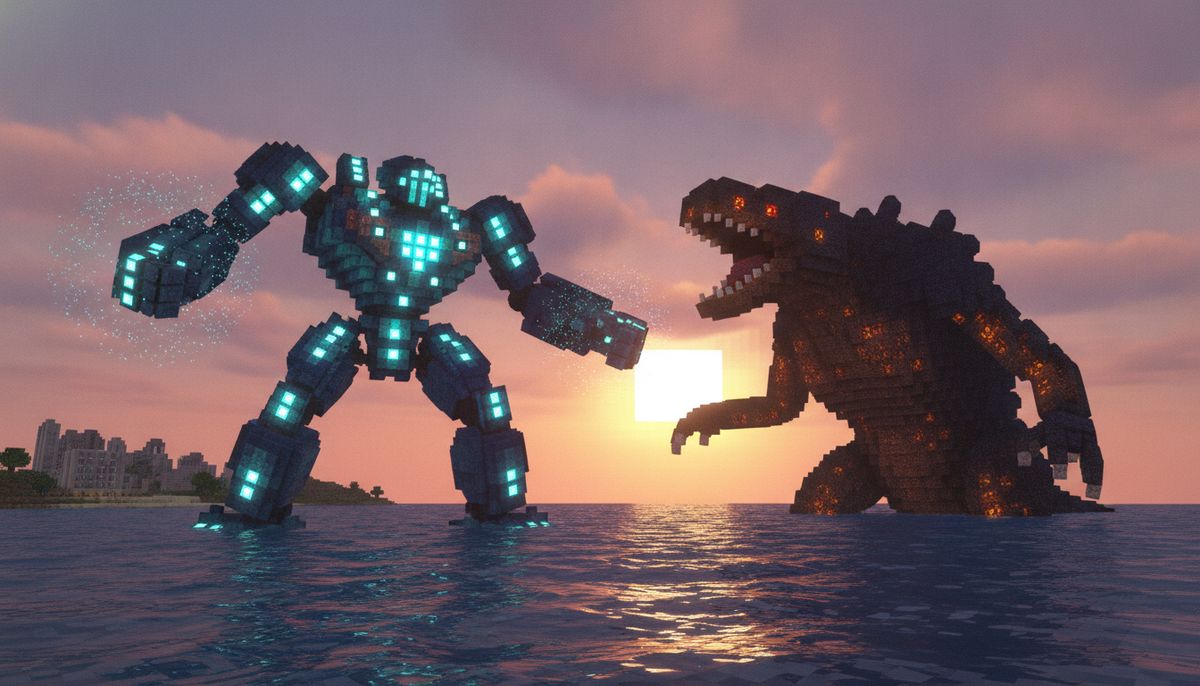
Giant robots battling interdimensional monsters in Minecraft. That is exactly what thousands of Bedrock players are searching for this month. The Pacific Rim addon has exploded across TikTok and YouTube, racking up tens of thousands of likes on videos showcasing pilotable Jaegers crushing Kaiju in blocky showdowns. TikTok videos featuring the addon have gained over 50,000 likes, with fresh content posted as recently as September 2026.
Monster122, a Filipino addon creator specializing in kaiju content for Minecraft Bedrock, built this phenomenon from the ground up. His work brings the high-stakes robot combat from the Pacific Rim film franchise directly into Bedrock Edition. Players can pilot massive mechs, summon terrifying beasts, and recreate the cinematic battles that defined Guillermo del Toro's 2013 blockbuster and its sequels.
The addon taps into the same appeal that made the films successful: humanity versus impossible odds, teamwork piloting enormous machines, and monsters so big they reshape cities. Translating that into Minecraft creates exactly the kind of spectacle players crave.
What Is the Pacific Rim Franchise?
Pacific Rim began as a 2013 science fiction film directed by Guillermo del Toro. The premise is simple but massive in scope: interdimensional portals open beneath the Pacific Ocean, releasing colossal creatures called Kaiju. Humanity responds by building Jaegers—giant humanoid robots piloted by pairs of humans linked through a neural bridge called "the Drift."
The franchise expanded with Pacific Rim: Uprising in 2018 and Pacific Rim: The Black, an animated Netflix series that ran from 2021 to 2022. At the core of every story are the same elements: pilots risking their lives inside mechanical titans, Kaiju threatening extinction-level destruction, and battles that span entire coastlines.
Bringing that into Minecraft means players control Jaegers like Gipsy Danger or Striker Eureka, face down Category-4 Kaiju like Knifehead, and build defensive structures worthy of the Pan Pacific Defense Corps. It is robot combat on a block-based scale.
Core Features of the Pacific Rim Addon
The addon includes pilotable giant robots modeled after Pacific Rim designs. These are not static decoration models. Jaegers function as rideable entities with combat capabilities, letting you stomp through biomes while fighting hostile creatures.
The addon also adds large enemy Kaiju that spawn and attack worlds, with configurable spawn rules so you can set frequency and difficulty. Customization is key—some players want relentless monster invasions, while others prefer carefully staged showdowns in creative mode.
Certain versions of the addon include Pacific Rim-inspired bases, rally points, or coastal spawn sites for Kaiju encounters. These structures add environmental storytelling, giving players locations that feel pulled from the films. Coastal cities, Shatterdomes, and research facilities all fit naturally into the addon's world-building.
The addon supports weapons and combat items designed for both pilot and mech use. Whether you are upgrading your Jaeger's arsenal or preparing for a ground assault against a Kaiju that made landfall, the mod provides tools for multiple playstyles.
For those looking for more creature variety, our mobs category offers hundreds of options, from peaceful animals to boss-tier threats.
How to Download and Install the Pacific Rim Addon on Bedrock Edition
Installation follows the standard Bedrock addon process. Download the addon file, open it with Minecraft to import automatically, then activate the pack under Behavior Packs and Resource Packs in your world settings. The process is identical whether you play on Android, iOS, or Windows.
Step-by-Step Installation for All Devices
Android: Tap the .mcaddon or .mcpack file, choose Minecraft from the "Open with" menu, and wait for Minecraft to launch automatically. Once the import completes, open your world settings, navigate to the Add-ons section, and activate both the behavior pack and resource pack.
iOS and iPad: Download the .mcpack or .mcaddon file using Safari, then tap "Open in..." or go to the Files app. Select Minecraft as the app to open the file. The game imports the addon, and you activate it the same way as on Android.
Windows 10 and 11: Download the .mcpack or .mcaddon file and double-click it—Minecraft for Windows (the Bedrock edition) opens and imports it. If Windows asks which app to use, choose Minecraft. Then enable the packs in your world settings.
Common Installation Issues
Sometimes Android browsers add an extra .zip extension to the file name, and Minecraft may not recognize the file because it no longer ends in the correct addon extension. If this happens, rename the file to remove the extra .zip, leaving only .mcaddon or .mcpack at the end.
Most "the addon doesn't work" problems come from missing the last step: activating the packs in your world. Importing the file is not enough. You must manually enable both the behavior pack and resource pack for each world where you want the addon active.
Some addons require experimental gameplay features. If Jaegers or Kaiju do not appear, check your world settings under Experiments and enable any toggles the addon requires, such as Beta APIs or Holiday Creator Features.
For a deeper dive into safe downloads and avoiding malicious files, read our guide on Are Minecraft Mods Safe? How to Download Without Viruses.
Is the Pacific Rim Addon Safe and Legitimate?
Community-created addons like this one carry inherent risks if downloaded from unverified sources. The addon itself is a legitimate Bedrock modification built using official Minecraft tools. However, safety depends entirely on where you download it.
Trusted Bedrock addon sites include MCPEDL, CurseForge Bedrock section, and creator-verified platforms. Avoid random file-sharing sites, especially those that require surveys, ask for personal information, or bundle the addon with unrelated APKs or executables.
Before downloading, check that the addon file ends in .mcpack or .mcaddon, from a source you trust. Scan any downloaded file with antivirus software before opening it, especially if the source is unfamiliar.
Monster122 publishes content on YouTube and social media, often sharing links through video descriptions or community posts. Following the creator directly reduces the risk of downloading modified or malicious versions.
For a comprehensive breakdown of Bedrock addon safety, check Are Minecraft Mods Safe? How to Download Without Viruses.
Gameplay Tips for the Pacific Rim Addon
Start in creative mode to familiarize yourself with controls. Piloting a Jaeger is different from standard Minecraft movement. Experiment with attack patterns, mobility, and weapon systems before committing to a survival playthrough.
Kaiju spawn mechanics vary depending on the version of the addon. Some configurations spawn monsters randomly in ocean biomes, while others require manual summoning or specific spawn eggs. Read the addon's documentation to understand how encounters trigger in your world.
Build defensive structures before enabling aggressive spawn settings. Pacific Rim is about coordinated defense, so constructing walls, bunkers, or Shatterdome-inspired bases adds strategic depth. Position your base near coastlines if you want authentic breach scenarios.
Team up in multiplayer. The films emphasize two-pilot Drift compatibility, and while the addon does not enforce dual piloting, cooperative play captures the spirit of the franchise. One player pilots the Jaeger while another manages support roles like scouting or resource gathering.
Combine the addon with complementary mods for enhanced gameplay. Our weapons category offers modern and futuristic armaments that pair well with mech combat, while vehicles addons expand mobility options for non-Jaeger exploration.
Comparing Pacific Rim to Other Kaiju Addons
The Pacific Rim addon is not the only kaiju-focused mod for Bedrock. Kaiju Craft Revamp Addon for Minecraft Bedrock offers a broader roster of giant monsters from various franchises, including Godzilla, Mothra, and other Toho creatures. That addon prioritizes monster variety over pilotable mechs.
Pacific Rim focuses on the Jaeger pilot experience. If controlling giant robots is your goal, this addon delivers that better than generalized kaiju mods. However, players who want maximum monster diversity may prefer Kaiju Craft Revamp or similar collections.
For fans of mech combat in general, Best Tech and Futuristic Addons for Minecraft Bedrock curates options ranging from industrial automation to sci-fi warfare. Pairing Pacific Rim with tech-focused mods creates a cohesive futuristic survival experience.
Explore More Creature Addons
Discover hundreds of mob addons, from realistic animals to fantasy bosses, for Minecraft Bedrock Edition.
Browse Mobs Collection →Building Pacific Rim-Themed Worlds
Recreating the world of Pacific Rim means more than spawning Jaegers and Kaiju. Coastal cities, military installations, and breach sites all contribute to the aesthetic. Use modern building addons or texture packs to design urban environments that look like Hong Kong or Tokyo from the films.
Shatterdomes—the massive Jaeger hangars—make excellent large-scale builds. Interior spaces should accommodate multiple Jaegers, include maintenance bays, and feature control rooms. Our houses and furniture collections provide structural inspiration and decorative elements.
Underwater breach portals add environmental storytelling. Constructing a submerged alien gateway using custom blocks or ores mods creates a visual centerpiece for your world. Light it with glowstone or sea lanterns to mimic the interdimensional glow from the films.
Combine the addon with realistic texture packs for cinematic visuals. Top 15 Realistic Texture Packs for Minecraft Bedrock 1.21 covers high-fidelity packs that enhance modern builds, making steel, concrete, and ocean environments look closer to the films.
Alternative Robot and Mech Addons
If the Pacific Rim addon does not meet your needs, several alternatives offer different takes on mech gameplay. Some focus on buildable mechs using Redstone and automation, while others provide pre-built vehicles with vehicle-style controls.
Best Vehicle Addons for Minecraft Bedrock — Cars, Planes, Boats Free includes mechs, tanks, and other pilotable machines. These addons vary in complexity, from simple rideable entities to fully scripted combat vehicles with health bars and weapon systems.
For players interested in military-themed content, Top 10 Gun Mods for Minecraft Bedrock 1.21 (2026) pairs well with mech addons. Modern firearms, explosives, and tactical gear create a cohesive military survival experience.
Titanfall-inspired addons occasionally appear in the Bedrock community, offering fast-paced mech combat similar to Pacific Rim but with greater emphasis on mobility and parkour. These mods cater to players who want nimble robots instead of lumbering titans.
Performance Considerations and Compatibility
Giant entities like Jaegers and Kaiju demand more resources than standard Minecraft mobs. Lower-end devices may experience frame drops during large-scale battles, especially in multiplayer worlds with multiple active entities.
To improve performance, reduce render distance and particle effects in video settings. Close background apps on mobile devices before launching worlds with the addon active. Windows players can allocate more RAM to Minecraft Bedrock through system settings or third-party launchers.
Test compatibility with other addons before committing to a long-term world. Some behavior packs conflict, especially those that modify mob spawn rules or entity IDs. Load the Pacific Rim addon alongside one or two others in a test world to confirm everything functions correctly.
For device-specific optimization, Top 15 FPS-Friendly Texture Packs for Low-End Devices lists resource packs that reduce visual load without sacrificing too much quality. Pairing a performance-focused texture pack with the Pacific Rim addon balances visuals and frame rate.
Multiplayer and Roleplay Potential
Pacific Rim thrives in multiplayer. Assigning roles—Jaeger pilots, base engineers, Kaiju researchers—creates structured gameplay that mirrors the films' military organization. Establish ranks, missions, and defensive protocols for a true Pan Pacific Defense Corps experience.
Roleplay servers benefit from combining the addon with Best Roleplay Addons for Minecraft Bedrock Edition. Custom NPCs, dialogue systems, and economy plugins transform basic survival into a narrative-driven experience.
PvP scenarios work surprisingly well with Jaeger combat. Organize tournaments where players pilot different mechs in arena battles. Adjust spawn rules to introduce Kaiju as environmental hazards during fights, forcing players to balance fighting each other while fending off monsters.
Cooperative survival modes challenge teams to defend a city from waves of Kaiju. Set up timed events where progressively stronger monsters spawn, requiring coordinated Jaeger deployment and resource management. This mode works best with Best Survival Addons for Minecraft Bedrock — Backpacks, Tools, Farming to expand crafting and inventory systems.
Top Weapons and Combat Mods
Equip your world with firearms, melee weapons, and explosives from our curated Bedrock weapons collection.
Browse Weapons Collection →Final Thoughts on the Pacific Rim Addon
The Pacific Rim addon delivers on its premise: massive robots fighting massive monsters. It succeeds because it understands what made the films compelling—scale, spectacle, and the primal satisfaction of watching a Jaeger land a rocket punch on a Category-4 Kaiju.
Installation is straightforward for Bedrock players on any platform. Performance depends on your device, but optimization is possible with the right settings. Safety comes down to downloading from reputable sources and scanning files before installation.
Whether you are recreating iconic film battles, building a Shatterdome in survival mode, or organizing multiplayer roleplay sessions, the addon provides a strong foundation. Pair it with complementary mods from our mobs, weapons, and vehicles collections for a complete experience.
The Pacific Rim universe fits Minecraft better than you might expect. Blocky aesthetics and kaiju-scale destruction work together. Try the addon, pilot a Jaeger, and see how long your coastal base survives.