What Is the Shooting Star Addon and Why Is Everyone Searching for It?
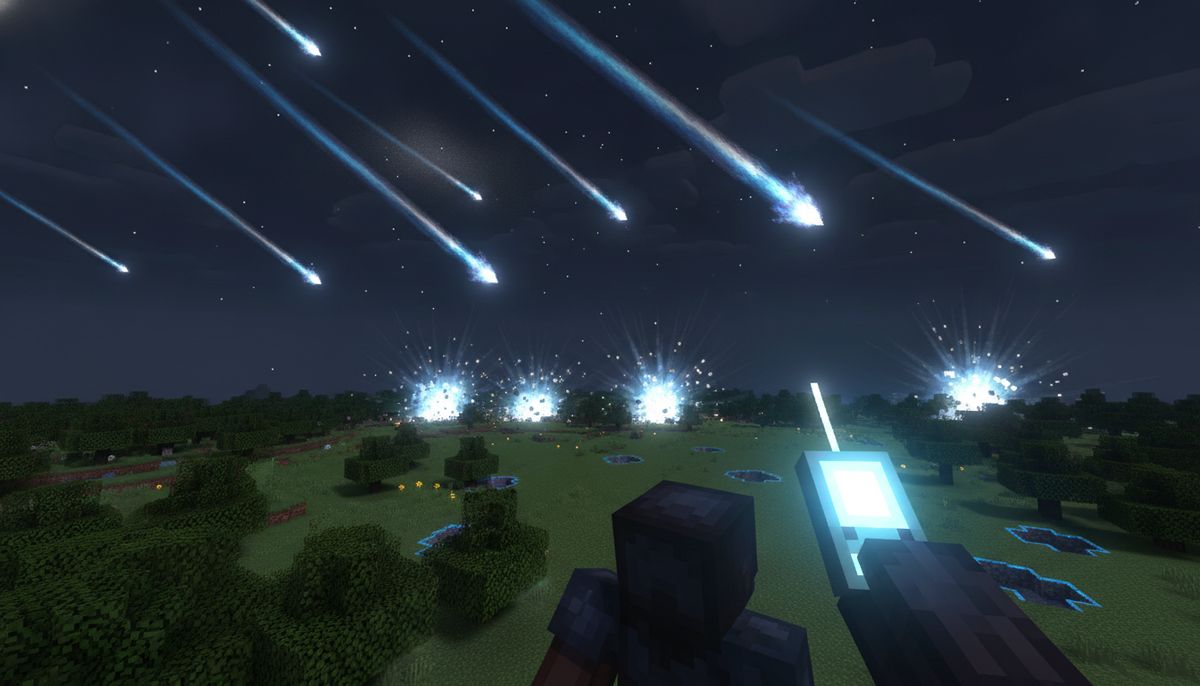
The Minecraft community moves fast. One week a mod is unknown. The next, it dominates search autocomplete across three continents. The Shooting Star Demo reached over 368,000 downloads within days of release, making it one of October 2026's most viral creations. Created by rimuru_dev, this Java Edition mod delivers exactly what its name promises: orbital strikes called down from space with cinematic camera work that pulls you out of the atmosphere before impact.
The concept is simple but executed with spectacular polish. You craft or obtain a device called the Stellar Remote. Point at a target. Press a button. The Stellar Remote triggers massive strikes from outer space, launching your camera through deep space as a railgun beam or constellation-powered attack carves terrain down to bedrock. The destruction is total. The visuals are unforgettable. And crucially, it is Java-only.
That last detail explains the search spike. Petraxxmc has been porting the Shooting Star addon to Bedrock Edition, and TikTok videos from October 2026 show installation guides and gameplay for mobile and console players. Bedrock users make up the majority of Minecraft's player base, spanning Android phones, iPhones, Windows 10 and 11, Xbox, PlayStation, and Nintendo Switch. When a mod this visually stunning goes viral on Java, Bedrock players flood search bars looking for a port. That is what is happening right now.
How the Shooting Star Mod Works
The Stellar Remote is a handheld device found in the Creative Combat tab or mod tab that triggers orbital strikes and space weapons. It is not a throwaway item. The skill menu (H key) includes sliders for Power and other settings, letting you dial the destruction up or down. Each skill has custom cutscenes. Space Cutscenes are cinematic camera sequences that fly through the solar system during attacks, following your strike from orbit down to impact.
The base mod includes multiple attack skills. SS-01 Railgun uses the K key, while SS-04 Seven Stars uses U. The railgun is a precision beam. A galaxy-scale railgun beam wipes out entire columns of terrain down to the void, while Seven Stars rains stars from the Big Dipper constellation to create burning trenches and deep craters. Destruction is permanent. Attacks permanently carve terrain, break blocks, and clear land down to bedrock.
The mod handles player safety with clever mechanics. The mod spares the player by lifting you into the sky or keeping your spot safe during the blast. In Creative mode you are lifted clear. In Survival the blast zone respects your position. This keeps the spectacle intact without killing you every time you test a new skill.
Community creators immediately began expanding the concept. SS-21 Quasar is an unofficial addon that adds a galactic orbital strike with a cinematic starting outside the galaxy, featuring a black-hole jet and gamma-ray burst crater. The Shooting Star Addition adds SA-01 Halley, a comet strike skill, and SA-02, a moon strike skill, both for the Stellar Remote. Miku Star adds the SS-39 Miku Star, a Total Annihilation orbital strike cannon for the Stellar Remote. The ecosystem grew from one mod to a whole subgenre in less than three weeks.
Key Features of the Shooting Star Addon
| Feature | Description |
|---|---|
| Stellar Remote | Handheld device that calls down orbital strikes with customizable power sliders |
| Multiple Skills | SS-01 Railgun, SS-04 Seven Stars, and additional skills via community addons |
| Cinematic Cutscenes | Camera flies through space during each attack, showing the strike from orbit |
| Total Terrain Destruction | Attacks erase blocks down to bedrock, creating permanent craters and trenches |
| Player Protection | Lifts or shields the player during strikes to prevent self-damage |
| Skill Menu (H Key) | Configure keybinds, adjust Power sliders, and manage cooldowns |
Star Core, Star Trace, and Thermal Conduit are now mineable with diamond pickaxe or better, while Block of Tungsten needs a netherite pickaxe and is 3x tougher than obsidian. The mod adds crafting materials and progression, not just weapons.
Weapons and Guns Collection
Explore more destructive addons, from firearms to explosive devices. Find the perfect arsenal for your world.
Browse Collection →How to Get Shooting Star on Minecraft Bedrock Edition
Here is the reality: the original mod by rimuru_dev is Java-only. It supports Fabric, Forge, and NeoForge on Minecraft versions 1.20.1, 1.21.1, and 26.3. Bedrock Edition players cannot install Java mods. The architectures are incompatible. There is no .mcpack version on CurseForge. Searching for a direct port of the original will not work.
What Bedrock players can find are unofficial ports and inspired recreations. Petraxxmc has released a Bedrock Edition port called "Shooting Star Addon Bedrock Edition", distributed through community channels. Installation videos appeared on TikTok throughout October 2026. These ports aim to replicate the orbital strike mechanics within Bedrock's addon framework. The visual fidelity and feature parity vary. Some recreate the Stellar Remote and basic strikes. Others are smaller experiments inspired by the concept rather than full recreations.
Installing Bedrock Addons (General Steps)
Bedrock addons come as .mcpack or .mcaddon files, and installing one requires activating the packs in your world. Most installation failures happen because players skip the activation step.
On Android:
- Download the .mcpack or .mcaddon file from a trusted source
- Open the file and the addon should open in Minecraft, or double-click the .mcpack or .mcaddon file to automatically open it with Minecraft Bedrock and install it
- Open your world, tap Edit, then activate the pack under Behavior Packs and under Resource Packs
- Turn on Beta APIs in Experiments if scripted items do nothing
On Windows 10 and 11:
- Download the addon file
- Double-click it and Minecraft for Windows (the Bedrock edition) opens and imports it
- Launch Minecraft, edit your world settings, and activate both Resource Packs and Behavior Packs
- Enable required experiments if the addon page lists any
On iOS (iPhone and iPad):
- Download the .mcpack or .mcaddon file using Safari, then tap "Open in..." or go to the Files app
- Open the file, tap Share, then select Minecraft (or "Copy to Minecraft")
- Confirm the import, then activate on a world
Console Players (Xbox, PlayStation, Switch): A console cannot open an .mcpack file, so third-party addons cannot be installed on the console itself. You must upload the world with addons already active from a Windows or mobile device to a Realm, then access that Realm from the console. This limits spontaneous addon installs for console-only players.
If you are searching for the Shooting Star addon specifically, be cautious. Verify that the file you download comes from a known Bedrock addon creator or repository. The original Java mod cannot be directly converted, so any Bedrock version is a port or inspired recreation. Check comments, reviews, or community feedback before installing.
Is It Safe? Verifying Bedrock Addons
The viral popularity of the Shooting Star mod makes it a prime target for fake downloads. Scammers repackage malware as trending mods, hoping players will not check the file type. A genuine Bedrock addon is just a .mcpack or .mcaddon file that opens inside Minecraft and never needs you to run an .exe or .bat on a PC or install a separate .apk. If a page asks for that, close it.
Red flags include:
- Files ending in .exe, .bat, .apk, or .jar (Bedrock uses .mcpack and .mcaddon only)
- Sites asking you to disable antivirus or "verify you are human" through app installs
- Download pages with more ads than content, or popups that redirect multiple times
- Promises of features impossible in Bedrock (full shader support, Java mod compatibility)
Trusted sources for Bedrock addons include MCPEDL, official creator Discord servers, and curated catalogs. Our site reviews and hosts addons after safety checks. If you cannot verify a file's origin, do not install it. For more on spotting fake mods, read Are Minecraft Mods Safe? How to Download Without Viruses.
Alternatives and Similar Addons in Our Catalog
If the Shooting Star Bedrock port is hard to find or does not meet your expectations, several addons in our weapons collection offer explosive firepower and spectacle.
Modern Warfare Addons: Check our Top 10 Gun Mods for Minecraft Bedrock guide for firearms ranging from pistols to rocket launchers. Many include particle effects and sound design comparable to the Shooting Star's visual polish. The TACZ Addon brings tactical weapon systems with realistic reload animations.
Boss Fight and Combat Addons: For players drawn to the Shooting Star's power fantasy, explore our Best Boss Fight Addons. These add massive enemies that require creative strategies and overwhelming force. Pair them with combat-focused mods for balanced difficulty.
Tech and Futuristic Addons: The orbital strike concept fits naturally with sci-fi themes. Our Best Tech and Futuristic Addons collection includes laser weapons, energy shields, and advanced machinery. The Best Space Exploration Addons take you off-planet entirely, adding rockets, alien worlds, and space stations.
Vehicle and Destruction Mods: If you want the scale of devastation without the space theme, browse vehicles with mounted weapons or explosive capabilities. Some vehicle addons include aerial bombardment mechanics similar to calling in orbital fire.
Explore More Combat Addons
Discover armor sets, melee weapons, ranged combat systems, and tactical gear to complement your arsenal.
Browse Collection →Tips for Using Orbital Strike Addons
Addons that erase terrain down to bedrock require planning. Test them in Creative mode first. Make backups of worlds before activating destruction-heavy addons. Bedrock Edition does not have an undo command for terrain changes outside of Creative fill commands, and even those are tedious at scale.
Performance Considerations: Large-scale particle effects and block updates can lag older devices. Mobile players should test the addon on a small creative world before bringing it into a long-term survival save. If frame rates drop significantly, adjust render distance and particle settings in video options. Some Bedrock ports may have less optimized effects than the Java original.
Multiplayer Balance: If you run a server or Realm, decide whether everyone can access the Stellar Remote or if it requires crafting materials. An item that erases mountains in seconds can wreck shared builds. Set ground rules or restrict the addon to specific zones like arenas or designated testing areas.
Combining Addons: Be careful stacking multiple Bedrock addons. Conflicts can cause crashes or prevent features from working. Our guide How to Combine Addons Safely on Bedrock covers load order, compatibility checks, and troubleshooting steps. If the Shooting Star port uses experimental APIs, test it alone before adding other mods.
Why the Shooting Star Mod Went Viral
Timing and presentation. Minecraft's modding community cycles through trends, but few hit with the intensity of the Shooting Star. The mod launched in early October 2026 with cinematic quality that rivals professionally produced trailers. YouTube and TikTok creators immediately showcased it. Videos showing the railgun's first-person camera fly-through or the Seven Stars constellation lighting up the sky rack up hundreds of thousands of views.
The mechanics are easy to explain: press button, watch explosion. The execution is anything but simple. Every strike has a custom animation. The cutscenes do not just pan the camera—they follow a logical path from the player's perspective to orbit to impact. Each attack features custom cutscenes that take your camera into deep space before the impact hits. This level of polish in a free mod creates instant shareability.
The mod also benefits from extensibility. Within days of release, community creators began publishing addons that expand the skill list. SS-21 appears on the Stellar Remote next to the stock skills, and you press Q (rebindable in Controls) while the camera leaves the planet for the edge of the Milky Way. Players can mix and match skill packs, creating personalized loadouts. This modular approach keeps interest high as new addons appear weekly.
For Bedrock players, the viral spread created demand the platform could not immediately meet. Java mods do not port automatically. Bedrock's addon system uses different APIs, file structures, and limitations. The gap between Java availability and Bedrock ports fuels search traffic as players hunt for workarounds or unofficial recreations.
Final Thoughts: Will Bedrock Get an Official Port?
As of October 2026, there is no official Bedrock Edition version from rimuru_dev. The addon is unofficial and fan-made for The Shooting Star Demo by rimuru_dev. Community creators like Petraxxmc are filling the gap with ports, but these are third-party projects. Quality and completeness vary. Some ports recreate the core mechanics. Others simplify or reinterpret features to fit Bedrock's constraints.
The demand is undeniable. Hundreds of thousands of players want this experience on mobile and console. Whether the original creator or a skilled Bedrock developer produces a definitive port remains to be seen. Until then, players can explore unofficial versions, follow TikTok installation guides, and browse alternative weapons and tools addons that deliver similar power fantasies.
The Shooting Star proves that Minecraft players crave spectacle. Orbital strikes, cinematic camera work, and total terrain destruction tap into the same appeal as massive explosions in other games. Bedrock's addon ecosystem continues to evolve. If the demand persists, the tools will follow. For now, search carefully, verify your sources, and enjoy the mods that bring the sky crashing down.